Mailing log — errors and troubleshooting
Description
When a mailing is launched, the platform runs a series of checks: validates settings, loads entities (databases, segments, templates), and processes the content templates. If a problem occurs at any stage, the mailing stops and an error appears in the log.
This article groups mailing log errors by their cause. Each group has a single troubleshooting approach — errors with the same solution are combined to avoid repeating the same steps for every key.
Where to view the mailing log
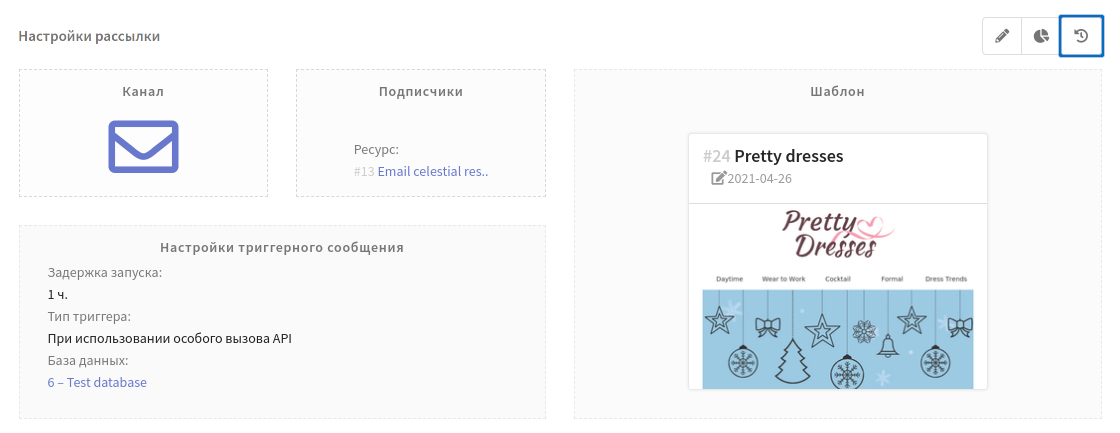
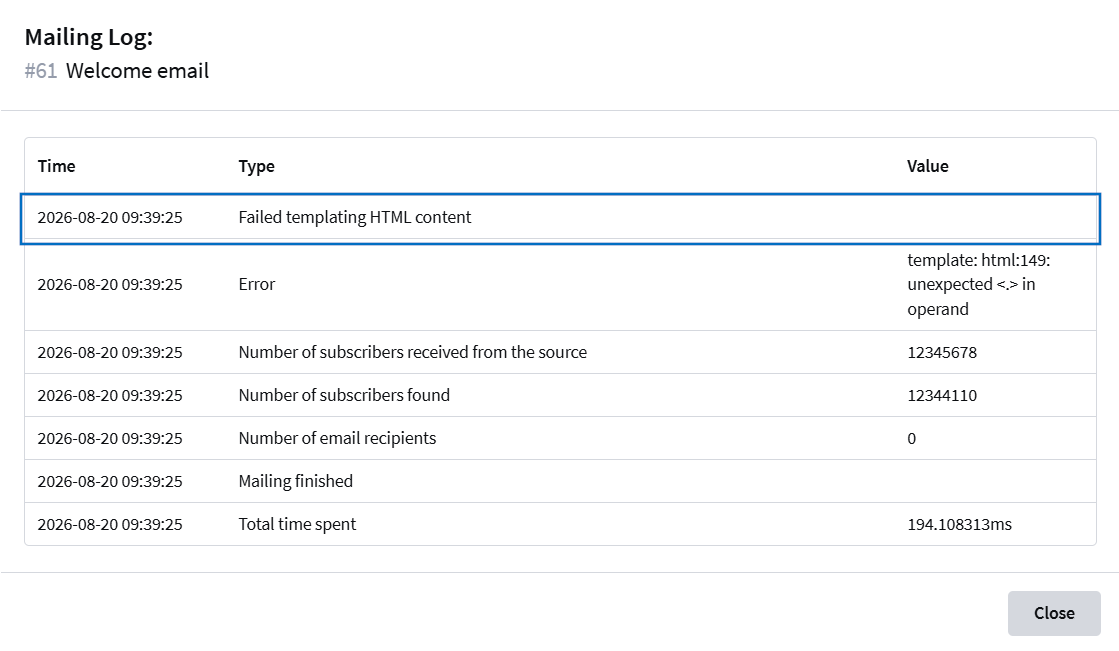
The mailing log is available on the mailing page in the Mailing settings block — the log button is in the upper right corner of the block. The log fills in when the mailing starts (including test sends): it shows the preparation stages, sending progress, and any errors that occurred.
Errors by category
Content templating error
Cause: the message template has a syntax error — an invalid placeholder, an unclosed tag, or an incorrect templating operator.
How to fix:
- Open the message template and fix the variable syntax — placeholders must be written correctly (for example,
{lead._fname}). - Make sure the loop operator
{.}is used only inside loop blocks. - Check the HTML markup for unclosed tags.
- If AMP content is used, make sure the AMP-HTML is valid.
- Save the template and run the mailing again.
Errors in this group:
| Error key | Message |
|---|---|
ERR_PARSE_HTML_CONTENT | HTML content templating error |
ERR_PARSE_TEXT_CONTENT | Text content templating error |
ERR_PARSE_SMS_CONTENT | SMS content templating error |
ERR_PARSE_MSG_SUBJECT_CONTENT | Message subject templating error |
ERR_PARSE_SUBJECT_CONTENT | Mailing subject templating error |
ERR_PARSE_MSG_FROM_EMAIL_CONTENT | Message from email templating error |
ERR_PARSE_MSG_FROM_NAME_CONTENT | Message from name templating error |
ERR_PARSE_MSG_REPLY_TO_EMAIL_CONTENT | Message reply-to email templating error |
ERR_PARSE_MSG_REPLY_TO_NAME_CONTENT | Message reply-to name templating error |
ERR_PARSE_CAMP_FROM_EMAIL_CONTENT | Mailing from email templating error |
ERR_PARSE_CAMP_FROM_NAME_CONTENT | Mailing from name templating error |
ERR_PARSE_CAMP_REPLY_TO_EMAIL_CONTENT | Mailing reply-to email templating error |
ERR_PARSE_CAMP_REPLY_TO_NAME_CONTENT | Mailing reply-to name templating error |
ERR_PARSE_RESOURCE_FROM_EMAIL_CONTENT | Resource from email templating error |
ERR_PARSE_RESOURCE_FROM_NAME_CONTENT | Resource from name templating error |
ERR_PARSE_RESOURCE_REPLY_TO_EMAIL_CONTENT | Resource reply-to email templating error |
ERR_PARSE_RESOURCE_REPLY_TO_NAME_CONTENT | Resource reply-to name templating error |
ERR_PARSE_PUSH_BODY_CONTENT | Push body templating error |
ERR_PARSE_PUSH_TITLE_CONTENT | Push title templating error |
ERR_PARSE_PUSH_ICON_CONTENT | Push icon templating error |
ERR_PARSE_PUSH_CLICKURL_CONTENT | Push link templating error |
ERR_PARSE_PUSH_CUSTOMJSON_CONTENT | Custom JSON templating error in push message |
ERR_PARSE_AMP_CONTENT | AMP content templating error |
ERR_PARSE_SITE_CONTENT | Site content templating error |
ERR_PARSE_JSON_URL_CONTENT | JSON request URL templating error |
ERR_PARSE_FORM_ACTIONS | Form templating error |
ERR_PARSE_LOYALTY_ACTIONS | Loyalty templating error |
ERR_PARSE_RELATION_ACTIONS | Relation templating error |
ERR_PARSE_CAMP_ATTACH_CONTENT | Failed to substitute variables in the attached file name/content |
ERR_UNSUBSCRIBE_NOT_EXIST | Unsubscribe link not found in the message body |
ERR_PARSE_POINT_CONTENT | Restricted {.} operator found outside of a loop |
ERR_CSS_INLINE | Failed to inline CSS — styles will not be embedded into the email |
The part of the key after ERR_PARSE_ indicates the affected field: subject, body, from email, reply-to, etc.
Read more about templates and variables: Altcraft Variables and Functions.
Custom channel error (fields, settings, bindings)
Cause: the custom channel settings are invalid — required fields are missing, or the bound entities are unavailable.
How to fix:
- Check the custom channel settings in the mailing and fill in all required fields.
- Check that the bound entities (resources, forms) exist and have not been deleted.
- If a resource is used, make sure it has options configured for the required sending type (email, SMS, push, custom channel).
Errors in this group:
| Error key | Message |
|---|---|
ERR_CANT_PREPARE_CHANNEL_FIELDS | Failed to prepare the custom channel fields |
ERR_CHECK_CUSTOM_CHANNELS_CAMP_FIELDS | Invalid custom channel fields |
ERR_CHECK_CUSTOM_CHANNELS_RESOURCE_FIELDS | Required fields for the custom channel are missing in the resource |
ERR_CAMPAIGN_GET_EXTERNAL_ENTITIES | Error processing custom channel fields with bound entities in mailings |
ERR_MESSAGE_GET_EXTERNAL_ENTITIES | Error processing custom channel fields with bound entities in messages |
ERR_UPDATE_TEMPLATE_FIELDS | Failed to update the custom channel template fields |
ERR_VALIDATE_CHANNEL_ACCOUNT_FIELDS | Failed to validate the custom channel settings in the account |
RESOURCE_WITHOUT_EMAIL_OPTIONS | The specified resource has no email options |
RESOURCE_WITHOUT_PUSH_OPTIONS | The specified resource has no push options |
RESOURCE_WITHOUT_SMS_OPTIONS | The specified resource has no SMS options |
RESOURCE_WITHOUT_CUSTOM_CHANNEL_OPTIONS | The specified resource has no custom channel options |
Read more about custom channel setup: Custom Channels.
File or attachment loading error
Cause: the custom channel template file is not loaded or cannot be read, or the attached files are invalid, empty, exceed the size limit, or cannot be compressed.
How to fix:
- Make sure the attached files are not empty and do not exceed the total size limit.
- Try re-uploading the files if they are corrupted.
- (For custom channel errors) Check that the custom channel template file is loaded and available.
Errors in this group:
| Error key | Message |
|---|---|
ERR_LOAD_CUSTOM_FILE | Custom channel file loading error |
ERR_READ_CUSTOM_FILE | Error reading the custom channel template file |
ERR_GET_CAMP_ATTACH_CONTENT | Error getting the attached files |
ERR_CAMP_ATTACH_FILES_SUM_SIZE | Total attached files size exceeded |
ERR_CAMP_INVALID_ATTACH | Invalid or empty attached files |
ERR_CAMP_ATTACH_COMPRESS_FAILED | Failed to compress the mailing attached file |
Channel, sender or SMS gateway error
Cause: the SMTP sender is not initialized, the SMS gateway does not support the template content type, the template message (HSM) is outdated, or the Viber*™ connection is missing.
How to fix:
- Check that the correct virtual sender is selected in the mailing settings. Real senders are configured by the platform administrator — users do not have direct access to them.
- Check the SMS gateway connection in Settings — Connections. If the gateway does not support the template content type (for example, Unicode), select another gateway or change the content.
- If WhatsApp* is used, check the template message (HSM) — its version in the platform may be outdated.
- Check that the Viber*™ connection exists in the account integrations.
Errors in this group:
| Error key | Message |
|---|---|
ERR_INIT_SENDER | Sender initialization error |
ERR_NOT_SUPPORTED_IN_DEVINO | The Devino SMS gateway does not support the content type used in the template |
ERR_NOT_SUPPORTED_IN_MTS | The MTS SMS gateway does not support the content type used in the template |
ERR_NOT_SUPPORTED_IN_SMS_TRAFFIC | The SMS Traffic gateway does not support the content type used in the template |
ERR_NOT_SUPPORTED_IN_RAPPORTO | The Rapporto SMS gateway does not support the content type used in the template |
ERR_HSM_OBSOLETE | The template message (HSM) in the platform is outdated |
ERR_HSM_CHECK | Unable to check the template message (HSM) relevance in the platform |
ERROR_VIBER_CONNECTION_NOT_FOUND_IN_INTEGRATION | Viber*™ connection not found in the integration |
Read more about channel setup: SMS channel, Viber*™, Connections.
Data source or audience error
Cause: the data source is not found, its type is not recognized, the database or segment is deleted, the SQL query is invalid, or the segment contains no profiles.
How to fix:
- Check that the database, segment or SQL query exists and has not been deleted.
- Make sure read access to the segment data is granted.
- Check that the segment returns profiles — if the audience is empty, the mailing will not start.
- If timezone filtering is used, make sure at least one profile matches the selected timezones.
- Check the profile field structure — it must match the database schema.
- If an SQL query is used, make sure the syntax is correct and all tables exist.
Errors in this group:
| Error key | Message |
|---|---|
ERR_BAD_DATA_ID | Data source unavailable |
ERR_BAD_DATA_TYPE | Unknown data source type |
ERR_BAD_LIST_ID | Invalid profile database ID |
ERR_LOAD_NON_DELETED_LIST | Profile database missing |
ERR_LOAD_ONE_NON_DELETED_LIST | Profile database unavailable |
ERR_LOAD_NON_DELETED_SEGMENT | No access to the segment data, check access rights |
ERR_VALIDATE_NON_DELETED_SEGMENT | Invalid segment structure |
ERR_NO_PROFILES_IN_SOURCE | No profiles found in the source segment |
ERR_NO_PROFILES_FOR_TIMEZONES | No profiles found for the selected timezones |
ERR_INVALID_LEAD_FIELDS | Invalid subscriber fields passed |
ERR_GET_LL_COUNTER | Error getting the precomputed profile count for the mailing |
ERR_GET_CURSOR | Error getting the mailing cursor |
ERR_LOAD_QUERIES | Error processing SQL query results |
ERR_LOAD_NON_DELETED_QUERIES | Data table query unavailable |
ERR_QUERY_PREPARE | Failed to prepare the SQL query for execution |
ERR_PARSE_QUERY_RAW | SQL query parsing error |
Read more: Segmentation, Managing databases, Managing Data Tables.
Empty content or missing required fields
Cause: the content of the selected type (email/SMS/push) is not filled in, or the required sender fields are not specified.
How to fix:
- Open the template and fill in the content for the selected channel: HTML body, text version and subject for email; text for SMS; body and title for push.
- Check that the sender address (From email) is specified — it is set at the mailing, message or resource level.
- Make sure the sender name (From name) for email or Caller ID for SMS is specified.
Errors in this group:
| Error key | Message |
|---|---|
ERR_EMPTY_CONTENT | No content of the required type |
ERR_LOAD_EMPTY_CONTENT | The message content is empty |
ERR_EMPTY_SOME_EMAIL_CONTENT | Part of the email content is missing |
ERR_EMPTY_SOME_PUSH_CONTENT | Part of the push content is missing |
ERR_EMPTY_SOME_SMS_CONTENT | Part of the SMS content is missing |
ERR_ALL_EMPTY_FROM_EMAIL | Sender address not specified |
ERR_ALL_EMPTY_FROM_NAME | Sender name not specified |
ERR_ALL_EMPTY_CALLER_ID | Caller ID not specified |
Read more about filling in templates: Email template, SMS template, Push template.
Message template or fragment unavailable
Cause: the message template or template fragment has been deleted or is unavailable.
How to fix:
- Check that the message template exists and has not been deleted.
- If fragments are used, make sure all of them exist and have not been deleted.
Errors in this group:
| Error key | Message |
|---|---|
ERR_LOAD_NON_DELETED_MESSAGE | Failed to load the template: it may have been deleted |
ERR_LOAD_NON_DELETED_FRAGMENT | Fragment unavailable |
Read more about message templates: Message templates.
Resource, channel, form or connector unavailable
Cause: an entity referenced by the mailing (resource, channel, form, connector, placement) has been deleted or is unavailable. A relation is a link between two profiles in a database (for example, "employee — company") that can be used in a message template. A placement is a trigger placement that a trigger mailing is bound to.
How to fix:
- Check that the resource specified in the mailing exists and has not been deleted.
- Make sure the channel exists and is active.
- If the mailing uses a form, check that the form has not been deleted.
- For trigger mailings, check that the placements exist and are available.
- Check that the connectors (links between entities) are active.
- If the message template uses a relation between profiles, check that the relation exists.
Errors in this group:
| Error key | Message |
|---|---|
ERR_LOAD_RESOURCE | Resource loading error |
ERR_RESOURCE_IS_MISSING | Sending error without a resource |
ERR_GET_CHANNEL | Error getting channel data |
ERR_READ_CHANNEL | Failed to read the channel data when processing a placement |
ERR_LOAD_CONNECTORS | Connector loading error |
ERR_LOAD_FORM | Form unavailable |
ERR_LOAD_RELATION | Relation unavailable |
ERR_READ_PLACEMENTS | Placements reading error |
ERR_READ_PLACEMENT | Failed to read the placement |
Suppression list error
Cause: the suppression list has been deleted or is unavailable, or the platform cannot count the addresses/numbers/domains in it.
How to fix:
- Check that the suppression lists (global, database or message) exist and have not been deleted.
- Make sure the global suppression list is available.
- If the error persists after checking the lists, contact technical support.
Errors in this group:
| Error key | Message |
|---|---|
ERR_LOAD_GLOBAL_SUPPRESS | Unable to load the global suppression list |
ERR_LOAD_ONE_NON_DELETED_MESSAGE_SUPPRESS | Suppression list loading error |
ERR_LOAD_ONE_NOT_DELETED_LIST_SUPPRESS | Suppression list unavailable |
ERR_COUNT_GLOBAL_SUPPRESS_EMAILS | Error counting emails in the global suppression list |
ERR_COUNT_GLOBAL_SUPPRESS_PHONES | Error counting phone numbers in the global suppression list |
ERR_COUNT_GLOBAL_SUPPRESS_DOMAINS | Error counting domains in the global suppression list |
ERR_COUNT_LIST_SUPPRESS_EMAILS | Error counting emails in the database suppression list |
ERR_COUNT_LIST_SUPPRESS_PHONES | Error counting phone numbers in the database suppression list |
ERR_COUNT_LIST_SUPPRESS_DOMAINS | Error counting domains in the database suppression list |
ERR_COUNT_MESSAGE_SUPPRESS_EMAILS | Error counting emails in the message suppression list |
ERR_COUNT_MESSAGE_SUPPRESS_PHONES | Error counting phone numbers in the message suppression list |
ERR_COUNT_MESSAGE_SUPPRESS_DOMAINS | Error counting domains in the message suppression list |
ERR_PRECHECK_TARIF_LIMIT | Tariff calculation error |
Read more about suppression lists: Suppression lists.
VK Notify template error
Cause: the VK Notify connection is unavailable, or the template (regular or base) has not passed the correctness check or is outdated.
How to fix:
- If the error is about the connection, make sure the VK Notify integration is configured and the account is connected.
- If the error is about the template, contact technical support — users do not have access to the VK Notify system templates.
Errors in this group:
| Error key | Message |
|---|---|
ERR_NOTIFY_TEMPLATE_CHECK | Failed to check the VK Notify template for correctness |
ERR_ NOTIFY_CHECK | Failed to check the connection to VK Notify |
ERR_NOTIFY_TEMPLATE_OBSOLETE | The VK Notify template is outdated |
ERR_BASE_TEMPLATE_CHECK | Failed to check whether the VK Notify base template has been updated |
ERR_BASE_TEMPLATE_OBSOLETE | The VK Notify base template is outdated |
ERR_ NOTIFY_CHECK — checking the connection to VK Notify. ERR_NOTIFY_TEMPLATE_CHECK — checking the message template. ERR_BASE_TEMPLATE_CHECK / ERR_BASE_TEMPLATE_OBSOLETE — checking the VK Notify base template: the platform compares the saved copy with the current template in VKontakte; if the base template has changed, the mailing must be updated.
Multivariate test error
Cause: the multivariate test cannot continue: the waiting period has not elapsed, the winner has not been selected, or an unknown test type is specified.
How to fix:
- If the test is paused, wait for the waiting period between waves to end.
- If a manual winner selection is required, open the multivariate test settings and select the winner.
- Check that the multivariate test type is correct.
Errors in this group:
| Error key | Message |
|---|---|
ERR_SPLIT_WAIT_TIME | Waiting time has not elapsed |
ERR_SPLIT_NO_MANUAL_WINNER | Winner template not selected |
ERR_CHOISE_WIN_MSG | Winner template not selected |
ERR_BAD_SPLITTEST_TYPE | Invalid multivariate test type |
Read more about multivariate testing: Multivariate testing.
Timezone data loading error
Cause: the platform cannot load the timezone map or the account timezone.
How to fix:
- Check that the account timezone is set correctly.
- If the error persists, contact technical support.
Errors in this group:
| Error key | Message |
|---|---|
ERR_GET_TZ_INFO_MAP | Error getting the timezone map |
ERR_GET_TZ_OFFSET_MAP | Failed to load the timezone offset map |
ERR_LOAD_ACCOUNT_TIMEZONE | Failed to load the account timezone |
Cron scheduler error
Cause: failed to create or delete a cron job for a scheduled or recurring mailing.
How to fix:
- Check that the mailing start time is set correctly.
- If the error persists, contact technical support.
Errors in this group:
| Error key | Message |
|---|---|
ERR_CRONTAB_NEW | Cron job creation error |
ERR_CRONTAB_REMOVE | Failed to delete the schedule |
Read more about launch scheduling: Mailing schedule.
Sending policy unavailable or violated
Cause: the sending policy attached to the mailing is not found, or the mailing violates a policy rule (time or frequency restriction).
How to fix:
- Check that the sending policy exists and is attached to the mailing.
- If the mailing violates the policy, change the settings (sending time, frequency) or ask the administrator to adjust the policy.
Errors in this group:
| Error key | Message |
|---|---|
ERR_LOAD_POLICY | Sending policy unavailable |
ERR_POLICY_RULE_OFFENCE | Sending is prohibited by the policy |
Account not found or unavailable
Cause: the account is not found by ID or is inactive.
How to fix: Contact the platform administrator and check the account status.
Errors in this group:
| Error key | Message |
|---|---|
ERR_LOAD_ONE_ACTIVE_ACCOUNT | Account unavailable |
ERR_CANNOT_FIND_ACCOUNT | Failed to find the account |
Tariff limits or billing error
Cause: the tariff plan limit is exhausted, or the tariff data cannot be loaded.
How to fix:
- Check the current tariff plan and remaining limits.
- If the limit is exhausted, wait for the reset or upgrade the tariff.
- If the calculation error persists, contact technical support.
Errors in this group:
| Error key | Message |
|---|---|
ERR_CANT_GET_TARIFF | Unable to get the account tariff information |
ERR_TARIF_LIMIT | Tariff limit reached |
Loyalty program unavailable
Cause: the loyalty program specified in the mailing is not found, is inactive, or is unavailable for promocode generation.
How to fix: Check that the loyalty program exists, is active, and is attached to the mailing.
Errors in this group:
| Error key | Message |
|---|---|
ERR_LOAD_ONE_ACTIVE_ACTUAL_LOYALTY | Unable to load the loyalty program |
ERR_LOAD_ONE_PROMOCODE_LOYALTY | Loyalty program unavailable |
Read more about loyalty programs and promo codes: Loyalty programs.
Account frozen
Cause: the account is frozen (debt, blocking). The mailing cannot start.
How to fix: Pay the debt or contact the administrator to unblock the account.
Errors in this group:
| Error key | Message |
|---|---|
ERR_ACC_FROZEN | Mailing start error: account is frozen |
Template in draft status
Cause: the message template is in the "Draft" status. Sending is impossible.
How to fix: Publish the message template — change its status from "Draft" to "Published".
Errors in this group:
| Error key | Message |
|---|---|
ERR_MESSAGE_IS_DRAFT | The message template is marked as a draft |
Read more about template statuses: Working with message templates.
Unsubscribe link missing in the template
Cause: the HTML template does not contain the unsubscribe link placeholder.
How to fix: Add the unsubscribe link placeholder to the HTML template.
Errors in this group:
| Error key | Message |
|---|---|
ERR_NO_UNSUB_LINK | No unsubscribe link in the template |
Read more about subscription management: Subscription Manager.
Push notifications disabled
Cause: push notifications are disabled at the platform or account level.
How to fix: Contact the administrator to enable push notifications.
Errors in this group:
| Error key | Message |
|---|---|
ERR_PUSHES_IS_DISABLED | Push notifications disabled |
Read more about the push channel: Push Channel.
Invalid JSON in the push message template
Cause: after variable substitution, the JSON in the push message turned out to be invalid.
How to fix: Check the JSON in the push message settings — after variable substitution, the result must be valid JSON.
Errors in this group:
| Error key | Message |
|---|---|
ERR_MARSHAL_PUSH_CUSTOMJSON_CONTENT | Error generating JSON in the push message |
Too many tracking pixels in the template
Cause: too many tracking pixels are specified in the template.
How to fix: Reduce the number of tracking pixels in the template.
Errors in this group:
| Error key | Message |
|---|---|
ERR_MANY_PIXELS | Too many pixels! |
Read more about pixels: Pixels.
Link processing error (tracking)
Cause: failed to process a link in the content (for example, for tracking).
How to fix: Check the links in the template — they must be correct and reachable.
Errors in this group:
| Error key | Message |
|---|---|
ERR_LINK_PROCESSING | Failed to process the link |
Read more: How email tracking works.
Placement trigger deactivation error
Cause: failed to deactivate the placement trigger when the mailing finished.
How to fix: Contact technical support.
Errors in this group:
| Error key | Message |
|---|---|
ERR_DEACTIVATE_PLACEMENT_TRIGGER | Placement trigger deactivation error |
Read more: Trigger mailing, Placement mailing.
Global control group settings error
Cause: failed to get the ignore settings in the Global control group.
How to fix: Contact technical support.
Errors in this group:
| Error key | Message |
|---|---|
ERR_GET_IGNORE_GCG_SETTINGS | Failed to get the ignore settings in the Global control group |
Read more: Global control groups.
Platform system errors
The errors below relate to internal platform processes and do not depend on the mailing settings. Contact technical support if they appear.
Errors in this group:
| Error key | Message |
|---|---|
ERR_BAD_CAMPAIGN_TYPE | Unknown mailing type |
ERR_SAVE_CAMPAIGN | Mailing save error |
ERR_GET_CAMPAIGN | Error getting the mailing data |
ERR_FAILED_START_PUBLISHER | Publisher initialization error |
ERR_FAILED_GET_PUSH_TEMPLATES | Failed to get the push templates |
ERR_FORCE_REGEN_OFF | Error disabling the forced preview generation |
ERR_LOAD_ALL_NON_DELETED_VSENDERS | Virtual senders unavailable |
ERROR | Error |
*The Meta organization, which owns Instagram, Facebook and WhatsApp products, has been declared as extremist and banned in Russia.
* Viber™ is a trademark of Rakuten Group, Inc. Blocked in the Russian Federation.