MoodRec recommendations in messages
MoodRec is an external personal recommendation service that selects relevant products for each subscriber based on their behavior and your catalog. Recommendations are inserted into a message as dynamic content: each recipient gets their own product selection at send time.
Connect MoodRec to a message as a source of dynamic JSON content. The content URL can be taken from the Connection tab of an email placement in the MoodRec dashboard.
Connecting an external recommendation service
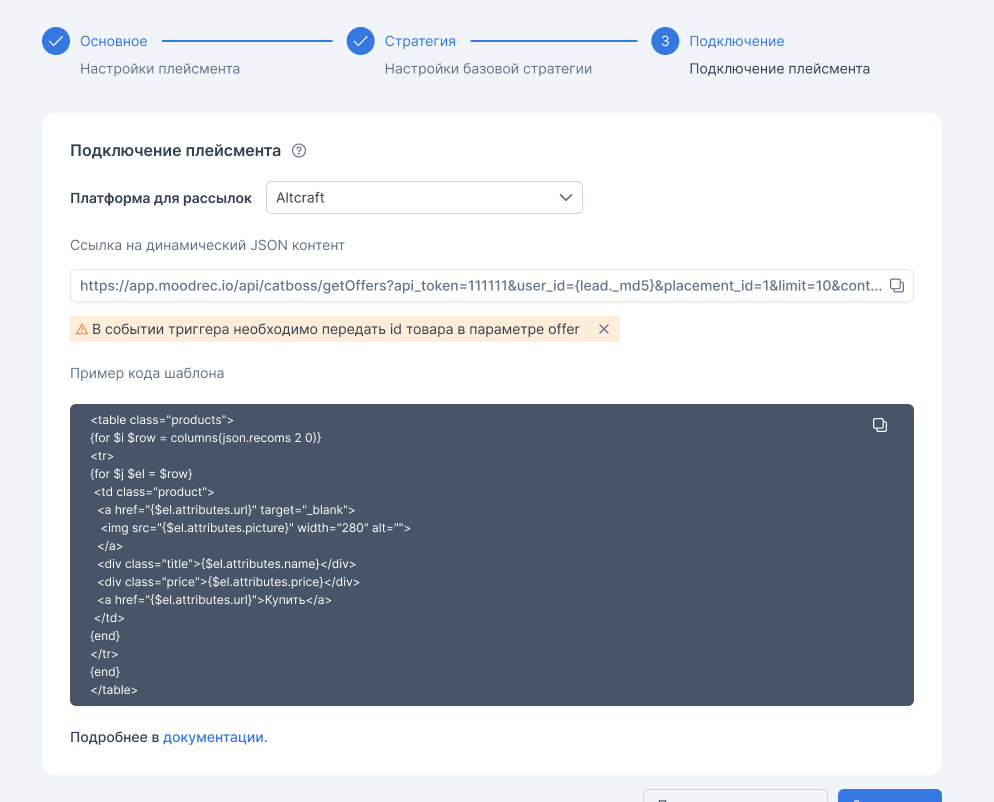
- Open the placement in the recommendation service dashboard and go to the Connection tab.
- In the Mailing platform field, select Altcraft.
- Copy the dynamic JSON content URL and the template code example:
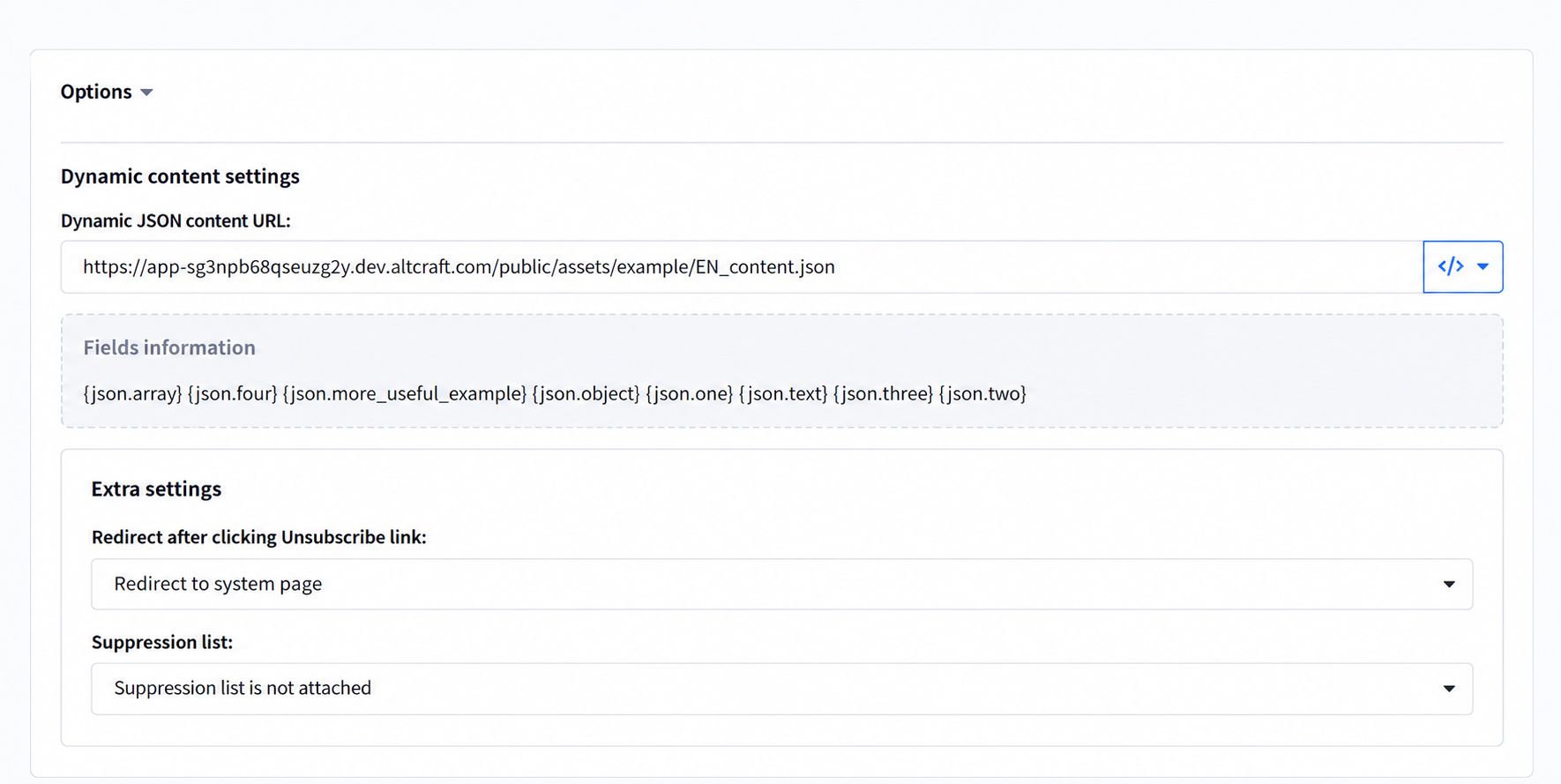
- In the Altcraft message editor, open the Options tab, section Dynamic content settings, and paste the copied URL into the Dynamic JSON content URL field. The URL from the service dashboard contains a user identifier placeholder: replace it with the profile variable that stores the user's identifier on your website (see Request format).
- Paste the template code example from the recommendation service dashboard into the HTML version of the message. The code already contains a loop over the recommendations array.
Request format
The dynamic JSON content URL looks like this:
https://<service domain>/catboss/getOffers?token=<token>&user_id={lead._acid}&limit=15&attributes[]=name&attributes[]=price&attributes[]=url&attributes[]=picture
| Parameter | Description |
|---|---|
token | Placement access token. Added to the URL automatically. |
user_id | User identifier on your website. The platform does not substitute it automatically: the URL must contain the profile variable that stores this identifier (see below). |
limit | Number of recommendations in the response. |
attributes[] | Product attributes to return: name, price, link, image. |
contextOfferIds[] | Identifiers of products the user added to the cart or viewed. Required for the Similar items and Cross-sell algorithms. |
contextCatIds[] | Identifiers of categories to consider when selecting recommendations. Optional: if omitted, categories are taken from the user's internal statistics. |
user_id is the unique identifier you use to match a website visitor with an Altcraft profile. Substitute into the URL the profile variable that stores this identifier — for example, {lead._acid}, {lead._email}, or a custom profile field variable. The variable value must match the identifier under which the user is loaded into the recommendation catalog.
If the placeholder is left in the URL or the variable stores a different identifier, the service cannot match the recipient with the website user — all subscribers receive the same recommendations.
Request context
Some algorithms take the request context into account — cart items and items the user viewed, as well as the categories they are interested in. The context is passed in the URL via the contextOfferIds[] and contextCatIds[] parameters:
| Algorithm | Context parameter |
|---|---|
| Similar items | contextOfferIds[] — required |
| Cross-sell | contextOfferIds[] — required |
| Popular in favorite categories | contextCatIds[] — optional |
| New arrivals in favorite categories | contextCatIds[] — optional |
| Bestsellers in favorite categories | contextCatIds[] — optional |
| Cross-categories (often bought together) | contextCatIds[] — optional |
For the Similar items and Cross-sell algorithms, passing contextOfferIds[] is required. For the other algorithms in the table, contextCatIds[] is optional: if omitted, categories are taken from the user's internal statistics; if passed, the passed values are used. Only the algorithms listed above take the context into account.
Response format
The service returns JSON with an array of recommendations in the recoms field:
{
  "placement_id": 272,
  "client_id": "1493995421.1771423091",
  "user_id": "AA123462374",
  "recoms": [
    {
      "offer_id": "487927",
      "attributes": [
        { "name": "name", "value": "Winter jacket" },
        { "name": "price", "value": "12 990" },
        { "name": "url", "value": "https://example.com/catalog/jacket" },
        { "name": "picture", "value": "https://example.com/img/jacket.png" }
      ]
    }
  ]
}
All response fields are available in a template through {json.<field>} variables: for example, {json.recoms} is the recommendations array and {json.placement_id} is the placement identifier.
A loop over the recommendations array:
{for $index $el = json.recoms}
  {$el.offer_id}
  <div>
    {for $i $item = $el.attributes}
      {$item.name} — {$item.value}
    {else}
      No attributes
    {end}
  </div>
{else}
  No recommendations
{end}
Recommendation attributes are stored in the attributes array as name-value pairs, so they are iterated with a nested loop. The same approach works when rendering attributes conditionally: check $item.name and place $item.value where needed in the markup.
Notes
- Recommendations are requested from the service at the moment each message is sent, so the selection is always up to date.
- An identifier of the mailing is passed in the request to attribute clicks and purchases made through the recommendation block.
- Message preview requests the recommendation service just like a real send. To see the product selection, the preview profile must contain the data the service uses to find recommendations.