JSON batch request (HTTP POST action hook)
Batch requests allow you to combine many HTTP requests into one by specifying each request as a separate object in the body. The server returns one HTTP response that contains the responses to each submitted request.
When we choose this request type, we send the received events in JSON format in the body of the POST request to an external API. When sent, a JSON array with events will be generated.
Request settings
The standard request is sent without authorization. However, if you want to send data to an external service that uses the OAuth 2.0 framework as its authorization method, change the authorization type to OAuth2. In this case, you will need to select the connection that links Altcraft Platform and the service.
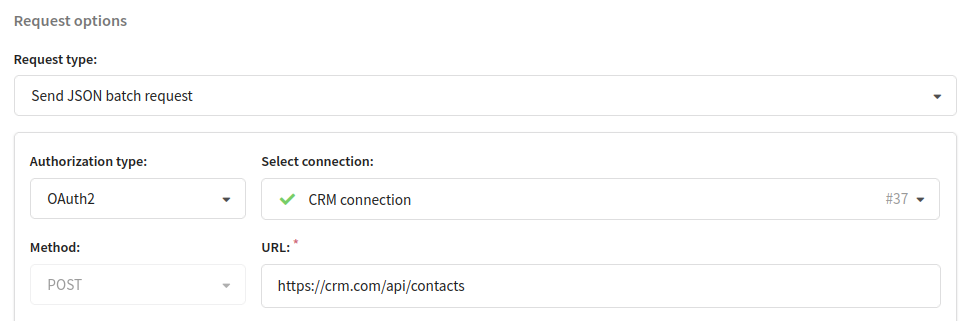
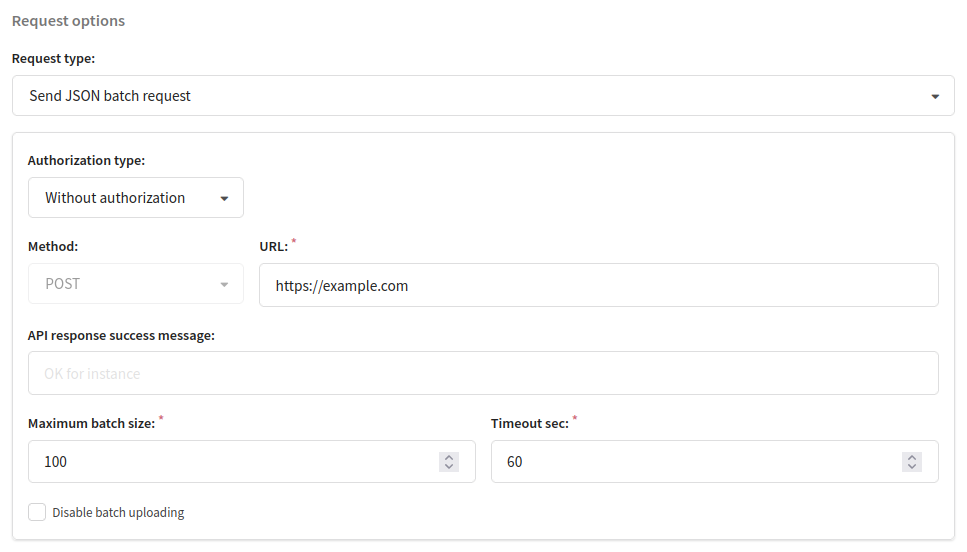
You have to specify:
- URL of the service that receives the data
- Maximum batch size: limit the number of events in JSON array. POST request will be sent as soon as there are enough events.
[{"event": "send", ... }, { }, ... ]
- Timeout sec: the period of time during which events are accumulated in a batch to be sent to the server. If during this time the maximum batch size is not reached, the POST request is still sent. In this case, the JSON array contains the number of events that have accumulated by the time the timeout expires.
- API response success message: the response from the server must go into this Regex, only then the request to the server will be considered successful. For instance:
.*OK.*
If you leave field API response success message empty, any response the status code of which is 200 is considered successful.
Email delivered message example
[
  {
    "event_type": "deliv",
    "list_id": 50,
    "account_id": 161,
    "_xxh": "5ada5e6ea3c6da5f",
    "_md5": "a5656dc1e3f603063a1918d582a10f58",
    "event_data": {
      "message_id": 5,
      "segment_id": 0,
      "campaign_id": 130
    },
    "event_date": "2016-11-15T09:12:28.514388956Z",
    "custom_data": {
      "email": "eddie@test-ukr.net",
      "_fname": "Eddie"
    },
    "is_test": false
  },
  {
    "event_type": "deliv",
    "list_id": 50,
    "account_id": 161,
    "_xxh": "bb42e541c7267fa6",
    "_md5": "593b250db256a764da8d2da4be694b31",
    "event_data": {
      "message_id": 5,
      "segment_id": 0,
      "campaign_id": 130
    },
    "event_date": "2016-11-15T09:12:28.569124547Z",
    "custom_data": {
      "email": "simon@test-gmail.com",
      "_fname": "Simon"
    },
    "is_test": false
  }
]