Altcraft Docs LogoAltcraft Docs Logo
User guideDeveloper guideAdmin guide
Company siteHelp center
English
  • Русский
  • English
v74
  • v74
  • v73
  • v72
Login
  • User documentation
  • FAQ
  • Altcraft glossary
  • Profiles and databases
  • Communication channels
  • Segmentation
  • Message templates
  • Mailings
  • Campaigns
  • Automation scenarios
  • Market
  • Loyalty programs
  • Reports and analytics
  • Integrations
    • Action hooks
      • Altcraft Action Hooks
      • Action hooks event types
      • Action Hook Message Structure
      • JSON batch request (HTTP POST action hook)
      • Message to RabbitMQ broker
      • Message to RabbitMQ exchanger
      • Message to Kafka broker
      • Test event
    • Integration of third-party services using Albato
    • Facebook Ads Manager™
    • Google Ads Audiences
    • Yandex.Audience™
    • VK Ads™
    • Static segment synchronization
    • Yandex AppMetrica™
    • Tilda™
    • Lpgenerator™
    • WhatsApp
    • Viber*™ integration
    • Integration scope
    • Notify
  • Weblayers
  • Settings
  • API requests: where to start
  • Changelog
  • library
  • Integrations
  • Action hooks
  • Message to Kafka broker
Documentation for version v74

Message to Kafka broker

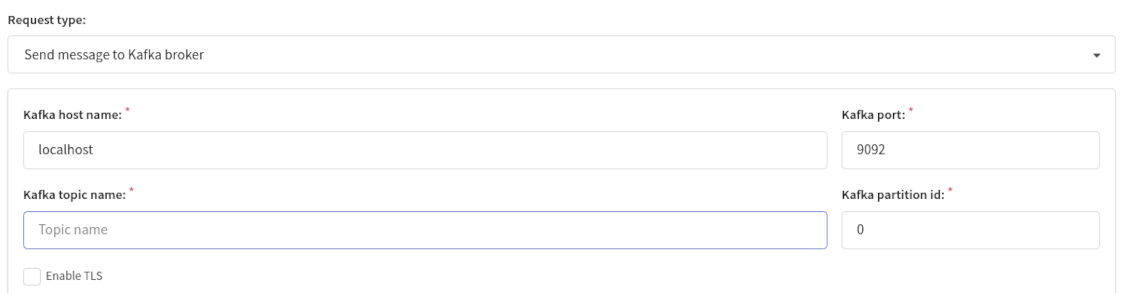
To configure sending events to Apache Kafka, specify the next parameters:

  • kafka host name,
  • kafka port,
  • kafka topic name,
  • kafka partition id.

Activate TLS if you need. When using a self-signed certificate, if it is not included in the trusted ones, specify the CA certificate chain in PEM format. This also takes into account the global option ALLOW_INSECURE_REQUESTS in the main.json configuration file, if it is set.

The validity of certificates is not checked. If authorization with a client certificate is used, then you must specify both the client's private key and the certificate, also in PEM format.
Last updated on Apr 23, 2023
Previous
Message to RabbitMQ exchanger
Next
Test event
© 2015 - 2025 Altcraft, LLC. All rights reserved.