v2026.3.78
As of version v2026.3.78, deferred custom channel tasks are processed only by the master procpiper. For cluster installations, reconfiguration of main.json is required after the upgrade: add the CLUSTER.PROC_PIPER section and set the master flag (FORCE_MASTER_ROLE: true) on only one node — the same way procloyalty is configured. Until this configuration is set, deferred custom channel tasks will not be processed.
Example section:
"PROC_PIPER": [
  {
    "HOST_ID": "app1",
    "RPC_HOST": "0.0.0.0",
    "RPC_HOST_CLI": "app1",
    "RPC_PORT": 8062,
    "FORCE_MASTER_ROLE": true
  },
  {
    "HOST_ID": "app2",
    "RPC_HOST": "0.0.0.0",
    "RPC_HOST_CLI": "app2",
    "RPC_PORT": 8062,
    "FORCE_MASTER_ROLE": false
  }
]
This update requires running migrations. If you have profile databases with more than 5 million profiles, increase the timeout in main.json before running the migrations:
"MONGODB_SOCKET_TIMEOUT_MIN": 360
Restarting the platform is not required — the parameter is needed to run the migrations. After the migrations are complete, restore the original value or remove the parameter if it was not set.
Manual installation
- Take the
akd,aktool, andmigratebinaries from the new build archive. - For cluster deployments (multiple platform instances), stop the processes on all servers before the first migration run:
./akd stop webcontrol api procevent procloyalty proctask procworkflow. - Run PRE-UPGRADE with
./akd upgrade. At theUnpack v78 and confirm [Y/n]:prompt, enternto abort POST-UPGRADE. - Update the platform and restart the nodes in the admin panel.
- Run POST-UPGRADE with the same command
./akd upgrade. - Make sure all processes have started:
./akd start.
Docker
- Stop the platform container (on all platform instances).
- Run PRE-UPGRADE via
docker runwith./akd upgrade, using the new image without starting the platform itself. At theUnpack v78 and confirm [Y/n]:prompt, enternto abort POST-UPGRADE. - Start the container with the new platform.
- Restart the nodes in the admin panel.
- Run POST-UPGRADE with the same command
./akd upgrade.
v2026.3.78.507 — Scenario priorities, unified segment condition editor, and fixes
This update introduces scenario priorities, rolls out the unified segment condition editor across the rest of the platform, and makes the profile history API more informative. Platform stability and security have been improved, the loyalty program now works faster, and attribute handling has been improved.
Scenario priorities
You can now mark the most important scenarios — for example, business-critical ones. Their tasks are processed first and do not wait in a queue behind others.
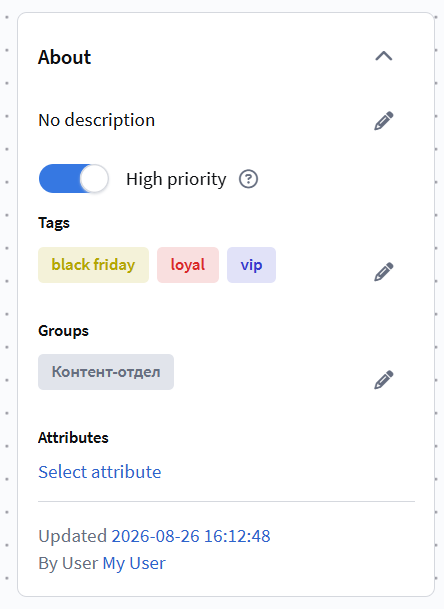
- A High priority checkbox has been added to the scenario settings. Tasks of such scenarios are processed by dedicated workers; their count is set by the administrator in the cluster configuration (the
HIGH_PRIORITY_WORKERSparameter). The configuration is validated: if the parameter is missing on some cluster nodes, it will be rejected. - Mailings inside a high-priority scenario are also sent on a priority basis — no extra setup is needed, the platform sets this automatically.
- Changing a scenario's priority applies to new tasks only: profiles that are already in the scenario continue processing with the previous priority.
Unified segment condition editor
The unified segment condition editor is now used in all places where profile selection is configured — conditions look and work the same in every module: funnels, profile relations, filtering mailings by channel fields, and profile capture in trigger scenarios by goals.
Profile history API enrichment
The profile history API (subscribers/history_get and subscribers/history_get_all) has become more informative: events now return detailed data about related objects. For a goal (pixel), this includes its name and ID, captured data, referrer, utm tags, browser and user device. A complete picture of a profile's activity can now be obtained with a single request. Existing response fields have not changed — new data is added as additional fields, so current integrations will keep working without changes.
Read more: Get profile action history.
Added
- The
campaigns/listAPI now supports a filter by template ID (message_id) — you can find all mailings that use a specific template. The response now returns complete information about each template: subject, sender name and email, reply-to address, template ID and name. - Push channel events now include the Read indicator — analytics on push notification reads is now available.
- Added complaint handling from the Altcraft Cloud SMTP mail server — complaints about emails are correctly recognized and taken into account.
- In the custom channel editor, an option has been added for external object (Entity) fields: "Do not use the field when sending a mailing". If enabled, the field data is not included in the sent message — this reduces the load when the field stores a large list of values.
Improved
- Improved stability: fixed crashes of internal processes that could make the platform unresponsive, and an error in the Market order import API. The loyalty program no longer stops due to lack of memory.
- Platform updates now complete correctly even with non-standard configuration paths, background queues are processed faster, and database hangs after Market queries have been fixed.
- Fixed a severe slowdown when sending mailings to many different domains — delivery speed no longer drops.
- Fixed traffic distribution in a virtual sender: mailings are now sent strictly according to the configured percentages and groups.
- Lists of participants and transactions in the loyalty program now load faster — they open quickly even with a large number of records.
- Fixed points calculation in the loyalty program: the balance no longer goes negative when blocked points are debited, API data matches the interface, and the points expiration date is set correctly.
- Improved attribute handling: when creating an attribute, the name and API name are auto-filled (e.g.,
new_field_1), the "add values from entities" function is enabled by default, and attribute conflicts produce a clear error message. - Fixed segment calculation errors: static segments correctly handle large data volumes, updatable segment calculation no longer fails, and numeric lists in dynamic segments and the "Relative to current date" condition display are fixed.
- Optimized task execution in scenarios: fixed an issue where tasks could take several tens of hours to process; manual broadcast mailing launch is now distributed across the cluster and does not overload the system.
- Fixed deactivation of a regular mailing with the "Active (Running)" status — without the "interrupt current sending" checkbox, the mailing now correctly switches to the "Inactive" status.
- Fixed an issue where users with view-only permissions could not view platform objects.
Other
- Fixed duplication of delivery events when sending mailings through the Sendsay provider.
- Fixed an error in the subscription manager: a subscription to a resource is no longer deleted if the resource is not added to the subscription manager.
- Fixed form fill export: exporting for specific dates now creates one task instead of two; the data order in the export is preserved.
- When exporting data and history from a profile page, all profile subscriptions are now exported.
- Fixed UTM tag analytics in popups: tags are now correctly taken into account.
- Fixed a login page error that could prevent the account from opening, and an endless reload loop when refreshing authorization.
- When activating a broadcast, the "Active" checkbox no longer resets before the mailing is complete.
- The segment condition selection menu in scenarios is no longer cut off.
- In goal capture, the "in range" condition now supports a range of values (for example, a purchase amount from and to) — previously only a single value was available.
- The mailing testing menu no longer shows invalid subscriptions.
- Fixed custom channel operation: sending mailings with external objects, the
paramsandoutservice fields became optional, added protection against duplicate tasks when running on schedule and queue settings in the listener. - Fixed encoding of event data values when inserted into links — Cyrillic and other special characters no longer break URLs.
- Fixed event capture: data from one hook no longer leaks into the data of other hooks.
- Fixed an error when creating cache tables for external SQL query results.
- Fixed referrer registration in profile events.
- Improved error diagnostics in the Soglasie SMS provider.
- Fixed an error creating indexes in MongoDB that could cause data operations to hang.
- Data sorting processes now terminate correctly and no longer accumulate on the server.
References
v2026.3.78.507: PL-22978 PL-22314 PL-22965 PL-22925 PL-22926 PL-22949 PL-22927 PL-22943 PL-22935 PL-22672 PL-22909 PL-22863 PL-22819 PL-22723 PL-22864 PL-22905 PL-22740 PL-22862 PL-22824 PL-22790 PL-22741 PL-22742 PL-22694 PL-22552 PL-22822 PL-22869 PL-22185 PL-22802 PL-22579 PL-22434 PL-19404 PL-22883 PL-22806 PL-22056 PL-22089 PL-21664 PL-22421 PL-22708 PL-22688 PL-22583 PL-22644 PL-22748 PL-22734 PL-22753 PL-22766 PL-22278 PL-22737 PL-22715 PL-22580 PL-22721 PL-22674 PL-22505 PL-22300 PL-22353 PL-20019 PL-21920 PL-22017 PL-14389 PL-22697 PL-22712 PL-22699 PL-22682 PL-22648 PL-22514 PL-22646 PL-22637 PL-22601 PL-22447 PL-22592 PL-22565 PL-22193 PL-22476 PL-22440 PL-21681 PL-22590 PL-22585 PL-22576 PL-22528 PL-22351 PL-21461 PL-20327 PL-19751 PL-22529 PL-18282 PL-18655 PL-22247 PL-22126 PL-21818
v2026.3.78.640 — Channel priority queues and fixes
This update adds priority queues for all sending channels. The stability of segments, campaigns, mailings, and scenarios has also been improved.
Channel priority queues
All types of sending channels now support priority queues: trigger and test messages go first, ahead of background bulk messages.
Priority also works for built-in channels — Email, SMS, and Push get dedicated priority queues on the provider side.
The custom channel settings now include a Dedicated queue checkbox: an enabled channel gets its own queue instead of the shared one.
Improved
- Updatable segment recalculation is faster: profiles are now fully counted only on manual launch and the first recalculation.
- Push notifications via Firebase are sent faster: extra data has been removed from the sending queue, and delivery confirmation now takes noticeably less time.
- Push event registration requests (
post_events) are no longer interrupted by a timeout.
Other
- Fixed an issue where not all profiles were included in a segment.
- Profiles no longer get stuck in the Condition node (dynamic segment membership check), and recalculation no longer hangs — including with an order filter and when the
SEGMENT_SQL_ABSORB_QUERIESparameter is enabled. - Scenario processing tasks no longer hang.
- Updatable segments no longer fail with unexplained errors or hang during recalculation, and the recalculation error text is now shown in the segment log.
- Fixed campaign launch: the segment audience is no longer counted as empty, and profiles are correctly split into the test and control groups.
- Removing profiles from the control group no longer puts excessive load on the database.
- Sending is no longer blocked when the tariff is exceeded with no limit set, and mailings are no longer sent from a forbidden sender address.
- Clicking a link in an SMS again no longer registers a duplicate delivery event.
- Blocking unsubscribe for one resource category no longer blocks the entire subscription manager — only that category becomes unavailable.
- Push delivery statistics are now more accurate: the "Device unregistered" error and RuStore delivery failures are now counted as permanent (hard bounce).
- Segments and push mailing analytics let you select a specific link from a template — clicks on links in notifications are now tracked correctly.
- In the profile history, the "Opened" and "Link click" actions now correctly show the device's push provider.
- Fixed crashes of message processing during bulk push sending.
- Custom channel templates no longer lose system form settings, templates with JSONPath in logical expressions are saved again, and processing of fields with bound external objects during mailings no longer fails.
- Fixed variable auto-substitution: saving a template no longer replaces words in the email subject with variables.
- Loyalty program points are now activated when the activation date arrives, and loyalty events no longer pile up unprocessed due to queue failures.
- Points accrual events (
points_accrual) now include the currency, and redemption for a promo code now carries correct transaction data. - The group of an account user can now be changed.
- In the API, the error for a missing required parameter now points to that exact parameter, paginated subscription retrieval (
subscriptions/list_all) no longer returns empty pages, and failed order imports now returnexternal_id. - The channel reports page no longer fails with an error.
- Fixed LDAP login: the platform no longer requests the entire group tree from Active Directory, and logging in to large directories is no longer interrupted by a timeout.
- Platform stability and security have been improved.
References
v2026.3.78.640: PL-23474 PL-23524 PL-23257 PL-23447 PL-23462 PL-23277 PL-23450 PL-23115 PL-23088 PL-23240 PL-22635 PL-23465 PL-23251 PL-23327 PL-23361 PL-23400 PL-23328 PL-23371 PL-23340 PL-23285 PL-23175 PL-23054 PL-23122 PL-23296 PL-23205 PL-23159 PL-23244 PL-23260 PL-22629 PL-23089 PL-23150 PL-23090 PL-22547 PL-22347 PL-23100 PL-22505 PL-23111 PL-23117 PL-22946 PL-22744 PL-22849 PL-22745 PL-22808 PL-22792 PL-22791 PL-22804 PL-23023 PL-23005