Common Errors When Importing Profiles
When importing profiles from a file, the platform validates data before writing it to the database. If a value does not match the field type, the profile may be rejected, and an error will appear in the import report.
Most often, errors occur when the data in the file does not match the field type in the database: for example, a date value is provided in a different format, text appears in a numeric field, or a list field contains a value that is not among the available options.
Error incorrect ip
This error occurs if a value that is not a valid IPv4 address is provided in an IP type field.
Examples of invalid values:
999.999.999.999
127.0.0.1.1
abc.def.ghi.jkl
The error may also appear if an empty value is provided in an IP field that expects a valid address.
How to fix:
Use an IPv4 address: four numbers from 0 to 255, separated by dots.
Valid examples:
127.0.0.1
95.165.10.20
If the IP address is unknown, leave the column unmapped from the IP field or configure empty value handling during import.
Error Incorrect phone
This error occurs if the phone number fails format validation.
Examples of invalid values:
12345
phone
+000000000000
+799912345678901234567890
How to fix:
Provide phone numbers in international format or configure phone number transformation during import.
Valid example of international format:
+79991234567
If the numbers in the file are recorded without a country code or in local format, use the field settings during import:
Add phone code to all values — adds the country code to the imported numbers.
Convert local phone code — replaces the local code with the international one.
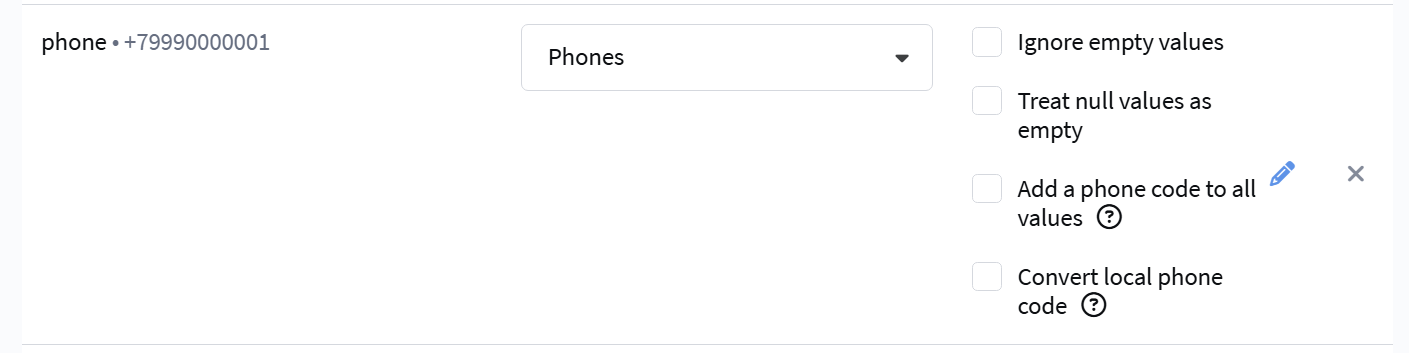
For example, a Russian number in local format can be converted to the +7 format using the local code conversion setting.
If the number contains text, too few or too many digits, fix the value in the file before import.
Error incorrect date
This error occurs if the date does not match the format selected during import configuration, or if the date is impossible.
Examples of invalid values:
2024/99/99
0001-01-01 00:00:00 +0000 UTC
31.13.2024
How to fix:
Check the date format in the field settings during import and bring the values in the file to this format.
Examples:
| Format | Valid Value |
|---|---|
%d-%m-%Y | 31-12-2024 |
%Y-%m-%d | 2024-12-31 |
| RFC 3339 | 2024-12-31T00:00:00.000Z |
Do not pass service zero dates if they should not be written to the profile. It is better to replace such values with empty ones and enable empty value handling.
Error incorrect integer value
This error occurs if a value that cannot be written as an integer is provided in an Integer type field.
Examples of invalid values:
one
NaN
Infinity
1,25
999999999999999999999999999999999999999999
How to fix:
Use only integer numeric values without letters, spaces, fractional parts, or extra characters.
Valid examples:
0
1
25
-5
If the value in the source may be empty or unknown, configure empty value handling or do not map such a column to a numeric field.
Error incorrect float value
This error occurs if a value that cannot be recognized as a floating-point number is provided in a Float type field.
Examples of invalid values:
money
∞
12..34
--0.5
1,234.56
How to fix:
Use numeric values without currencies, text labels, or extra characters. Use a dot for the fractional part.
Valid examples:
1234.56
0.5
-10.25
If the source uses a different decimal separator, convert the values to dot format before import.
Error incorrect enum field: not found value
This error occurs if a value that is not among the enum options is provided in an Enum type field.
Examples of invalid values:
unknown
male/female
?
unexisting_plan
999
-1
This error can appear in both system fields with predefined values and additional Enum type fields.
How to fix:
Check the list options in the field settings and provide one of the existing values. The value must match the list option exactly, including case, spaces, and characters.
For example, if the field has the following options:
basic
standard
premium
then the CSV should contain one of these values:
standard
You can also pass the option index for a list. Indexing starts from 1: first option is 1, second is 2, third is 3.
If the list value does not need to be updated, leave the cell empty and enable Ignore empty values and Treat null values as empty for this column. In this case, an empty value will not overwrite the current field value for an existing profile.
For a new profile with an empty value, the default value will be used if it is set in the field settings. For example, for an Enum type field, this value might be "Not selected".
If the list options consist only of digits, the platform may interpret them as indices rather than text values. To avoid confusion, it is better to use text values, such as plan_100 or tariff_200.
JSON Errors in "Object" Type Fields
For custom fields of type Object, the value must be valid JSON.
In the import report, such errors may look different:
invalid character 'b' looking for beginning of object key string
invalid character 'T' looking for beginning of value
invalid character 'u' looking for beginning of value
unexpected end of JSON input
invalid character 'q' after object key:value pair
Examples of invalid values:
| Value | Why It's Invalid |
|---|---|
{bad json} | An object key must be a string in double quotes. |
{"vip": True} | In JSON, boolean values are written in lowercase: true or false. |
{"field": undefined} | JSON has no undefined value. If the value is unknown, use null. |
{"city": "Moscow",} | There should be no comma after the last property of an object. |
{"nested": {"x": 1} | The outer curly brace is not closed. |
{"quote":"bad " quote"} | Quotes inside a string must be escaped. |
How to fix:
Provide valid JSON:
- keys and string values must be in double quotes;
- boolean values must be passed as
trueorfalse; - empty values must be passed as
null; - there should be no trailing comma at the end of an object;
- all curly and square brackets must be closed.
Valid example:
{"vip": true, "city": "Moscow"}
Error wrong data type for custom field ...
This error occurs if an inappropriate data type is passed to a custom field. For example, a string, single object, number, or invalid JSON is passed to an Array of objects type field.
Examples of invalid values:
{bad json}
[1,2,]
"unterminated
{"field": undefined}
How to fix:
For an Array of objects type field, provide an array of objects with the same structure.
Valid example:
[
  {"id": 1, "sum": 100},
  {"id": 2, "sum": 250}
]
In CSV, such a value should be written as a string with escaped double quotes:
"[{""id"": 1, ""sum"": 100}, {""id"": 2, ""sum"": 250}]"
If the first object contains fields id and sum, the remaining objects in this array must also contain the same fields.
Errors Due to Empty Values
An empty value is not always considered valid. An error may appear if an empty cell falls into a field where an IP, date, number, list, or other strictly typed value is expected.
Examples of errors in the report:
incorrect ip
incorrect date
incorrect float value
incorrect integer value
incorrect enum field: not found value
empty value for required field
If an empty cell falls into a required field, the empty value for required field error appears. See the section below for details.
How to fix:
If an empty value should not update the profile, enable Ignore empty values for the column.
If unknown values in the source are recorded as null, nil, none, or undefined, enable null value handling as empty and ignore empty values.
The empty value for required field Error
This error appears when no value is passed to a required field. The required attribute is set in the database field settings, and the check covers both system and custom fields: a profile is rejected if a required field has no value.
How to fix:
- Download the import error report and check the
error_fieldcolumn: it indicates the field that caused the profile to not be imported. - Fill in this field for all rows in the file.
- Repeat the import.
If the field value is unknown for some profiles, you can remove the required attribute in the database field settings. Then empty values will not block the import: with the Ignore empty values setting enabled, existing profiles keep their current field value, and new profiles get the default value if one is set.
How to Quickly Check a File Before Import
Before uploading the file, check:
- The first row contains column names, if this setting is enabled during import.
- The file encoding matches the selected import encoding.
- The delimiter and text qualifier are defined correctly.
- Dates are written in the selected format.
- Phone numbers are written in international format.
- IP addresses are written in IPv4 format.
- Numeric fields do not contain text, currencies, or special characters.
- List values exist in the settings of the corresponding field.
- JSON in Object and Array of objects fields is valid and properly escaped for CSV.
- Columns are mapped to fields of the appropriate type.
What to Do If the Error Persists
If the error repeats after fixing the file:
- Check which field the column is mapped to.
- Make sure the field type in the database is suitable for the data from the file.
- Check the date format, tag delimiter, and empty value handling settings.
- Check the options for Enum type fields.
- Validate the JSON in a validator and then escape it for CSV.
- Download the import error report and check the
error_fieldcolumn: it indicates the field that caused the profile to not be imported.