Undeliveries report
Description
Undeliveries report displays information about number of Email, SMS, Push, Telegram Bot, MAX Bot, Viber, WhatsApp* messages that could not reach subscribers.
Most recent undelivery reasons are:
| Channel | Reasons |
|---|---|
| Maximum number of attempts to send message has been reached Message has not been sent until end of its lifetime (24 hours) Message has been removed from messages queue by user Message has been sent to mailbox which does not exists | |
| SMS | Study your provider's documentation |
| Push | Invalid push token in a resource subscription |
| Telegram Bot | Invalid chat_id. |
| Viber | Study your provider's documentation (the reasons may vary) |
| MAX Bot | Invalid user_id |
| WhatsApp* | Study your provider's documentation (the reasons may vary) |
| Notify | Study your provider's documentation (the reasons may vary) |
In some cases it's impossible to determine a reason of undelivery. These messages delivery error marked as undefined.
The Altcraft platform allows an inaccuracy of 0.02% when generating reports.
Report settings
At the top of the page, select the period for the report.
You can group information by one or all mailings, also you can use grouping by from domain or by IP address which was used for sending.
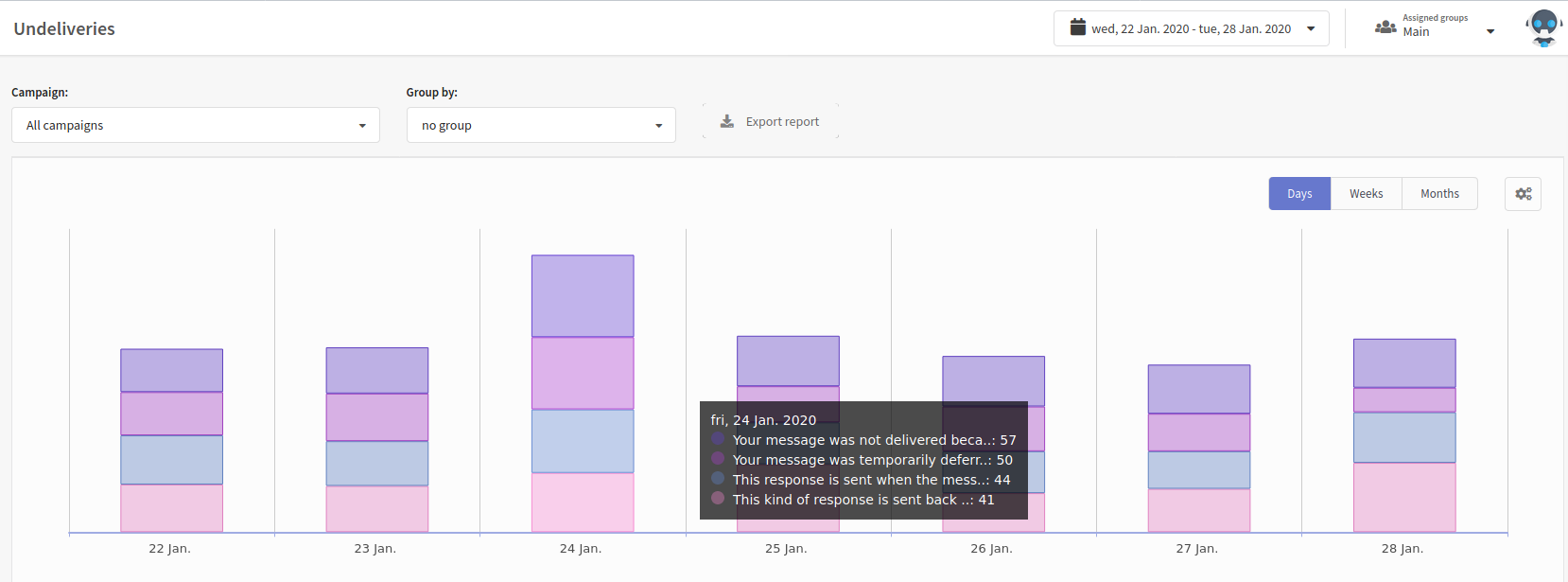
You can download the resulting report in MS Excel and CSV format by clicking the Export report button.
Table
The following information is displayed in the table:
- Group by — selected mailing (or "all mailings");
- To domain — receiving email domain;
- Bounce text — message from email provider about temporary unavailability of the recipient mailbox;
- Amount — number of replies.

To view the full error text, hover over the bounce message. Common delivery errors and their descriptions are listed in the table below:
| Bounce text | Description |
|---|---|
500 dial tcp <IP4:PORT>-><IP4:PORT>: i/o timeout | Network issue, failed to connect to the receiving server. |
500 lookup <DOMAIN> on <IP4:PORT>: no such host for domain:<DOMAIN> | The domain does not exist. |
540 <<EMAIL>>: recipient address rejected: Inactive | The recipient address exists, but it has been deactivated (e.g., disabled or temporarily suspended). This address may be reactivated later. |
550 relay not permitted | Incorrect forwarding configuration on the recipient's mailbox. |
550 No such user! | The email address does not exist on the server (either the account was deleted or never existed). |
550 Unrouteable address | Unroutable address (e.g., if the recipient’s domain lacks A/PTR records). |
550 Message was not accepted -- invalid mailbox. Local mailbox <EMAIL> is unavailable: user is terminated | The user's mailbox has been deleted. |
550 Message was not accepted -- invalid mailbox. Local mailbox <EMAIL> is unavailable: account is disabled | The user's mailbox is disabled. |
552 5.2.2 <<EMAIL>>: user is over quota | The recipient's mailbox is full. |
*The Meta organization, which owns Instagram, Facebook and WhatsApp products, has been declared as extremist and banned in Russia.