v2026.2.77
v2026.2.77.189 — i-Digital Direct API integration and improvements
This update adds a new SMS provider — i-Digital Direct API, accelerates static segment recalculation, and optimizes PostgreSQL operations and the scenario editor.
i-Digital Direct API SMS provider integration
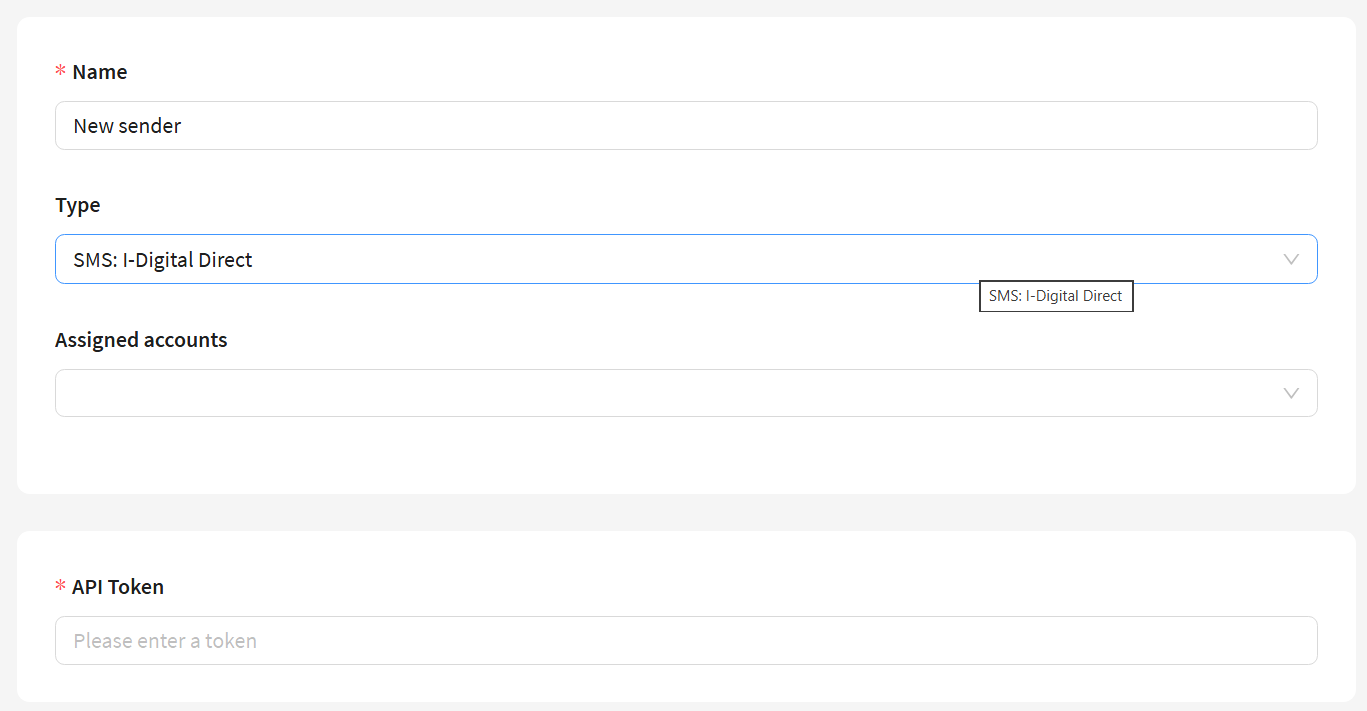
This update adds support for a new SMS provider — i-Digital Direct API.
When configuring a sender for this provider, you need to specify a token for API authorization.
Supported:
- Request format — JSON array (batch sending up to 1000 messages)
- Callback statuses:
delivered,undelivered,unsent - Retry logic for HTTP codes 429, 500, 502, 503 (exponential backoff)
If needed, the sending URL can be overridden via the SMS_IDIGITAL_CUSTOM_SENDING_URL configuration parameter.
Improved
- The recalculation of static segments was accelerated.
- Improved error messages when calculating a global control group with stratification.
- Optimized the PostgreSQL database process, simplifying compliance with information security requirements when deploying the platform.
- Added the ability to automatically clean up old files in the
download_taskreportdirectory. - Added localized messages for new error types in the mailing log.
- The scenario editor performance has been improved.
- Improved interface:
- the sender queue view button is now only displayed for Email channels;
- the list of product segments now correctly shows the user who last updated the segment.
Other
- Fixed the passing of
custom_datafields to event capture when launching a scenario via theworkflows/startAPI. - In the mailing testing section, a test profile is now created only if there is at least one subscription.
- When deactivating a global control group, the ability to remove profiles from the group has been added, and the system will register an exit event.
- Fixed the execution of the
point_trc_migratepoints transaction migration for ClickHouse in replicated mode. - Importing templates via archive no longer results in
httpbeing substituted into image links, reducing the risk of emails going to spam. - In scenarios, when configuring a "Scheduled segment", the selected launch month is now correctly saved. Selection of past dates is prohibited.
- Fixed error display when no profiles match the stratification conditions in the global control groups interface.
- Fixed the default value substitution for numeric fields using a predefined list of values in custom channels.
- Fixed an issue where profiles with a large number of additional fields were not added to the loyalty program.
- In the "Update static segment" scenario node, only segments from the current profile database are now available for selection.
- In analytics reports, deleted loyalty program group levels no longer appear as empty lines — their status and ID are now visible.
- Fixed an issue where profiles were not captured into a scenario when switching the trigger condition from "Click on link in Email" to "Any click in Email".
- When creating indexes in the Admin panel, the
_xxhfield can now be manually selected from the general field list instead of being automatically added via a separate checkbox. - When changing the schedule type in broadcast mailings, incompatible options are no longer saved.
- In segments, user fields are no longer replaced by system fields when creating selection conditions.
- Fixed the display of
procmarketandwebmarketprocess versions. - Added new conditions to segments for selecting profiles based on exclusion from the global control group.
- Fixed the issue with selecting resources and segments in segment conditions for users with limited permissions.
- Fixed an issue where only numeric values were written to a field of type "List" when importing profiles via API.
- Fixed profile capture into a scenario when activating a pixel with the "contains" or "does not contain" selection condition.
- Improved the event capture interface for custom channels: eliminated the ability to select an event that is not processed by hooks.
- Fixed the issue with campaign activation when one of the MongoDB replica members is unavailable.
- Attribute fields with editing restrictions in active objects are now correctly disabled after activation.
- Fixed the "for the last X days" condition in segments: value 1 now correctly selects events only for the current day.
- Fixed slow processing of the
hook_eventsqueue when capturing events with message content. - Fixed an issue where synchronization of static segments with Facebook Ads Manager did not work when selecting the "External identifier" data type.
- When sending a broadcast mailing by profile time zone, if no matching profiles are found, the message "No profiles found for the selected time zones" is now displayed.
- Fixed the display of field headers in segment conditions — the headers defined in the segmentation query are now used.
References
v2026.2.77: PL-18253 PL-19527 PL-20943 PL-20994 PL-21310 PL-21505 PL-21515 PL-21579 PL-21610 PL-21698 PL-21704 PL-21749 PL-21769 PL-21783 PL-21786 PL-21794 PL-21806 PL-21819 PL-21821 PL-21826 PL-21851 PL-21857 PL-21858 PL-21860 PL-21868 PL-21879 PL-21880 PL-21885 PL-21899 PL-21909 PL-21922 PL-21929 PL-21931 PL-21934 PL-21937 PL-21949 PL-21967 PL-21970 PL-21988 PL-22007 PL-21198 PL-18441 PL-18398 PL-8898 PL-18381 PL-21870 PL-21596 PL-21990 PL-12550 PL-17566 PL-21192 PL-21773 PL-21517 PL-21796 PL-21442 PL-20763 PL-20475 PL-21745 PL-21834 PL-21965 PL-21953 PL-21713 PL-21847 PL-20466 PL-19945
v2026.2.77.941 — Optimization, escape function
This update brings extensive optimization of internal platform processes: segmentation, template handling, external SQL queries, and sending workflows have all been accelerated. The escape function for variable escaping and new configuration parameters for controlling segment calculation intervals have been added. The platform is now more stable and faster.
Added
- Added the
escapefunction for escaping variables in templates and scenarios. It allows passing strings containing variable syntax (e.g.,{lead.email}) without substitution — the content inside{escape "..."}remains as-is. Learn more and see usage examples here. - Added the
SCHEDULE_RUN_INTERVAL_MINandWFCAPT_SCHEDULE_RUN_INTERVAL_MINparameters for optimizing segment calculation in scenarios. They set the minimum allowed interval for launching segment calculations in scenarios.
Improved
- The
subscribers/history_getAPI endpoint now supports pagination: thelimitandfrom_idparameters allow retrieving profile events page by page, and thenext_from_idfield in the response indicates which event to continue from. By default, events for the last 30 days are returned (limit — 1000 events). If onlydate_tois specified, the left-side date restriction is removed. More details: Get the history of a single profile. - The launch log in the "Scheduled profile segment capture" scenario node has been improved: a column showing the segment calculation status and the calculation completion time has been added.
- The block template editor performance has been optimized.
- Some visual elements of the platform have been improved, and some tooltip phrasings have been updated.
- Message sending via the Notify channel has been improved.
- External segmentation queries have been optimized: when using SQL queries to external databases with large data volumes, the segment formation time has been reduced from several hours to several minutes.
- The
templates/addandtemplates/getAPI methods have been optimized. - Subscription field handling in custom channels has been fixed: optional fields can now be empty, which matches the behavior when creating a subscription via the interface. Unsubscription via API works correctly for subscriptions with empty fields.
Other
- Fixed the import of profile files exported from the platform when spaces are present in the data.
- Fixed the display of empty pages in a segment when it contains no profiles.
- Loyalty program transactions in the profile card are now sorted correctly.
- Fixed the schedule in a scheduled segment — correct values can now be set.
- Added the
List-Unsubscribe-Postheader and DKIM signatures to emails sent via AKMTA. - Fixed the handling of a number passed to an enum field via API — it is now interpreted as a value, not as an index.
- Column names from Hive queries are now correctly parsed in templates.
- Fixed an error when using a "Month" type variable in segments.
- Profiles can now be sent to a scenario from a dynamic segment without saving it first.
- Fixed an error when duplicating values in a capture condition based on a "Tag" type field change in scenarios.
- UTM tags are now correctly saved in the profile when clicking a link from an email.
- Fixed the layout of the weekly report.
- Inherited attributes are now correctly passed through a custom channel.
- Fixed an error in the
/taskslist. - Entity search by attributes in segmentation has been optimized.
- Fixed the activity toggle when deactivating scheduled profile imports.
- Eliminated infinite loading when configuring order segmentation in the loyalty program.
- Fixed the segmentation condition fields "hit from [n] to [m] times within [x] days/period".
- Fixed the issue of returning to the beginning of the mailing list when switching between pages.
- Fixed incorrect display of banners in the campaign editor.
- Placement campaigns now pass validation when saved.
- Fixed the calculation of an updated segment with the condition "No N orders meeting all conditions" and a product segment.
- Fixed button descriptions in the interface.
- Updated the error message when activating a loyalty program if an active program with the same database already exists.
- Fixed the appearance of the parameter value panel when creating a segment with a segmentation query.
- Fixed pagination in the table component.
- In the segment builder, a single day can now be specified using the "Date/age relative to current date" field.
- Fixed an error when changing the segmentation query in a segment: when replacing a query with parameters with a query without parameters, the old parameters are no longer saved along with the new query.
- In forms, when opening a "List" element, the actions page is no longer blocked.
- Error logs for "Condition" nodes in scenarios now display the scenario and node IDs.
- Fixed a memory leak in the
procpiperprocess. - Buttons in Telegram Bot and Group now contain correct links.
- The CallerID is now pulled into the SMS template preview.
- In multivariate tests, the tested audience limit has been fixed.
- Attribute values can now be selected in Viber, WhatsApp, Notify, and MAX templates.
proctasknow correctly sends scheduled broadcast mailings.- Eliminated the non-clickable "Parts" tab in visual template editor variables when no parts have been created.
- Fixed the display of profile counters for accounts in the admin panel.
- Fixed the display of long names in the breadcrumb top header.
- Fixed errors in the campaign editor.
- The
formatvariable is no longer automatically replaced withformatdatewhen saving a template. - Added profile database validation for connected static and updated segments.
- After a platform update, field mappings in scheduled import settings are no longer reset.
- Fixed the default value for the "Week" type parameter when creating a segment with a segmentation query.
- For scenarios, the user who updated them is now correctly recorded.
- Links with the
no-trackattribute containing the}character at the end are now handled correctly. - Fixed the campaign launch date and time setting when creating from the calendar.
- Long field names in order segments no longer extend beyond the form boundaries.
- Eliminated an empty popup when creating a loyalty program level with an additional identifier.
- The language switch script on the unsubscription page now works correctly.
- Fixed documentation links in the platform.
- Eliminated a JS error when saving templates via the visual beta editor.
- The trigger mailing launch delay time is now displayed correctly.
- Fixed the narrowing of the update log table when re-expanding in updated and static segments.
- Segments with segmentation queries are now saved correctly.
- In the "Date in range" condition, a "to" date earlier than today can now be selected.
- Line breaks are now displayed in the MAX template preview.
- Eliminated a JS error when clicking the automatic UTM tag insertion button in a template.
- Fixed the renaming of segment groups.
- Fixed an error when opening a segment after deleting the associated profile database.
- Product segment recalculation can now be interrupted even when
proctaskcrashes. - Updated the loyalty condition texts inside the segment builder.
- Eliminated the overlap of page blocks in the form logic editor.
- Fixed link creation on triple click.
- Fixed errors related to the loyalty program.
- The template editor no longer attempts to load pixels from non-existent URLs.
- Fixed the display of the control group membership tag inside scenarios.
- Fixed the validation of repeated "Action Execution" nodes in scenarios.
- The campaign popup in calendars now opens correctly.
- Long names are now displayed correctly in the campaign log.
- Fixed the operators in the complex User-agent pixel condition in the segment builder.
- The segment is now saved when the script contains valid values.
- Fixed an error when creating a test profile when the tariff is exhausted.
- Added confirmation popups when removing entities from lists.
- The
action_hook_fill.loglog is now correctly rotated. - In the API node of scenarios, the
Authorizationheader can now be set. - The ability to edit the category selection in filters of an updated product segment has been added.
- Eliminated uncontrolled generation of
data-placeholderswhen creating templates for segmentation queries. - Fixed the date format in the segmentation query and in the segment condition.
- The selected launch method for a placement campaign is now displayed correctly when opened.
- Links in breadcrumbs for nested Market entities now work.
- Fixed the error text in the popup editor when platform variables are used incorrectly.
- The "Attribute Value" variable is now substituted into URLs.
- When adding a link to a text fragment, a checkbox for the confirmation link has been added.
- Added a selection option in goal segmentation by complex condition.
webcontrolperformance has been optimized.- Fixed the validation and editing of required attributes in the attribute editor.
- Added Firebase JSON file validation when uploading to a resource.
- Fixed user password validation in the interface and in the admin panel.
- Updated the list of browsers supported by the platform:
- Google Chrome, version 101 and above
- Mozilla Firefox, version 102 and above
- Microsoft Edge, version 101 and above
- Opera, version 91 and above
- Chromium, version 101 and above
- Safari, version 15.0 and above
- Yandex Browser, version 23.2 and above
References
v2026.2.77.941: PL-17761 PL-20895 PL-21643 PL-22018 PL-22052 PL-22039 PL-21855 PL-18603 PL-22085 PL-22012 PL-18684 PL-22102 PL-21689 PL-21512 PL-22021 PL-22053 PL-22035 PL-21178 PL-22028 PL-21947 PL-21576 PL-21573 PL-22016 PL-21986 PL-21291 PL-22095 PL-21539 PL-22051 PL-19111 PL-22080 PL-22071 PL-21799 PL-20995 PL-19748 PL-21055 PL-17177 PL-22069 PL-22078 PL-20161 PL-22079 PL-21150 PL-22066 PL-21540 PL-16016 PL-21587 PL-21932 PL-22006 PL-22033 PL-21985 PL-18477 PL-22048 PL-21734 PL-5820 PL-21691 PL-18275 PL-20561 PL-21944 PL-20996 PL-21467 PL-21674 PL-17466 PL-20676 PL-21179 PL-17297 PL-17450 PL-21437 PL-20905 PL-18251 PL-20898 PL-22061 PL-21843 PL-22057 PL-21096 PL-22055 PL-21859 PL-21854 PL-21525 PL-22041 PL-22037 PL-21672 PL-21312 PL-21268 PL-13622 PL-19090 PL-17409 PL-17995 PL-21778 PL-22029 PL-22008 PL-18958 PL-18423 PL-21946 PL-21770 PL-20785 PL-17147 PL-21918 PL-21878 PL-22020 PL-21984 PL-16252 PL-20375 PL-16594 PL-11413 PL-21584 PL-18197 PL-21580 PL-14392 PL-21642 PL-21506 PL-18579 PL-21973 PL-21948 PL-21976 PL-17169 PL-21963 PL-21930 PL-21900 PL-21044 PL-19611 PL-20721 PL-18820 PL-18780
v2026.2.77.1060 — Bug fixes
Improved
- The date picker fields in segment conditions now support manual date entry and paste.
- Improved reporting for the points transaction migrator.
- Optimized memory consumption of the
prochookprocess.
Other
- Fixed the display of the cyclic segment dependency error.
- Fixed segmentation by MAX channel events — profiles with events are now correctly selected.
- Notifications are now sent every time the tariff limit for profile import is reached.
- Fixed tooltip offset in the displayed fields editor in Safari and Chrome.
- Fixed an interface bug that prevented removing a value in the segment limit field.
- Fixed segment statistics population in ClickHouse.
- Fixed availability of custom channel custom events in segments and hooks.
References
v2026.2.77.1060: PL-22151 PL-21447 PL-20788 PL-22188 PL-22177 PL-22156 PL-22160 PL-22154 PL-22147 PL-22132 PL-21624 PL-13778 PL-21974 PL-21507 PL-21897 PL-21926 PL-18636 PL-20913 PL-21896 PL-21043
v2026.2.77.1610 — Segmentation improvements and bug fixes
This update revamps the segment builder interface for improved condition readability, and fixes issues related to custom channels, segmentation, global control groups, the loyalty program, and the audit log.
Improved
- The segment builder interface has been revamped for improved condition readability:
- color indicators have been added for filters and operators;
- a collapsed/expanded state mode for conditions has been added;
- the display of conditions with a large number of selected entities has been redesigned — separators, background highlighting on hover, and the ability to collapse and copy the list have been added;
- the order of fields in a condition has been changed: date, range, and resource selection has been moved to the top;
- the "Search" placeholder display in the condition selection menu has been fixed.
- Global control group validation has been improved: minimum profile count check has been added, tooltip texts have been updated.
- The error message when exceeding the maximum number of profiles in a global control group is now more informative.
- Segment calculation with profile history conditions has been optimized: multiple conditions are combined into a single ClickHouse query, significantly speeding up segment formation.
- Event capture content storage has been optimized: content is saved only for events matching the configured filters.
- Template size limits have been moved from constants to configuration, allowing limits to be changed without rebuilding the platform.
- Metrics have been added for the
procpiperprocess: pipe processing time, HTTP request time, event sending time, and total event processing time. - A timeout has been added for Firebase push notification sending, preventing process blocking when Firebase is unavailable.
- The code editor has been improved: shared button components have been added for use in HTML, SMS, and email template editors.
Other
- Fixed an issue where the "Account ID" and "User ID" columns had the same name in the audit log export.
- Fixed an issue where it was impossible to build a segment by relations between different profile databases with a segment specified for reverse relations.
- Fixed an issue where adding multiple conditions with attributes "never in the last X days" resulted in a zero-profile segment.
- Fixed an issue where age selection relative to the current date did not work in segments.
- Fixed segment builder validation for the "day/age relative to current date" condition.
- Fixed an issue where resources and segments were unavailable for selection in segment conditions for users with limited permissions.
- Fixed an issue where the
sortprocess consumed all available memory during updated segment recalculation. - Fixed an issue where inactive subscription highlighting was missing in the test mailing for push resources.
- Fixed an issue where moving active benefits in the loyalty program tree reset the active benefit count.
- Fixed an issue where mailings were not sent via a custom channel.
- Fixed an issue where a custom channel template did not enforce configured size and format rules for local files.
- Fixed an issue where the
MTA_ATTACH_MAX_SIZEparameter did not account for local files in custom channels. - Fixed an issue where a custom channel template with an external database query in the "Serialized JSON String" field could not be saved. Frontend validation has been disabled for JSON type fields in custom channel templates.
- Fixed an issue where mini-preview was not displayed in the template list for custom channel templates.
- Fixed an issue where local image paths were not replaced during block editor template import in the
block_template.jsonfile. - Fixed template import from other systems.
- Fixed control group issues that occurred when stratification settings were modified.
- Fixed an issue where some newly imported profiles were not captured into a scenario due to false duplicate task detection.
- Fixed an issue where single activation/deactivation of a campaign or scenario from the list did not always reflect the state change in the interface.
- Fixed an issue where the platform continuously required a password change after setting the "User must change password on next login" flag in the admin panel.
- Fixed a panic that occurred when calculating a global control group with the
FILEDB_ENABLE: falseparameter. - Fixed double URL escaping in webhooks when receiving statuses from the EDNA provider (WhatsApp).
- Fixed an issue where the
HSETEXcommand, not supported in Kvrocks, was used. - Fixed an issue where one out of three SMS messages was not delivered when sending via the Rapporto provider.
- Fixed an issue where the "Dropdown" form element was disabled when adding a custom option.
- Fixed an issue where PostgreSQL connections hung in the
ClientWritestate after market queries.
References
v2026.2.77.1610: PL-20821 PL-22237 PL-22278 PL-21873 PL-22086 PL-22334 PL-22273 PL-22322 PL-22274 PL-21894 PL-22232 PL-22242 PL-22243 PL-22190 PL-21862 PL-16725 PL-19825 PL-22056 PL-16289 PL-20731 PL-20584 PL-15635 PL-22311 PL-22112 PL-20743 PL-22290 PL-22281 PL-22240 PL-22259 PL-19892 PL-21422 PL-22027 PL-22258 PL-22173 PL-22103 PL-22183 PL-22239 PL-22233 PL-22224 PL-22195 PL-22168 PL-22137 PL-22083 PL-21349 PL-21922 PL-21751 PL-21356
v2026.2.77.1885 — Flutter SDK, form API, and bug fixes
This update adds Flutter support to the Altcraft mSDK, introduces a set of form-related API handlers, and adds the ability to specify the exchange type in the custom channel publisher pipe. It also fixes issues related to segmentation, scenarios, custom channels, and API operations.
Added
- The ability to specify the exchange type (direct, topic, fanout, headers) in the custom channel publisher pipe has been added.
- Flutter support has been added to the Altcraft mSDK. The
altcraft_sdkpackage provides push notifications (FCM, APNS, HMS, RuStore), mobile events, subscriptions, profile management, and push token management via the Dart API. For details: Flutter SDK. - API handlers for working with forms have been added:
/api/v1.1/forms/list— retrieve a list of forms with pagination and filtering;/api/v1.1/forms/get— retrieve information about a single form;/api/v1.1/forms/fills— retrieve form submissions for a specified period;/api/v1.1/forms/activate— activate (publish) a form and return a link;/api/v1.1/forms/deactivate— deactivate a form;/api/v1.1/forms/delete— delete a form and its submissions;/api/v1.1/forms/fill— export form submissions of a specific user with matching.
For more details, see the Forms section of the developer documentation.
Other
- Fixed an issue where API tokens remained blocked after account unfreeze.
- Fixed referrer display in profile events when registering a goal.
The referer parameter in the goal registration API now accepts a full URL or a relative path (in the browser Referer header format). If you previously passed only a domain without a path, update your integration — otherwise the referrer will not be displayed in profile events. For details: Goals and goal values registration.
- Fixed an error when working with a virtual sender containing multiple sender types.
- Fixed tag display in profile custom fields: data is now correctly separated on initial display.
- Fixed attachment validation in custom channel templates: file size and format limits are now enforced.
- Fixed segment condition processing for time-limited events: "never in the last N days" conditions now work correctly.
- Fixed a
prochookprocess panic when configuring event capture in Kafka broker with SASL+SSL and an empty certificate field. - Fixed account metadata updates when changing tariff: change time and user are now recorded correctly.
- Fixed profile export from segments: files download correctly even when the profile database name contains forward slashes.
- Fixed profile capture in scenarios via the "Field value change" trigger for Tag-type fields when adding a tag to an empty field.
- Fixed profile freezing on condition nodes in scenarios under high load.
- Fixed campaign and scenario state display in lists: the interface now updates without page reload after activation or deactivation.
- Fixed the "cannot get campaign" error when launching mailings in scenarios.
- Fixed a custom channel pipeline error when using the
toObjectfunction with new template fields. - Fixed an issue with increasing the profile limit: after reaching the limit, the system correctly processes increase requests, and the restriction flag is reset when the tariff is changed.
References
v2026.2.77.1885: PL-21607 PL-22422 PL-22278 PL-22416 PL-22300 PL-20726 PL-22397 PL-17877 PL-21353 PL-21012 PL-22360 PL-22242 PL-22386 PL-22362 PL-22359 PL-22044 PL-22133 PL-19310 PL-22272 PL-20545 PL-21590 PL-22354 PL-18377 PL-21314 PL-22307 PL-22355 PL-22333 PL-19892 PL-22139 PL-22146 PL-22116 PL-21658 PL-22105 PL-20853 PL-21661 PL-21981 PL-21028 PL-19582 PL-21035 PL-21022
v2026.2.77.2234 — PlatformRoles mode for LDAP/Keycloak, segment improvements, and bug fixes
This update adds the PlatformRoles mode for LDAP/Keycloak authentication, makes scheduling optional in updated segments, and adds the ability to view segmentation conditions from the update log in static segments. It also fixes issues related to the interface, segmentation, mailings, custom channels, the audit log, and process stability.
The MAX messenger API has been updated. Starting July 19, 2026, the MinTsifra certificate must be installed on the server for the integration to work.
Added
- The PlatformRoles mode for LDAP/Keycloak has been added: when enabled, user roles and groups are assigned through the platform interface and are not overwritten on each login. LDAP/Keycloak is used only for authentication and synchronization of basic data (email, name, status).
- Updated segments now support disabling the recalculation schedule.
- Static segments now have a button in the update log to view segmentation conditions in read-only mode, as well as a button to copy the conditions.
Improved
- Memory consumption of the
procworkflowprocess has been optimized.
Other
- Fixed button display when viewing completed tasks in lists: the "Close" button is now shown.
- Fixed mailing testing: the tracking domain in the test email is now taken from the mailing resource, not from the global configuration.
- Fixed the variable selection menu in the scenario API call node: the menu now closes after selecting a variable, and the variable is appended to the existing text in the URL field.
- Fixed error display when deleting a mailing source: the error is now shown at the source level.
- Fixed the color of gray labels in the filter component.
- Improved stability of the
proctask,proctrigger, andprocloyaltyprocesses. - The user JWT token is no longer readable on service subdomains (pixel/tracking).
- Campaign events have been added to the audit log.
- Fixed phone number formatting in the Viber channel when creating a subscription via the interface: the unified format
+79999999999is now used. - Fixed the "not equal" and "not in list" segment conditions for email subscriptions: profiles without subscriptions are now correctly selected in both cases.
- Fixed table view settings when search is active.
- Fixed date range validation in segment conditions: the same date can now be selected in the "From" and "To" fields.
- Restored the ability in the segment builder to create a "opened at least N times in the last X days" condition bound to a resource without specifying a specific mailing or template.
- Fixed date and time display in the scheduled segment: the date is displayed in the interface language and fits fully in the field, start and end times are shown in the account time zone.
- Fixed an issue where deleting a custom field in one channel of a resource also removed fields with the same API name from profile subscriptions on other channels of that resource.
- Fixed event condition grouping optimization in segments: queries are now correctly combined when mixing "within N days" and "within period" conditions.
- Fixed an issue where invalid subscriptions on one channel blocked message sending on another channel.
- Fixed benefit application when using order segments in the loyalty program: discounts are now applied correctly according to order segmentation conditions.
- Updated the MAX channel integration: the API domain has been changed to
platform-api2.max.ruand MinTsifra certificate support has been added. Note: the chat ID must now be entered manually — it can be found in the web.max.ru URL after opening the desired chat. - Profiles now correctly leave the local control group when stratification settings are modified.
- Fixed new and old password identity validation in the admin panel.
- Fixed ClickHouse query error in undelivery analytics with IP address grouping.
- Fixed wildcard usage in allowed SMS sender numbers in the Admin panel.
- Improved archive upload security mechanism.
- Added proper MongoDB error handling when deleting a profile.
- Fixed an issue where users with limited permissions could see inaccessible scenarios.
- Fixed traffic distribution between senders in a virtual sender: traffic is now distributed strictly according to configured percentages.
- Fixed local control group calculation upon mailing activation: the number of profiles in the LCG now matches the configured percentage.
- Fixed an issue where mailings could not be created when the "Enable smart settings" option was disabled in account settings.
- Fixed a segmentator bug where the selection returned 1% more profiles than configured in the interface.
- Fixed a Market API error when importing orders with custom fields via
api/v1.1/market/orders/import. - Fixed an error that occurred when creating ClickHouse tables for certain SQL queries.
- Fixed data collection for unique events in form analytics.
References
v2026.2.77.2234: PL-19566 PL-21942 PL-22036 PL-20727 PL-21621 PL-22489 PL-22514 PL-22349 PL-19610 PL-22084 PL-16923 PL-21206 PL-22542 PL-22291 PL-22435 PL-22500 PL-22473 PL-22450 PL-22342 PL-18064 PL-22445 PL-22475 PL-22269 PL-22442 PL-22438 PL-22425 PL-21650 PL-20096 PL-22183 PL-19604 PL-22198 PL-22172 PL-21541 PL-19535 PL-22335 PL-22419 PL-22392 PL-22050 PL-22267 PL-21387 PL-22285 PL-21433 PL-21945 PL-22214 PL-22593 PL-22505 PL-22314 PL-22472 PL-22013