Local control groups (LCG)
Description
Local control group (LCG) is a part of the campaign audience that does not participate in marketing activities. It is used for more precise audience management and for analyzing the impact of campaigns on recipients. Currently, LCG reporting is not available in the platform.
Global control group (GCG) applies to the entire profile database and excludes a selected portion of profiles from all activities on the platform. If a profile belongs to GCG, it cannot participate in a campaign, except when this campaign is added to the exceptions. GCG is configured in the profile database settings. More details in the separate article on GCG.
Configuring local control group
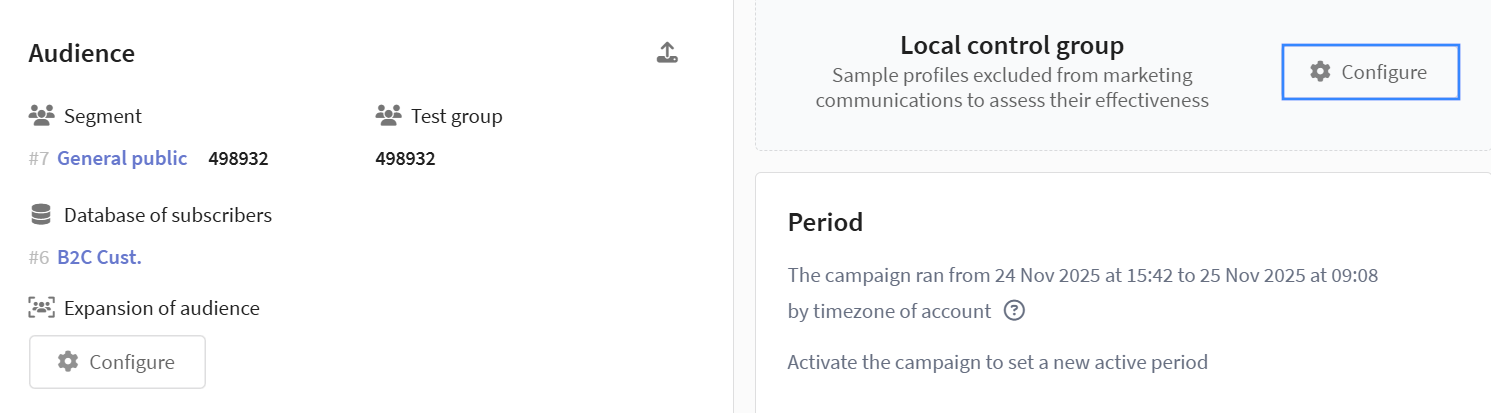
Configure the local control group via the Local control group widget on the main screen of the campaign editor by clicking the Configure button:
Configuring group size
Specify the size of the control group in percent. Use fractional values for precise configuration:
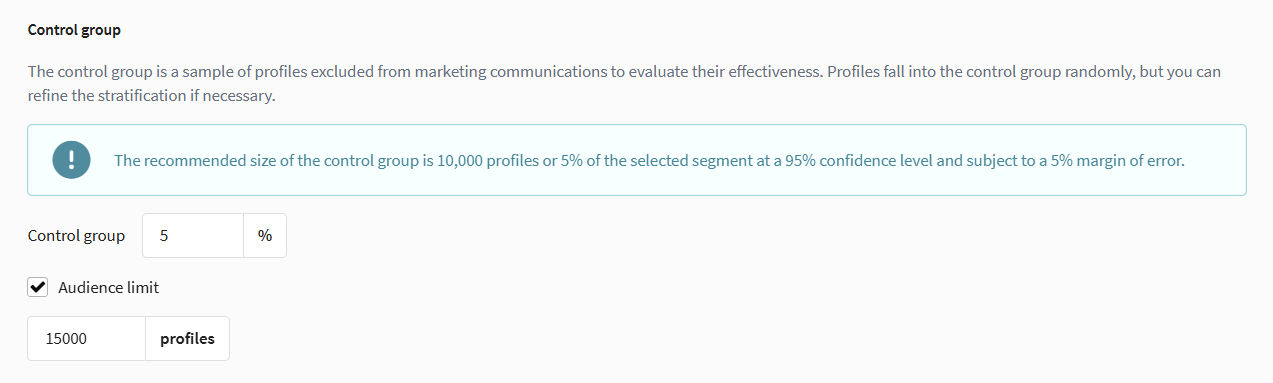
When the Audience limit option is enabled, you can set the maximum number of profiles for the control group. The actual group size will not exceed this value, but may be smaller depending on the percentage and available audience.
Recommended LCG size — 5% of the campaign audience. Too small a group may not yield statistically significant results, while too large a group reduces campaign reach.
Stratification
Description
Stratification is a method of random profile selection with preliminary division of the audience into subgroups (strata) by specified characteristics. The audience is divided into groups so that each reflects the composition of the entire population.
From each group, a portion of profiles is randomly selected, proportional to the size of that group. This helps form a control group with the same distribution of characteristics as the test group, making campaign results more accurate. The maximum number of strata depends on the number of selected characteristics and the number of groups within them. These limits can be configured in the system.
Stratum — a group of conditions defined by one or more criteria. Each unique combination of criteria forms a separate stratum.
Field — a criterion by which strata will be defined.
Stratification example
Suppose a marketer needs to divide the audience by three criteria:
- City: Moscow, Saint Petersburg
- Gender: male, female
- Age: 18-30 years
The system will create strata for all combinations of criteria:
- Men aged 18-30 from Moscow
- Men aged 18-30 from Saint Petersburg
- Women aged 18-30 from Moscow
- Women aged 18-30 from Saint Petersburg
Stratum share calculation: Suppose your target audience consists of:
- 50% men and 50% women
- 40% aged 18-30 years
- 60% from Moscow, 40% from Saint Petersburg
Then the share of the stratum "Men aged 18-30 from Moscow" of the entire audience will be: 0.5 (gender) × 0.4 (age) × 0.6 (city) = 0.12 (12%)
Profiles for the control group are selected from each stratum proportionally to its calculated share.
Stratification setup
Stratification configuration is in the same window as the main LCG parameters and is available via a dropdown menu.

Define strata by one or more fields, specifying conditions for each group: for example, date ranges, numeric values, groups of items from a list, etc. Stratification is configured through the user interface, where you can sequentially add strata and set parameters for each:
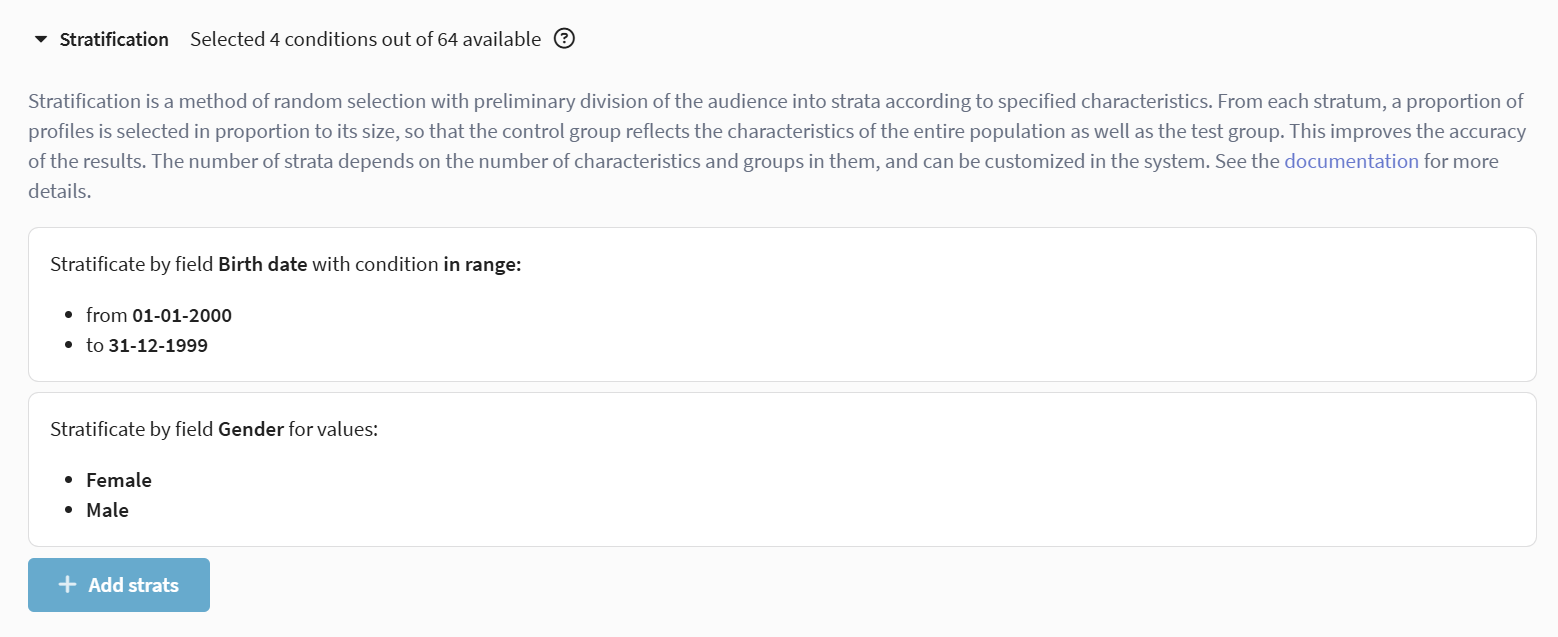
It is not recommended to change stratification settings in an active campaign or for an already formed LCG, as the composition and homogeneity of the control group may change.
More details on system behavior for each type of change — in the Stratification changes in an active campaign section.
Stratification changes in an active campaign
Changing stratification settings in an active campaign has specific characteristics. The behavior of the system for each type of change is described below:
LCG is not replenished from the test group. The LCG is populated only with new profiles that enter the campaign after the settings change — for example, when the segment is updated or the audience is expanded.
Removing a field value. Profiles that no longer match the remaining values are moved to the test group. The rest remain in the LCG.
Example
Stratification by field region: Moscow, Ryazan, Tula. The value "Tula" is removed.
Profiles from Tula are moved to the test group. Profiles from Moscow and Ryazan remain in the LCG.
Returning a removed value. If the value is added back, profiles from the test group do not return to the LCG. Profiles with this value will be added to the LCG only from new profiles that enter the campaign after the change.
Example
The value "Tula" was removed from stratification by region, and profiles from Tula were moved to the test group. Then the value "Tula" is returned.
Profiles from Tula do not return to the LCG. Profiles from Tula will be added to the LCG only from new profiles that enter the campaign after the value is returned.
Adding a field value. Current profiles in the LCG are not affected. Profiles from the test group that match the new value are not added to the LCG. Profiles with the new value will be added to the LCG only from new profiles that enter the campaign after the change.
Example
Stratification by field region: Moscow, Ryazan. The value "Kolomna" is added.
Profiles from Moscow and Ryazan remain in the LCG without changes. Profiles from Kolomna already in the test group are not added to the LCG. Profiles from Kolomna will be added to the LCG only from new profiles that enter the campaign after the value is added.
Adding a field. The number of strata increases — calculated by multiplying the conditions of all fields. Profiles in the LCG are checked against the new conditions: those who have the new field filled and the value matches one of the conditions will remain. Profiles without a value for the new field are moved to the test group.
Example
Stratification was by region: Moscow, Ryazan — 2 strata. The field age is added: 18–30, 31–50. There are now 4 strata: Moscow 18–30, Moscow 31–50, Ryazan 18–30, Ryazan 31–50.
Profiles in the LCG with age filled, falling into one of the ranges, remain. Profiles without an age value are moved to the test group.
Removing a field. Profiles that match the remaining fields will stay in the LCG.
Example
Stratification was: region (Moscow, Ryazan) and age (18–30, 31–50) — 4 strata. The field age is removed, only region remains — 2 strata.
All profiles in the LCG have region Moscow or Ryazan, and remain without changes.
Removing stratification. When the remove stratification button is clicked, all stratum settings are removed entirely. Profiles from the LCG are not moved — already distributed profiles retain their group.
Enabling stratification. If stratification was disabled and then enabled, the system checks all profiles in the LCG against the new strata. Matching profiles remain, non-matching profiles are moved to the test group.
Example
The campaign is activated without stratification, 10 profiles are in the LCG. Stratification is enabled by region (Moscow, Ryazan) and age (18–30, 31–50).
Of the 10 profiles, those with both fields filled and values matching the conditions will remain. A profile without an age value or with region "Tula" is moved to the test group.
Supported field types
For stratification, you can use core and additional fields of the following types:
- enum — list of fixed values
- bool — boolean value
- int/float — numeric values
- string — string values
- date — date
Conditions for field types
For each field type, different conditions are available:
- Number — selection condition "in range" with "from" and "to" fields
- Float — "in range" condition with "inclusive/exclusive" selection
- String — selection condition "equals" with the ability to enter a list of values
- Boolean — conditions by values "true", "false", "missing"
- List — selection condition "equals" with multi-select capability
- Date — conditions "in relative range" (year/month/day) and "in range" (exact dates)
Stratification limits
- Minimum number of conditions — 2 in each field
- Maximum number of conditions — 64 for the entire stratification
- Maximum number of data fields — 32
The limit is calculated by multiplying the number of conditions in the selected fields. For example: "City" field with 3 conditions × "Age" field with 2 conditions = 6 combinations.
Values within one field must not fully overlap:
- Dates — ranges within one field must not overlap
- Numbers — ranges must not fully cover each other
- Strings/lists — full duplication of values is not allowed
Recommendations on the number of strata
- Segment up to 100k — 5-10 strata using key metrics (gender, age, region)
- Segment from 100k to 1M — 10-20 strata using key and behavioral metrics
- Segment from 1M — 20-30 strata with deep segmentation by demographics, behavior, and RFM
Recommended number of conditions in one field — from 2 to 4. More than 5 conditions may lead to overly narrow strata.
Stratification error
The system may issue a warning if the LCG limit is too small for proportional filling of all strata. The warning does not block campaign operation, but signals a possible violation of proportions. For example:
| Parameter | Value |
|---|---|
| Segment | 10,000 profiles |
| LCG | 10% (should be 1,000 profiles) |
| Stratification | Region: Moscow, Saint Petersburg |
| LCG limit | 500 profiles |
Initial distribution
| Stratum | In segment | Share | Expected in LCG (with limit 500) |
|---|---|---|---|
| Moscow | 5,000 | 50% | 250 |
| Saint Petersburg | 5,000 | 50% | 250 |
Proportions are maintained, no error. Then 5,000 new profiles from Moscow are added to the segment. Now the segment has 15,000 profiles: 10,000 from Moscow, 5,000 from Saint Petersburg.
| Stratum | In segment | Share | Should be in LCG (without limit) | Expected in LCG (with limit 500) |
|---|---|---|---|---|
| Moscow | 10,000 | 66.7% | 1,000 | 333 |
| Saint Petersburg | 5,000 | 33.3% | 500 | 167 |
With an LCG limit of 500, the required LCG size should be 1,500 (10% of 15,000 profiles in the segment). According to shares of 66.7% and 33.3%, the correct distribution for 500 spots is 333 from Moscow and 167 from Saint Petersburg. The actual LCG composition (250 and 250) does not match this. The LCG cannot be expanded due to the enabled limit, so the system issues a warning.
How to fix: increase the limit to the actual LCG size (at least 1,500) or disable it entirely. In that case, the LCG will be able to add profiles for the required ratio during subsequent audience updates.
Ignoring marketing activities
Description
The Ignore marketing activities setting allows you to select specific activities within a campaign that will send messages to all profiles, including control group participants. This is useful for critical notifications that must reach the entire audience regardless of LCG participation.
- Critical notifications — transactional emails, order status notifications
- Legal communications — notifications about changes to terms, privacy policy
- Technical notifications — messages about maintenance, system updates
- Emergency communications — important alerts concerning all users
Ignore setup
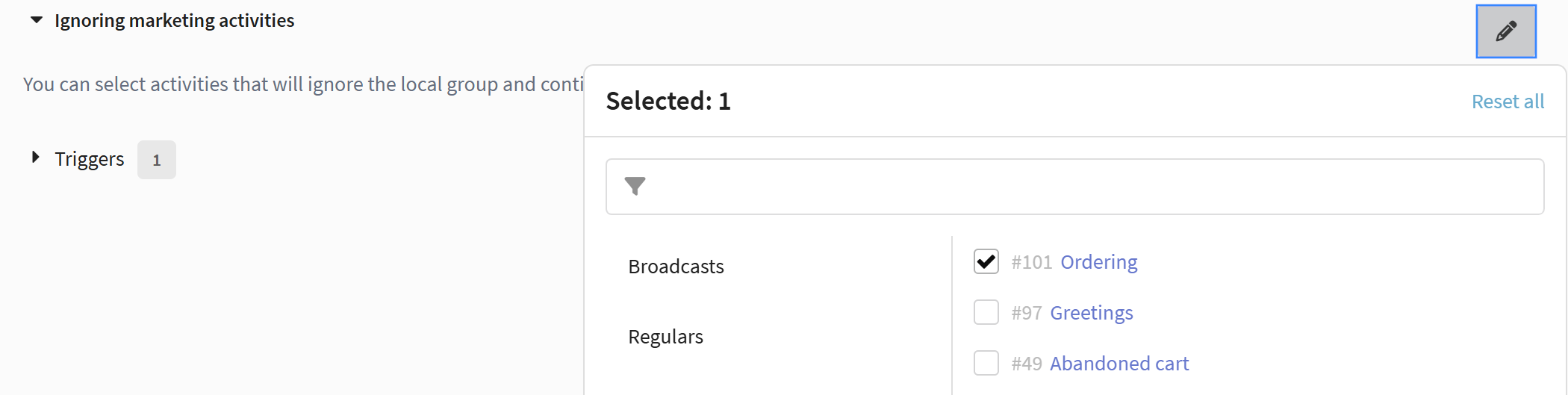
The ignore activities setting is in the same LCG settings window and is available via a dropdown menu:

To edit the list of activities that ignore LCG, in the LCG settings click  Edit:
Edit:
Audience building process
After configuring LCG parameters, when the campaign is activated, the system starts the Audience building process. This process also starts when LCG settings are changed in an already active campaign. During this time:
-
Profiles are distributed between the test and control groups
-
Messages are paused until the recalculation is complete
-
The campaign is assigned an additional status Audience building, while its main status is preserved
Please note that when LCG is enabled in a campaign that was already active, the control group will be formed only from profiles that entered the campaign after its activation, for example as a result of audience expansion. Profiles that were placed in the test group during the first labeling remain in the test group.
If broadcasts or regular Messages were active in the system at the time the audience recalculation was launched, they will be paused until it is complete.
LCG management
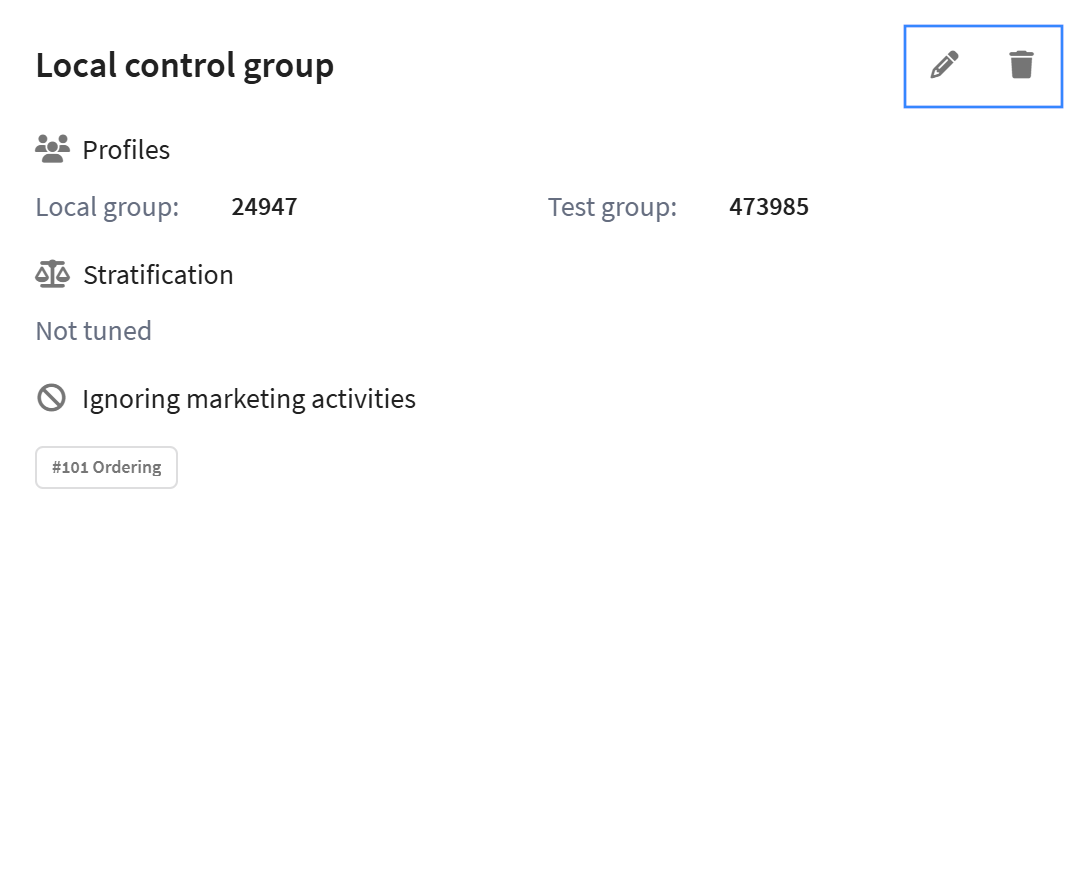
After configuring LCG, the following actions are available in the campaign interface:
- Edit settings — changing LCG parameters, stratification, and exceptions;
- Delete LCG — complete removal of the local control group. All related settings will be deleted along with the LCG (Stratification and Ignore marketing activities). As a result of this action, profiles from the control group will be moved to the test group;
- Export profiles — ability to export LCG participants. After audience formation is complete, when configuring profile export, you can select local control group participants for export in the filters. Export is available inside the Audience widget. More details on campaign profile export can be found here.
LCG operation specifics with segment updates
Audience building is triggered automatically after each segment change. The system distributes only new profiles added to the segment between the test and control groups. Profiles already in the campaign retain their group.