Altcraft Docs LogoAltcraft Docs Logo
User guideDeveloper guideAdmin guide
Company siteHelp center
English
  • Русский
  • English
v74
  • v74
  • v73
  • v72
Login
  • User documentation
  • FAQ
  • Altcraft glossary
  • Profiles and databases
  • Communication channels
  • Segmentation
  • Message templates
  • Mailings
  • Campaigns
  • Automation scenarios
  • Market
    • Market settings
    • Products
      • How to create a product manually
      • How to import a product from a file
      • Scheduled product import
      • Product and SKU Segments
      • Preparing the YML file
    • Orders
    • Market variables in message template
    • Guide: how to send an order confirmation email
  • Loyalty programs
  • Reports and analytics
  • Integrations
  • Weblayers
  • Settings
  • API requests: where to start
  • Changelog
  • library
  • Market
  • Products
Documentation for version v74

Products

Products are goods or services for sale. Each product has its own card with a name, description, image, and other information. You can add multiple SKUs (product modifiers) to one product.

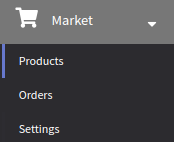
To start working with products, open the " Market" section → "Products".

There are several ways to create a product or SKU:

  1. Manually
  2. Import a product from a file
  3. Import via feed on schedule
  4. Import via API
Last updated on Apr 14, 2022
Previous
Market settings
Next
How to create a product manually
© 2015 - 2025 Altcraft, LLC. All rights reserved.