Altcraft Docs LogoAltcraft Docs Logo
User guideDeveloper guideAdmin guide
Company siteHelp center
English
  • Русский
  • English
v74
  • v74
  • v73
  • v72
Login
  • User documentation
  • FAQ
  • Altcraft glossary
  • Profiles and databases
  • Communication channels
    • Email channel
    • Push channel
      • Mobile Push
      • Web push
        • Preliminary Settings
        • Web browser push configuration
          • Firebase Cloud messaging
          • Apple Safari
          • Mozilla Services
        • Connecting Web Push to a Website
        • Transferring Data to the Platform
        • Web Push SDK Methods
        • Import of subscriptions from third-party push services
    • SMS channel
    • Creating mailing from scratch
    • Communication Channels Workflow
    • Руководство: SMS-рассылка через УТШ
    • Руководство: push-рассылка через сервис от "Согласие"
  • Segmentation
  • Message templates
  • Mailings
  • Campaigns
  • Automation scenarios
  • Market
  • Loyalty programs
  • Reports and analytics
  • Integrations
  • Weblayers
  • Settings
  • API requests: where to start
  • Changelog
  • library
  • Communication channels
  • Push channel
  • Web push
  • Web browser push configuration
  • Mozilla Services
Documentation for version v74

Mozilla Services

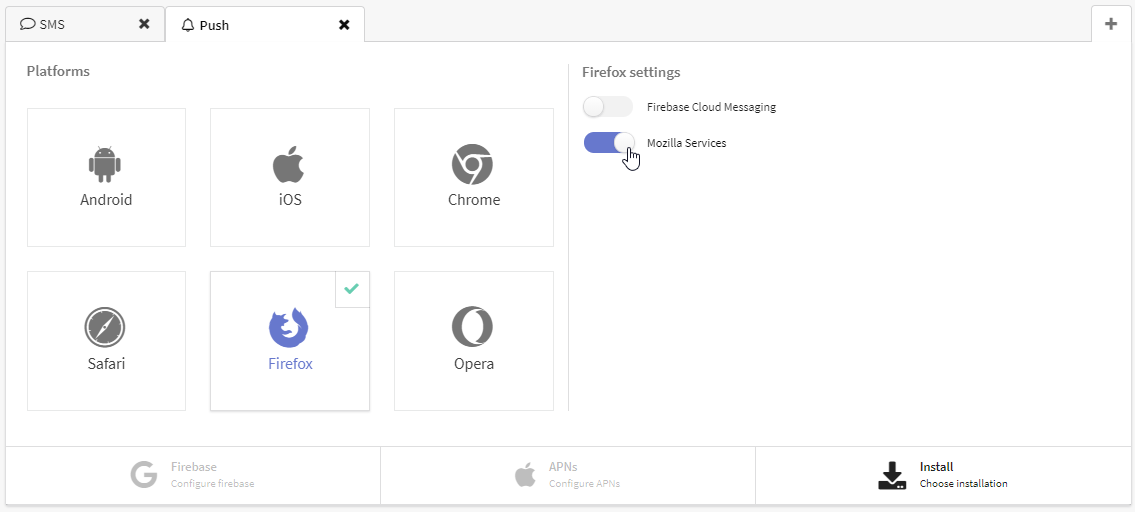
Do you want to begin sending push notifications to Mozilla Firefox browser? All you need is to enable "Mozilla Services" in the resource push options. Firefox has a built-in push SDK.

tip

The next step is Implementing Web push.

Last updated on Apr 23, 2023
Previous
Apple Safari
Next
Connecting Web Push to a Website
© 2015 - 2025 Altcraft, LLC. All rights reserved.