Custom Channels
A channel is an entity that defines interaction with a subscriber (profile) through an external integration. Such interaction can be sending an SMS, a message to a CRM, a post in a social media community, and much more.
The platform has two types of channels:
- Built-in (Email, SMS, Push, messenger channels) — channels described in the system code. Email, SMS, and Push operation cannot be configured, while messenger channel configuration is stored in the
json_consts/channelsdirectory. - Custom — fully configurable channels that are created and configured by the platform administrator.
Why custom channels are needed
Built-in channels cover standard communication scenarios. But if you need to connect an external service that is not available out of the box — for example, a messenger, an advertising platform, a CRM system, or a custom delivery gateway — a custom channel is created for this purpose.
A custom channel allows you to:
- Define what data is sent to the external service and in what format
- Configure the fields that the user sees when creating templates, mailings, and senders
- Define the events that are registered after sending (delivery, click, error, etc.)
- Connect external data sources — for example, select profiles from a CRM directly in the template editor
- Fully control the interaction logic with the external service API through pipelines
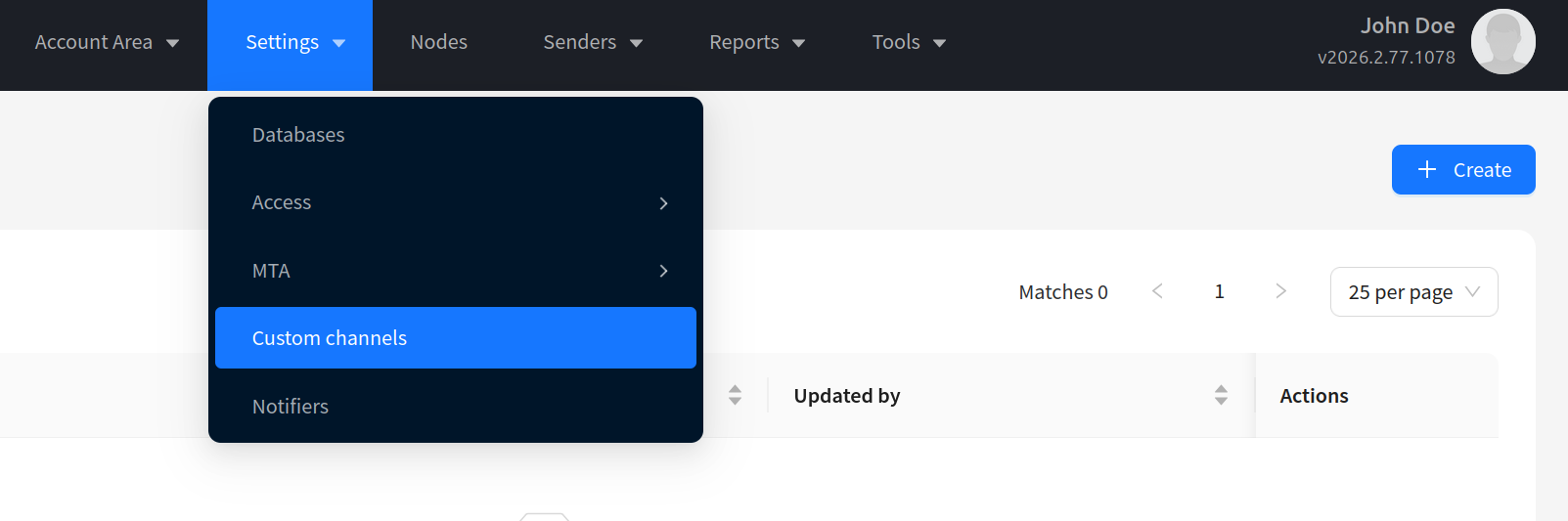
Custom channels are created and edited in the admin panel under Settings — Custom Channels.
Preparation before creating a channel
Before creating a channel, it is recommended to prepare the following information:
- Documentation for the external service API: message sending requests, delivery status check requests, callbacks, etc.
- Which fields are used when sending a message
- Which fields are used to identify a subscription
- Which fields will be configured by the user and which by the administrator
- Which events will occur on the channel and which platform events they correspond to
Channel parameters and settings
The following can be configured for a custom channel:
| Parameter | Description |
|---|---|
| Name and identifiers | Human-readable channel name, unique string ID for API, reports, and exports, unique numeric ID |
| Icon | Visual channel icon in the platform interface |
| Communication type | Direct (personalized sending) or Indirect (one content for everyone) |
| Mailing types | List of campaign types where the channel is available: broadcast, regular, splittest, trigger, placement |
| Moderation | Option to enable moderation mode for indirect channels |
| Events | System events linked to platform event types (send, deliv, undeliv, etc.), and custom events |
| System forms | Field sets for Template, Resource, Campaign, Sender, Subscription, Account — define the data the user or administrator sees (account and sender fields) |
| Presets | Field sets for different content types in Template. More details — in the Presets article |
| External objects (Entities) | Entities for interacting with external APIs: List, Read, Create, Update, Delete operations with pipelines and forms |
| Pipelines | JSON chains of pipes for Message, Schedule, Listener, Stop, Moderate — describe the logic of sending, processing responses, registering events, stopping placements, and moderation |
| Localization | Translations of field names, events, and presets for different language versions of the platform |
String ID
Each channel has a unique numeric and a unique string identifier. They are used to store the channel flag in events, data structures, exports, and API requests. After the channel is created, the identifiers cannot be changed.
Communication types
When creating a channel, you must select a communication type:
- Direct — personalized sending. A mailing creates a separate message for each profile, using profile data (subscription fields, etc.). For a direct channel to work, at least one field in the Subscription form is required. For example, a subscription field will be available in the pipeline as
$subscription.client_id. - Indirect — non-personalized sending. One content is sent for the entire mailing, without binding to a specific profile. Suitable for cases where interaction occurs with an undefined set of profiles (for example, a bot in a group or messenger channel) or when profiles are absent from the platform. For an indirect channel to work, at least one field in the Resource form is required.
Moderation
For indirect channels, the Enable moderation (With moderate) option is available. It enables the mailing moderation mode and opens the Moderate pipeline for editing.
How this works from the user's perspective:
- The user activates a placement campaign on a channel with moderation — the campaign receives the ModerationPending status. The edit form is locked.
- The platform launches the mailing in moderation mode: the message is routed to the Moderate pipeline instead of Message.
- The Moderate pipeline sends content to an external approval service (for example, via HTTP Request). The result is processed by the Eventer pipe:
moderate_pass— status changes to ModerationPassed (Moderation passed). The mailing will launch on schedule if configured, or via the Run Now button.moderate_error— status changes to ModerationError (Moderation error). A red warning icon and the error text from the Eventermessagefield are displayed in the interface.
- If moderation fails, the user fixes the content and saves the campaign — it is automatically sent for re-moderation.
- After successful moderation, the user launches the campaign, and messages are delivered through the regular Message pipeline.
- A campaign in ModerationPending or ModerationPassed status cannot be re-activated — it can only be deactivated.
- The "Start now" checkbox is hidden when creating a campaign on a channel with moderation.
Channel events
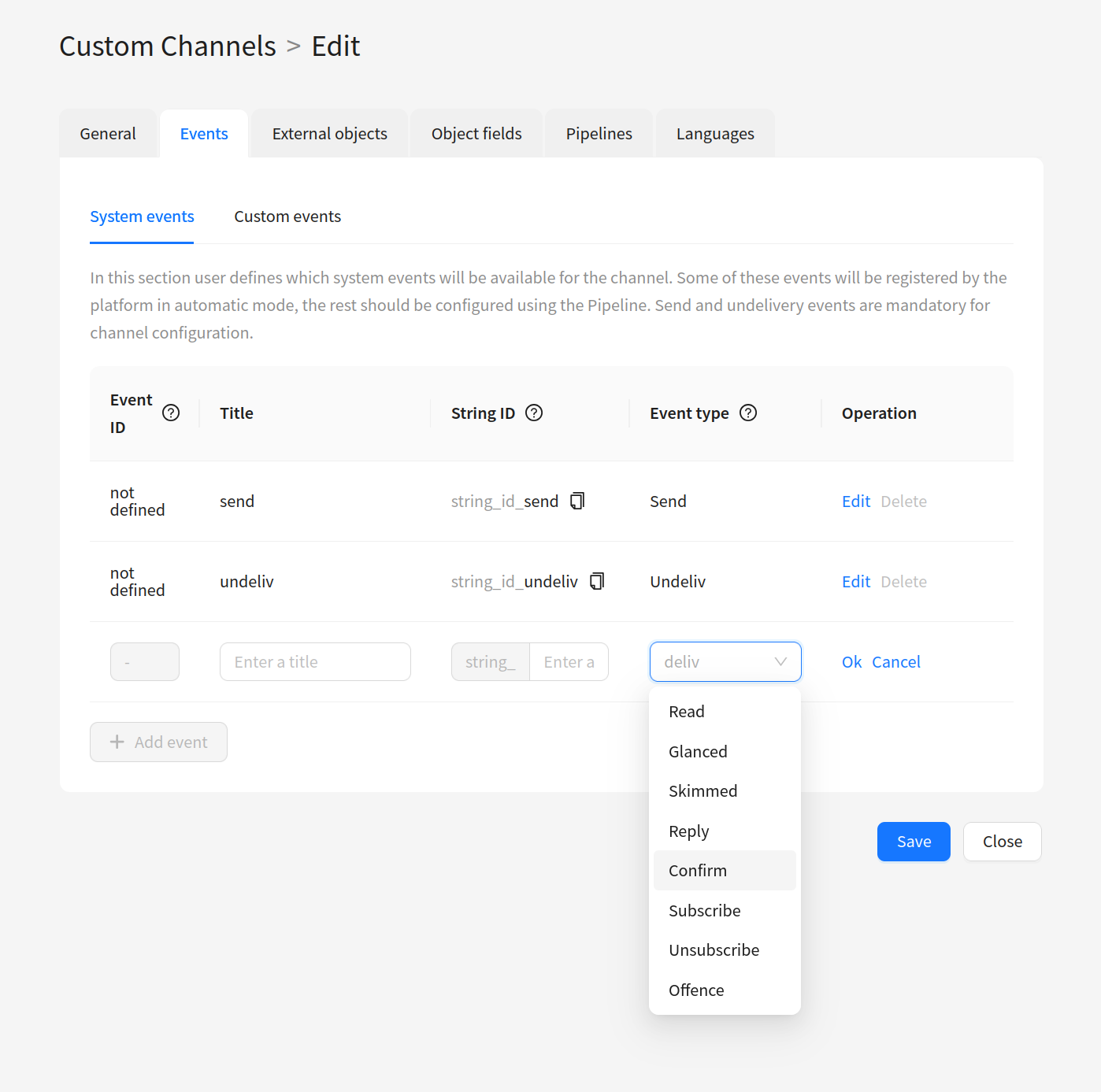
Events can be defined in a channel, which are reflected in reports, profile history, segments, and other platform modules. Each event is assigned:
- Unique numeric and string identifiers
- Name (Title)
- Platform event type (for example, send — sending, undeliv — non-delivery)
Events are divided into system (System Events) and custom (Custom Events).
System events are registered automatically by the platform (for example, a click on a tracking link) or through a pipeline using the Eventer pipe.
Custom events are created in the Custom Events section and registered only through a pipeline with type custom. These are events that do not correspond to any system event type, for example, a like or adding to favorites. Like system events, they will be displayed in analytics and segmentation.
Platform event types (Event type)
When creating an event in the Events section, you need to select a platform event type. The type determines how the event is processed by the system:
| Event type | Purpose | Automatic registration |
|---|---|---|
send | Message sending | Yes — generated automatically when a campaign is sent |
deliv | Message delivery | No — via Eventer |
undeliv | Message non-delivery | No — via Eventer |
hbounce | Hard bounce | No — via Eventer |
sbounce | Soft bounce | No — via Eventer |
open | Message open | Yes — when HTML content with open pixel is opened |
uopen | Unique open | Yes — when HTML content with open pixel is opened |
click | Link click | Yes — when following a tracking link |
uclick | Unique click | Yes — when following a tracking link |
uclick_link | Unique click with link data | Yes — when following a tracking link |
click_link | Click with link data | Yes — when clicking a tracking link in HTML content |
subscribe | Subscription | Yes — registered automatically when subscription status changes |
unsubscribe | Unsubscription (via API or manually) | Yes |
unsub | Unsubscription | Yes — registered automatically when a profile unsubscribes |
uunsub | Unique unsubscription | Yes — automatically when unsubscribing by link |
uunsub_link | Unique unsubscription by link | Yes — automatically when unsubscribing by link |
unsub_link | Unsubscription by link | Yes — automatically when unsubscribing by link |
complain | Complaint (spam) | No — via Eventer |
read | Message read | No — via Eventer (sends to trkread) |
reply | Reply to message | No — via Eventer |
confirm | Confirmation | No — via Eventer |
glanced | Glanced | Yes — when tracked via tracking |
skimmed | Skimmed | Yes — when tracked via tracking |
custom | Custom event | No — via Eventer |
The types unsubscribe and unsub are different:
unsubscribe— unsubscription via API or manually in the interface. The event is registered when an administrator or an external service changes the subscription status.unsub— unsubscription by link. The event is registered automatically when a user follows the unsubscribe link in a message.
If you do not add an event with type unsub in the channel settings, unsubscription by link will not work: the user will see the unsubscribe page, but the subscription status will not change.
To register events in a pipeline, the Eventer pipe is used.
Pipelines
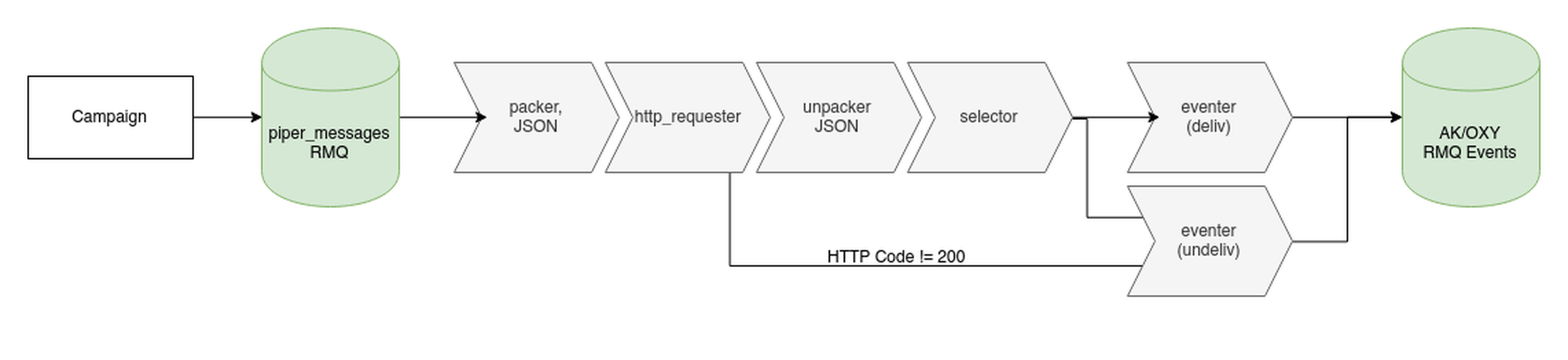
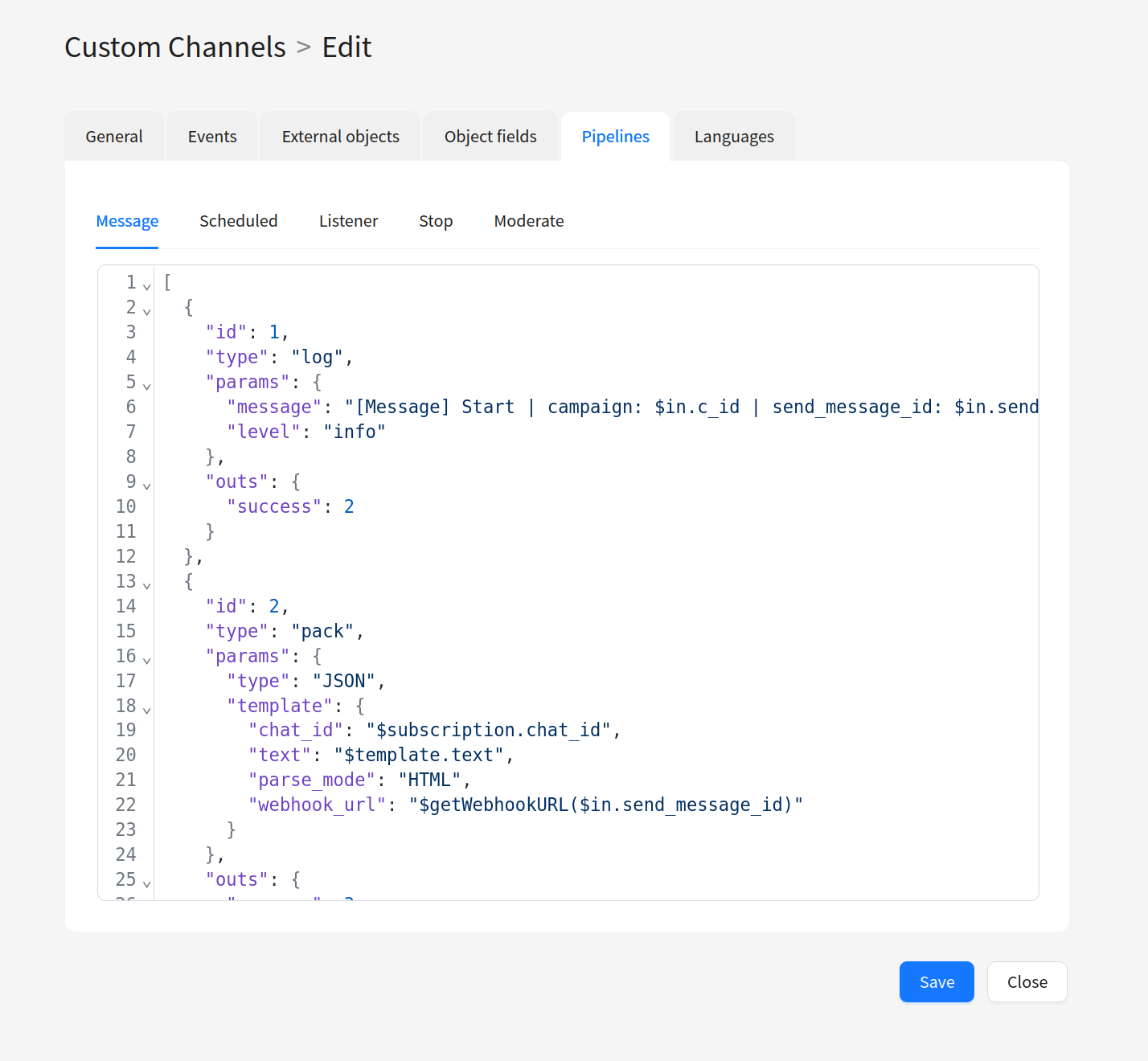
Interaction with external services when sending messages and receiving events occurs through pipelines. Each pipeline consists of a JSON configuration that describes sending requests, transforming data, saving and loading values, and creating events in the platform.
Types of pipelines:
- Message — main processing of mailing messages
- Schedule — deferred processing on a schedule
- Listener — incoming events from external services
- Moderate — mailing moderation (for indirect channels)
- Stop — completion of a placement mailing
System forms
Channel content and settings are defined through fields that can be configured for the following platform entities:
- Template — content delivered to the user. This is where all dynamics are assembled: profile data, events, and other variables are substituted. Template fields: text message body, image, attachments, etc.
- Resource — a means for organizing client subscriptions to specific content over specific communication channels.
- Campaign — placement-level settings: display periods, placement locations, and other parameters. A campaign has no personalization — profile data is not substituted.
- Sender — sender settings: API key (not accessible to the user), URL for content delivery. Often used for migration scenarios — for example, an old sender with an old URL and a new one with a new URL, while the mailing percentage between them is overridden and everything works without downtime.
- Subscription — identifiers for a contact and their properties: email, phone, user ID in CRM, etc. Links a resource to a profile in a channel.
- Account — global channel settings and permissions that need to be hidden from the user (for example, a kill-switch).
Dynamic content (substitution of profile and event data) is assembled only in Template. Personalization does not work in other entities.
For the channel to work correctly, the Template and Subscription forms (for direct channels) or Template and Resource forms (for indirect channels) are mandatory. At minimum, you need to define Template fields and the fields of entities that depend on the selected communication type.
To create a custom channel from scratch, go to the step-by-step guide: Creating a Channel.