Processing HTTP/HTTPS traffic
note
For a complete list of all configurable parameters, see the section - Configuration file. To apply changes to the platform configuration, restart AKD (./akd restart).
tip
To get free Let's Encrypt certificates, you can use the certbot utility.
Default traffic processing scheme on the Altcraft side
By default, HTTPS is required for pixels to work and custom cookies to be processed. Setting the COOKIESAVER_SSL_ON parameter to false will not affect the presence of the https:// protocol in links generated by mailings.
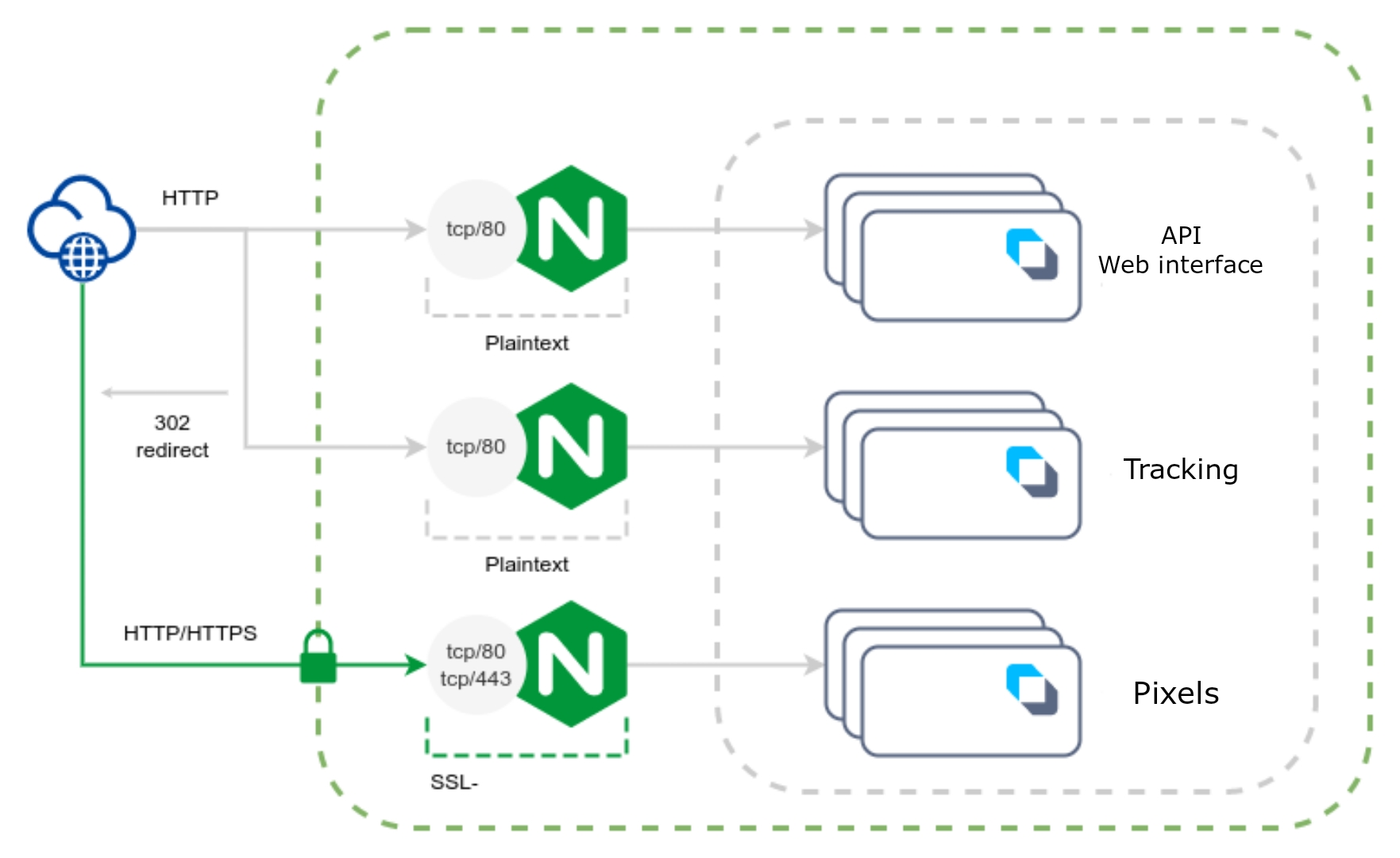
Required parameters
| Parameter | Type | Value | Description |
|---|---|---|---|
| SSL_ON | bool | false | Disabling SSL termination for the web interface |
| TRACKING_SSL_ON | bool | false | Disabling SSL termination for tracking |
| COOKIESAVER_SSL_ON | bool | true | Enable SSL termination for pixels |
| COOKIESAVER_SSL_CRT_PATH | string | /etc/letsencrypt/live/pxl.example.com/fullchain.pem | Path to certificate for pixels |
| COOKIESAVER_SSL_KEY_PATH | string | /etc/letsencrypt/live/pxl.example.com/privkey.pem | Path to the private key to the certificate for pixels |
Scheme for processing traffic with full SSL termination on the Altcraft side
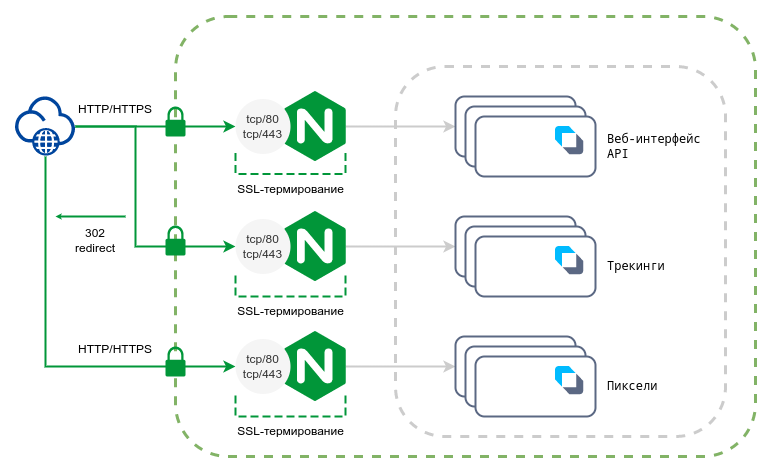
Required parameters
| Parameter | Type | Value | Description |
|---|---|---|---|
| SSL_ON | bool | true | Enabling SSL termination for the web interface |
| SSL_CRT_PATH | string | /etc/letsencrypt/live/altcraft.example.com/fullchain.pem | Path to the certificate for the web interface |
| SSL_CRT_KEY | string | /etc/letsencrypt/live/altcraft.example.com/privkey.pem | Path to the private key to the certificate for the web interface |
| TRACKING_SSL_ON | bool | true | Enabling SSL termination for tracking |
| TRACKING_SSL_CRT_PATH | string | /etc/letsencrypt/live/click.example.com/fullchain.pem | Path to a trekking certificate |
| TRACKING_SSL_CRT_KEY | string | /etc/letsencrypt/live/click.example.com/privkey.pem | Path to the private key to the tracking certificate |
| COOKIESAVER_SSL_ON | bool | true | Enable SSL termination for pixels |
| COOKIESAVER_SSL_CRT_PATH | string | /etc/letsencrypt/live/pxl.example.com/fullchain.pem | Path to certificate for pixels |
| COOKIESAVER_SSL_KEY_PATH | string | /etc/letsencrypt/live/pxl.example.com/privkey.pem | Path to the private key to the certificate for pixels |
Traffic processing scheme with full SSL termination on the external side
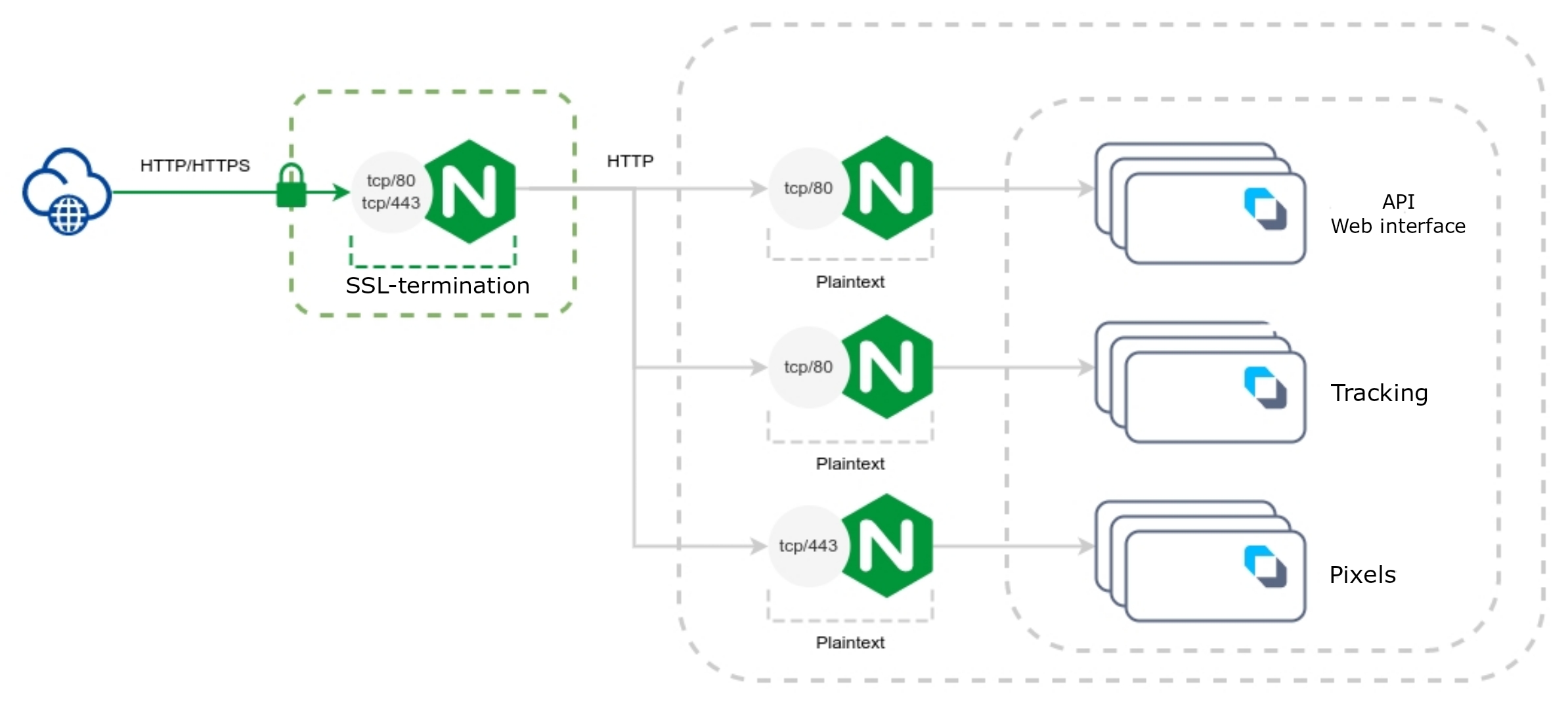
Required parameters
| Parameter | Type | Value | Description |
|---|---|---|---|
| SSL_ON | bool | false | Disabling SSL termination for the web interface |
| TRACKING_SSL_ON | bool | false | Disabling SSL termination for tracking |
| TRACKING_SSL_EXTERNAL_ON | bool | true | Setting the sign of using SSL termination at the top for tracking |
| COOKIESAVER_SSL_ON | bool | false | Disable SSL termination for pixels |
| NGINX_TRUSTED_PROXIES | array | [ "Внешний IP-адрес прокси" ] | List of trusted proxy IP addresses |
| NGINX_REALIP_HEADER | string | "X-Forwarded-For" | Header from which a real IP address of a client will be obtained |
External NGINX Configuration Example
server {
    listen 80;
    listen 443 ssl;
    server_name altcraft.example.com;

    if ($scheme != "https") { return 307 https://$host$request_uri; }
    ssl_certificate /etc/letsencrypt/live/altcraft.example.com/fullchain.pem;
    ssl_certificate_key /etc/letsencrypt/live/altcraft.example.com/privkey.pem;

    ssl_session_cache shared:le_nginx_SSL:10m;
    ssl_session_timeout 1440m;
    ssl_session_tickets off;

    ssl_protocols TLSv1.2 TLSv1.3;

    location / {
        proxy_pass http://172.16.0.10:80;
        proxy_set_header X-Forwarded-For $proxy_add_x_forwarded_for;
        proxy_set_header X-Forwarded-Proto $scheme;
        proxy_set_header X-Real-IP $remote_addr;
        proxy_set_header Connection "";
        proxy_set_header Host $host;
        proxy_http_version 1.1;
        proxy_read_timeout 900;
    }
}


server {
    listen 80;
    listen 443 ssl;
    server_name click.example.com;

    if ($scheme != "https") { return 307 https://$host$request_uri; }
    ssl_certificate /etc/letsencrypt/live/click.example.com/fullchain.pem;
    ssl_certificate_key /etc/letsencrypt/live/click.example.com/privkey.pem;

    ssl_session_cache shared:le_nginx_SSL:10m;
    ssl_session_timeout 1440m;
    ssl_session_tickets off;

    ssl_protocols TLSv1.2 TLSv1.3;

    location / {
        proxy_pass http://172.16.0.11:80;
        proxy_set_header X-Forwarded-For $proxy_add_x_forwarded_for;
        proxy_set_header X-Forwarded-Proto $scheme;
        proxy_set_header X-Real-IP $remote_addr;
        proxy_set_header Connection "";
        proxy_set_header Host $host;
        proxy_http_version 1.1;
        proxy_read_timeout 900;
    }
}


server {
    listen 80;
    listen 443 ssl;
    server_name pxl.example.com;

    if ($scheme != "https") { return 307 https://$host$request_uri; }
    ssl_certificate /etc/letsencrypt/live/pxl.example.com/fullchain.pem;
    ssl_certificate_key /etc/letsencrypt/live/pxl.example.com/privkey.pem;

    ssl_session_cache shared:le_nginx_SSL:10m;
    ssl_session_timeout 1440m;
    ssl_session_tickets off;

    ssl_protocols TLSv1.2 TLSv1.3;

    location / {
        proxy_pass http://172.16.0.12:443;
        proxy_set_header X-Forwarded-For $proxy_add_x_forwarded_for;
        proxy_set_header X-Forwarded-Proto $scheme;
        proxy_set_header X-Real-IP $remote_addr;
        proxy_set_header Connection "";
        proxy_set_header Host $host;
        proxy_http_version 1.1;
        proxy_read_timeout 900;
    }
}