Altcraft Docs LogoAltcraft Docs Logo
User guide iconUser guide
Developer guide iconDeveloper guide
Admin guide iconAdmin guide
English
  • Русский
  • English
Login
    Getting Started
    Administrator documentation
    Functional characteristics
      Technology descriptionarrow
    • Architecture Overview
      Component Description
        Deployment schemesarrow
      • Basic scheme
        Fail-safe scheme
        Typical Placement in Infrastructure
    System requirements
      Admin Panelarrow
      • Account areaarrow
        • Accountsarrow
        • Account Users
          Account Virtual Senders
          Account Database Indexes
        Tariffs
        External data configuration
        LDAP
        Tasks
        Schedule Jobs
        Global Stop Lists
        Webversion Store Policies
        Settingsarrow
      • Databases
          Accessarrow
        • Admins
          API tokens
        Notifiers
          MTAarrow
        • Default rules
          Retry rules
          Lock rules
          Bounce patterns
          Strategies
          Keys
          ISPs
          Pools
      Nodes
        Sendersarrow
      • Email
        SMS
        Event generator
        Integration with Sendsay
        ENS: настройка сендера
        Reportsarrow
      • Audit Journal
        Data Usage
        Toolsarrow
      • ARF decoder
        URL decoder
        SMID decoder
        License
      Platform installationarrow
    • Automatic installation
      Manual installation
      Running the platform in a Docker container
      Platform configurationarrow
    • Configuration file
      Domain settings
      LDAP access configuration
      Sending Email via SMTP relay
      Pixel and push domain configuration
      Cluster and Replication Setup
      System notifications configuration
      Processes UNIX sockets configuration
      HTTPS Configuration
      Migrating from MongoDB Community Edition to Percona Server for MongoDB
      Adding sender IP addresses
      Deduplication request settings
      PostgreSQL database for account data
      Proxy server settings
      Keycloak Integration with Altcraft
      Getting HTTP service statuses
      Configuration MongoDB logs rotation
        Configuration of system constants and directoriesarrow
      • Filtering bot actions
        Directory of gender markers
      Platform maintenancearrow
    • Personnel requirements
      Platform maintenance processes
      Platform updating
      Platform service monitoring
      Backup and recovery
      Transferring the platform to a new server
      Creating, deleting, and populating tables for statistics in ClickHouse
      Usage of the aktool utility
      Users and directories engaged by the platform
      Custom channels guidearrow
    • Overview
      Creating and configuring a channel
      Entity field configuration
      Template language
      Entities
        Pipesarrow
      • Pipe: Basic Concepts
        Result
        Errors
        Log
        Pack
        Unpack
        HTTP Request
        Store Set
        Store Get
        Selector
        SQL
        Eventer
        Scheduler
        Pipelinesarrow
      • Pipeline: Basic Concepts
        Message
        Schedule
        Listener
        Moderate
        Stop
      Extraarrow
    • System page customization
      Send Message ID
      Инструкция по миграции истории в ClickHouse
      Instructions for migrating history to ClickHouse
      Utility for importing push subscriptions to Firebase project
      Utility for importing push subscriptions to Firebase project
    Processing HTTP/HTTPS traffic
      Administrator APIarrow
      • Accounts admin apiarrow
        • Restricted accessarrow
        • Account Activation and Deactivation
          Account Freeze and Unfreeze
        Get accounts list
        Add a new account
        Delete the account
        Account usersarrow
      • Update an Existing Account
        Add a new account
        Delete a user
        Get a list of users
        Sending a Welcome Email
        Nodesarrow
      • Synchronize node MTA configuration
        Get nodes list
        Get node MTA status
        Activate node MTA
        Deactivate node MTA
        Senders admin apiarrow
      • Create or update AKMTA sender
        Get AKMTA sender information
        Assign account to sender
        Get senders list
        Delete sender
        Restore sender
          Sender queuearrow
        • Get sender queue information
          Hold sender queue
          Release sender queue
          Clear sender queue
        Virtual sendersarrow
      • Get virtual senders list
        Get virtual sender information
        Create virtual sender
        Update virtual sender
        Clone virtual sender
        Delete virtual sender
    Documentation Archive
  • Extra
  • Utility for importing push subscriptions to Firebase project

Utility for importing push subscriptions to Firebase project

Description​

Utility firebase_import_subs is a tool for importing Web Push subscriptions of a third-party push service into a Firebase project.

How does it work?​

  1. A CSV file is sent as the input data. It contains fields for subsequent matching during the import process and subscription data.
  2. A new CSV file is sent as the output data. All data from the source file is saved in the file, but also the column firebase_push_token is added.

How to do a request?​

  • The Altcraft platform user transfers the CSV file with subscriptions to the platform administrator.
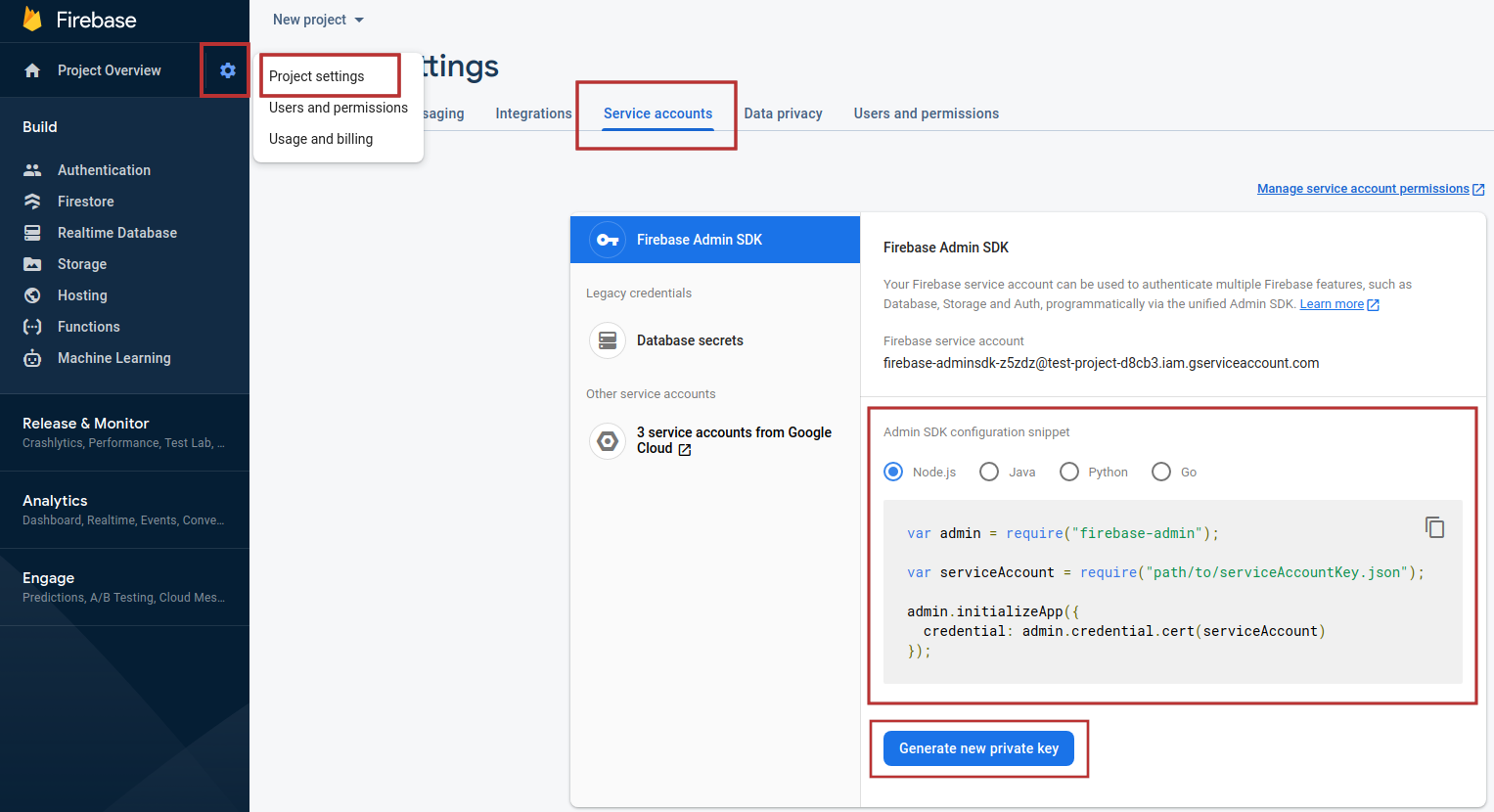
  • You need a service account JSON file. You can get it in the Firebase console: https://firebase.google.com. Go to the settings of the project into which you want to import subscriptions: "Project Settings" —> "Service accounts". Go to the "Admin SDK configuration snippet" section and click "Generate new private key" to download the JSON file.
  • Go to the directory where the Altcraft platform is installed. By default, it is /opt/MarketingPlatform/

cd /opt/MarketingPlatform/
  • Use the utility:
ak/bin/firebase_import_subs --in ~/test_firebase_import/in.csv --out ~/test_firebase_import/out.csv --cred_json ~/test_firebase_import/cred.json --auth_field_name web_auth --p256_field_name web_p256 --endpoint_field_name identifier --publ_vapid_key BDkO8iue5By4UcLUk5SCL0LLtDl9RWvSyqr0WOIjiXQTJmwH0yHxcrqidZ-PyJ9QwksTBHkh9wx88YK4xnn17_Y

Parameters​

Required parameters
in
out
cred_json
auth_field_name
p256_field_name
endpoint_field_name
publ_vapid_key
Additional parameters
---
proxy
config

Utility example:​

note

All errors that happened when you start the utility are recorded in the log file.

  • If you've done everything right, the new out.csv contains:
    1. the same data that the initial file contains
    2. column firebase_push_token.

  • Send the resulting csv file to the platform user.

Last updated on Jul 14, 2023
Previous
Utility for importing push subscriptions to Firebase project
Next
Processing HTTP/HTTPS traffic
  • Description
  • How does it work?
  • How to do a request?
    • Parameters
    • Utility example:
© 2015 - 2026 Altcraft, LLC. All rights reserved.

