Altcraft Docs LogoAltcraft Docs Logo
User guide iconUser guide
Developer guide iconDeveloper guide
Admin guide iconAdmin guide
English
  • Русский
  • English
Login
    User API documentationAPI interactionMatching
      Profilesarrow
    • Import profileUpdate profileImport multiple profilesUpdate multiple profilesAdd multiple profilesAdd profile to databaseQuick profile importImport profile to RabbitMQGet profile dataUploading profiles to a fileSuspend all database profilesUnsuspend all profiles in a databaseDelete profileSubscription fields functional updateDatabase fields functional updateMerging multiple profilesUnsubscribe profile from resourceProfile splitting
        Subscriptionsarrow
      • Add or edit subscriptionGet all profile subscriptionsGet all subscriptions from multiple profilesGet profile subscriptionDelete profile subscriptionRestore deleted subscriptionSuspend all subscriptionsUnsuspend all suspended subscriptions
        Action historyarrow
      • Get profile action historyGet multiple profiles action history
        Profile relationsarrow
      • Attach relationDetach relationModify relation propertiesOverwrite relation propertiesGet profile relations infoGet profile relations info
      Get data for multiple profiles
      Databasesarrow
    • Get database statisticsUpdate statistics on databaseGet database listGet database informationGet database fieldsDatabase wipe
      Resourcesarrow
    • Get resource statisticsUpdate statistics on resourceGet resources listGet resource informationGet resource subscription fields
      Segmentsarrow
    • Get statistics on resourceUpdate statistics on segmentAdd or remove profileGet profile data in a static segmentCreate segmentUpdate segmentGet segment informationGet segments listDelete segment
      Suppression listsarrow
    • Create suppression listUpdate suppression listGet suppression list infoGet the list of suppression listsDelete suppression listUpload suppression list data to file
        Suppression list actionsarrow
      • Check if email is suppressedAdd email to suppression listAdd multiple emails to suppression listRemove email from suppression listRemove all emails from suppression listCheck if domain is suppressedAdd domain to suppression listAdd multiple domains to suppression listRemove domain from suppression listRemove all domains from suppression listCheck if phone number is suppressedAdd phone number to suppression listAdd multiple phones to suppression listRemove phone number from suppression listRemove all phone numbers from suppression list
      Templates and fragmentsarrow
    • Get templates listGet template infoDelete templateAdd templateUpdate templateChannel object
      Campaignsarrow
    • Get campaign informationGet campaign listActivate campaignComplete campaignDeactivate campaignGet campaign status
      Mailingsarrow
    • Activate mailingDeactivate mailingGet mailing listGet mailing informationGet mailing logClone mailingDelete mailingGet mailing status
        Broadcast mailingsarrow
      • Get broadcasts listGet broadcast informationCreate broadcast mailingUpdate broadcast mailingLaunch a broadcast mailing
        Regular mailingsarrow
      • Get regular mailings listGet regular mailing informationCreate regular mailingUpdate regular mailingLaunch a regular mailing
        Trigger mailingsarrow
      • Get trigger mailings listGet trigger mailing informationCreate trigger mailingUpdate trigger mailingTrigger launch (API call)Profile import + trigger mailing launchTask for bulk trigger launchTask for bulk profiles import + trigger launchBulk trigger launchBulk profiles import + trigger mailing launchClone a trigger mailingData array
      Automation scenariosarrow
    • Engage profile in scenarioImport and engage profile in scenarioBatch import and engage profiles in a scenarioTask for batch import and engaging profiles in the scenarioGet scenarios listActivate scenarioDeactivate scenario
      Loyalty Programsarrow
    • Get profile tier in a loyalty programExport points transactionsExpiring points for a periodGet profile account transactionsGet trigger promotions listAccrue points to a memberRedeem member pointsCommit temporary transactionPreliminary Order CalculationOrder ConfirmationRoll back temporary transactionCancel points transactionGet points account balanceRegister member in a loyalty programRemove member from loyalty program
      Promo codesarrow
    • Import promo codesGet promo code informationActivate promo codeUpdate promo codeAttach promo codeDetach promo codeGet all promo codes
      Goalsarrow
    • Goals and goal values registration
      Application push notificationsarrow
    • Processing and adding a subscriptionAdd app push events
      Marketarrow
      • Market objectsarrow
      • Order data objectProduct data objectSKU data objectCategories arrayCustom fields array
        Ordersarrow
      • Import order and item statusesGet orders listDelete orderGet order statusUpdate order line status
        Products and SKUarrow
      • Import products, SKUs and categoriesImport SKUs and categoriesGet products listGet SKUs listDelete productsDelete SKU
      Analytic reportsarrow
    • Get summary reportGet soft bounces reportGet undeliveries report
      SendersDevarrow
    • Get senders list
        Virtual senders (Smart accounts only)arrow
      • Get virtual senders listGet virtual sender informationClone virtual senderCreate virtual senderUpdate virtual senderDelete virtual sender
      External datatables queriesarrow
      • Segmentation queriesarrow
      • Add segmentation queryUpdate segmentation queryGet segmentation query informationGet segmentation queries listDelete segmentation query
        Template queriesarrow
      • Add template queryUpdate template queryGet template query informationGet template queries listDelete template query
      Objectsarrow
    • AKMTA objectContent objectEmail rule objectFile objectProfile data objectSMS rule objectSender objectSender typesStart schedule objectSubscription objectTrigger types
      Miscellaneousarrow
    • Upload fileGet message web versionPush providersDeduplication of requestsHow to send API request with RabbitMQList of gender identificationsObtain valid values for fields: browsers, devices, tz, oses, languages
    Importing the API collection in PostmanList of API endpoints
      SDKarrow
      • mSDKarrow
        • Androidarrow
        • Quick StartSDK FunctionalitySDK ConfigurationPublic SDK API
            Provider configuration androidarrow
          • Firebase Cloud MessagingHuawei Mobile ServicesRuStore
          iOSarrow
        • Quick StartSDK FunctionalitySDK ConfigurationPublic SDK API
            Provider configurationarrow
          • Apple Push Notification ServiceFirebase Cloud MessagingHuawei Mobile Services
          React Native (Android/iOS)arrow
        • Quick StartSDK ConfigurationSDK FunctionalityPublic SDK APIProvider setup
        Managing JWT and Role Token
  • SDK
  • mSDK
  • iOS
  • Provider configuration
  • Firebase Cloud Messaging

Firebase Cloud Messaging

Step 1. Firebase Cloud Messaging project setup​

  • Create a Firebase project.

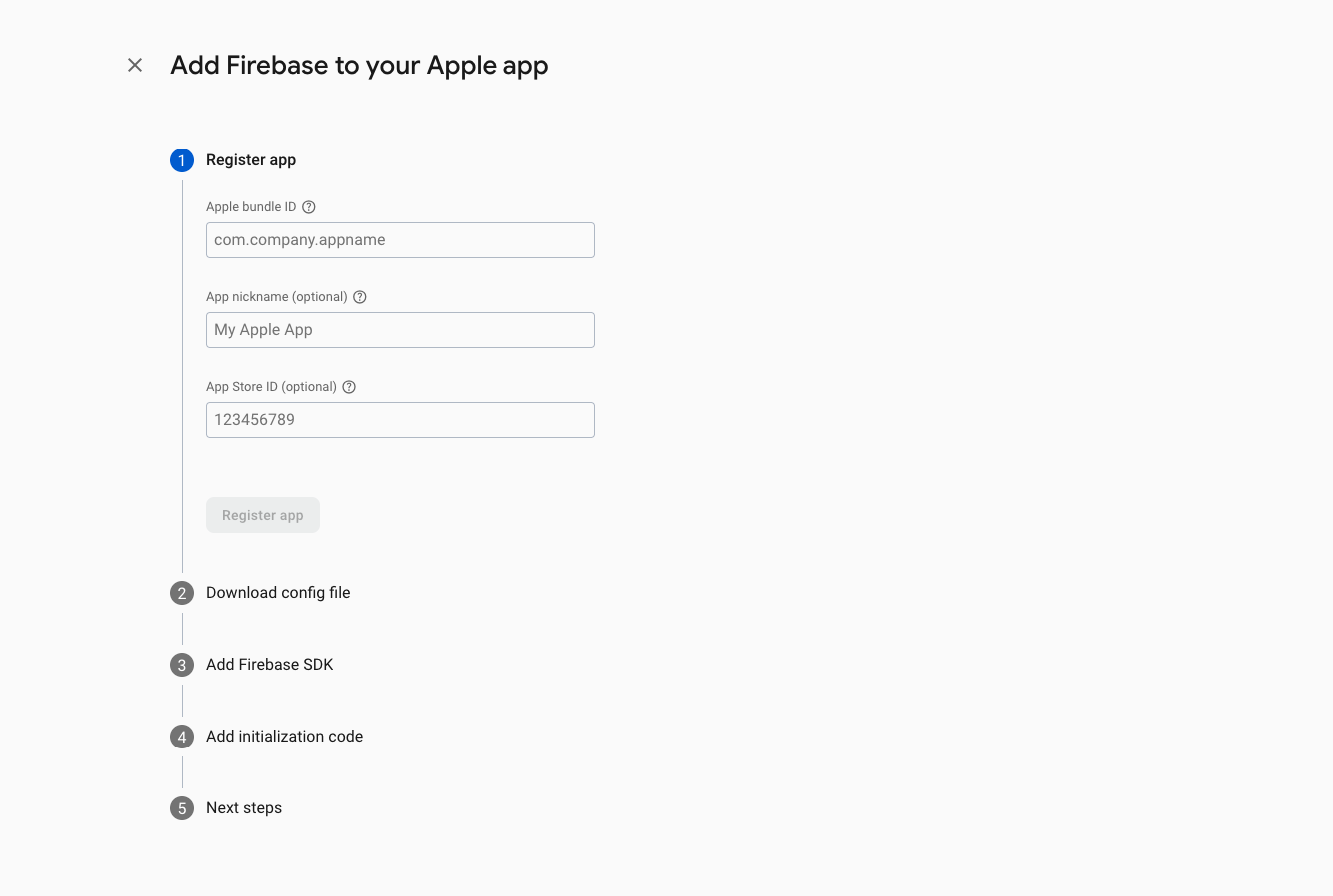
  • Register a new app in the project:

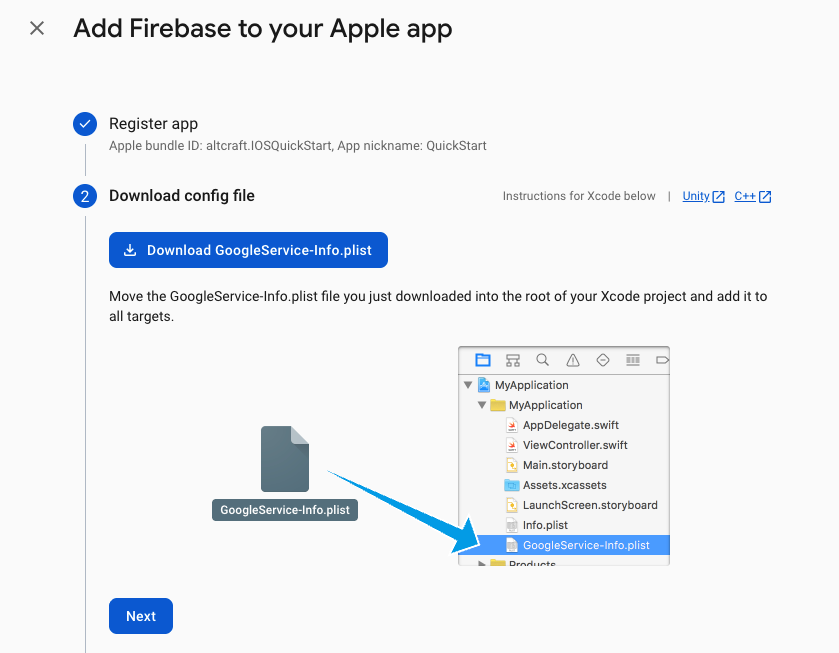
  • Download the GoogleSrvice-Info.plist file.

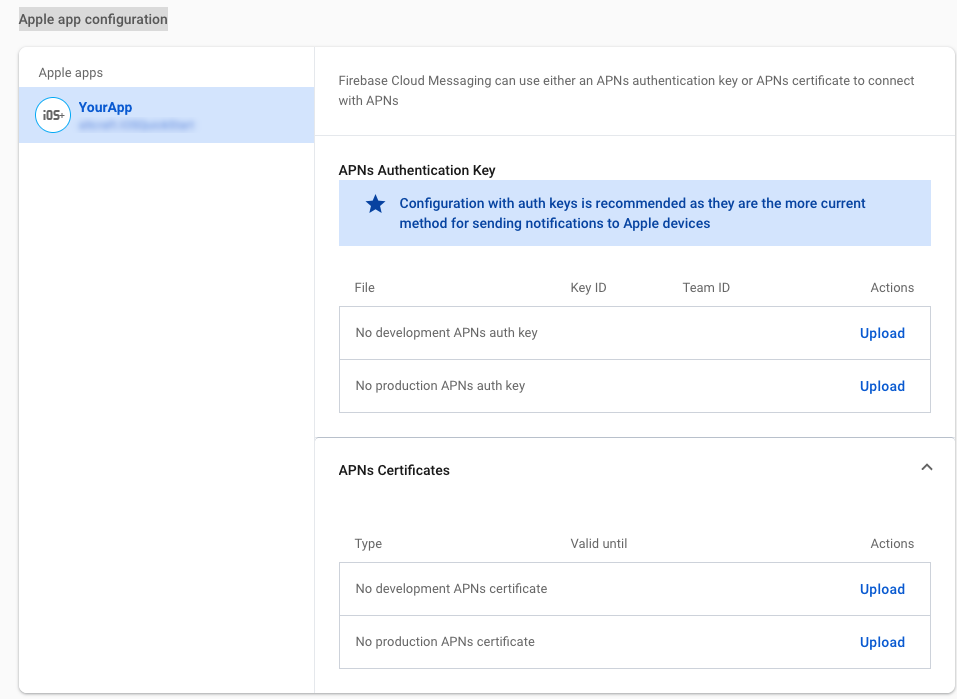
  • Go to Project Settings —> Cloud Messaging —> Apple app configuration.

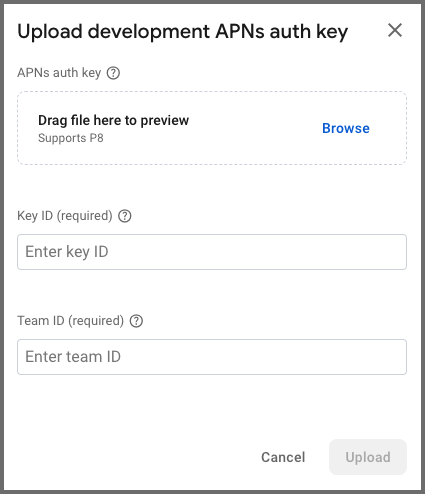
  • Add the required APNs Authentication Key data (the key must first be created in Apple Developer):

Enter the following data:

  • upload the .p8 key file
  • specify the key ID
  • specify the team ID

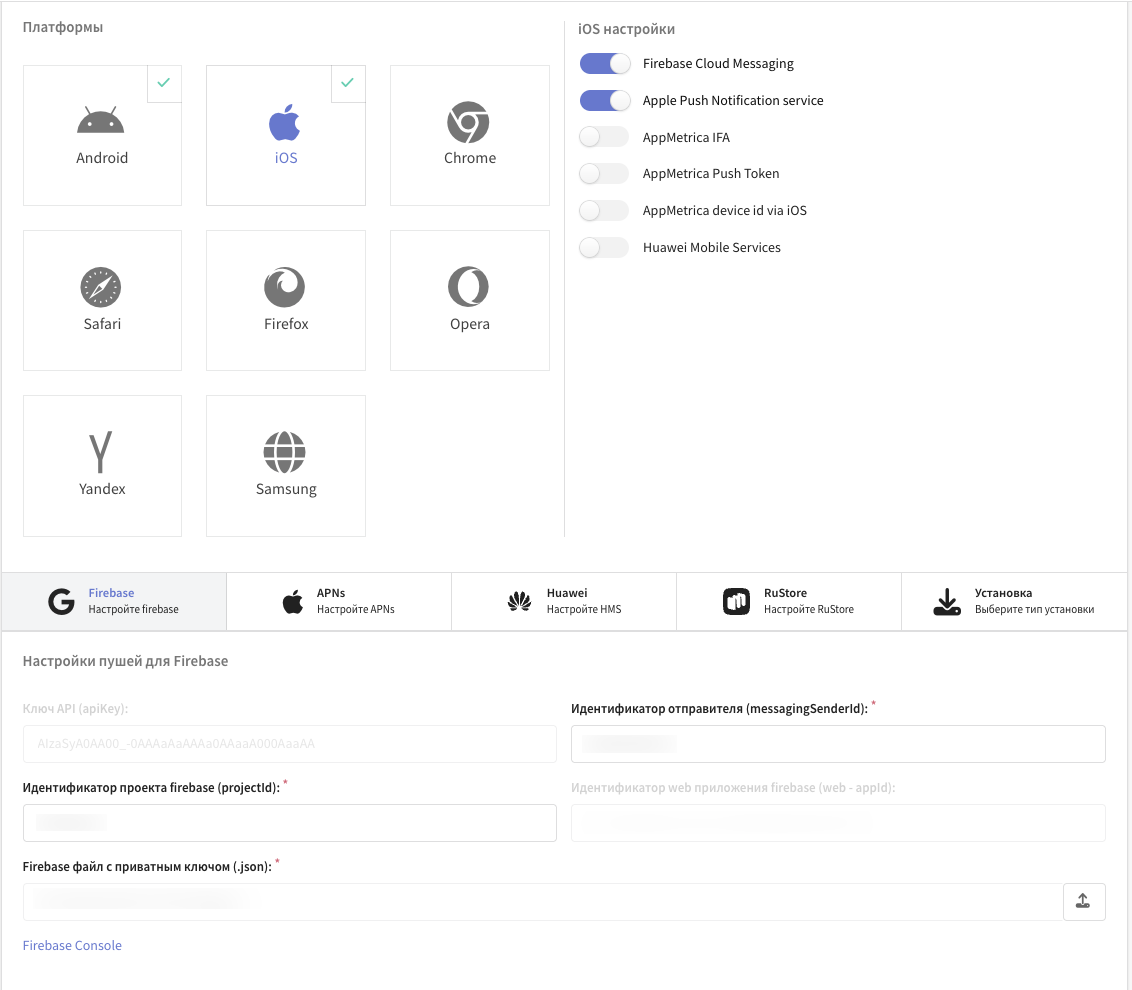
Step 2. Altcraft resource configuration​

  • specify the messagingSenderId
  • specify the projectId
  • upload the Firebase private key file (.json). The file is created in Project settings —> Service account.

Step 3. Integrating Firebase Cloud Messaging into the app project​

  • Move the downloaded GoogleSrvice-Info.plist file into the application folder (app).

  • Add the Firebase package using Swift Package Manager — repository Firebase. The Firebase package version must be compatible with your Xcode version.

  • General:

    • Ensure that the FirebaseMessaging library is added under Frameworks, Libraries, and Embedded Content of the app target.
  • Signing & Capabilities:

    • PushNotifications

Option 1: FirebaseAppDelegateProxyEnabled — YES (Default for Firebase Messaging)​

  1. Add the MessagingDelegate protocol to AppDelegate:

    class AppDelegate: UIResponder, UIApplicationDelegate, MessagingDelegate {}

This allows receiving a callback with the current FCM token through the messaging(_:didReceiveRegistrationToken:) method.

  1. Initialize Firebase in didFinishLaunchingWithOptions:

    FirebaseApp.configure()
    Messaging.messaging().delegate = self
    application.registerForRemoteNotifications()
  2. Implement the delegate method to receive the token:

    func messaging(_ messaging: Messaging, didReceiveRegistrationToken fcmToken: String?) {
    guard let token = fcmToken else { return }
    print(" FCM Token: \(token)")
    }
Full example of Firebase initialization and FCM token retrieval
import SwiftUI
import FirebaseCore
import FirebaseMessaging
import Altcraft

@main
struct IOSQuickStartApp: App {
@UIApplicationDelegateAdaptor(AppDelegate.self) var delegate

var body: some Scene {
WindowGroup {
ContentView()
}
}
}

class AppDelegate: UIResponder, UIApplicationDelegate, MessagingDelegate, UNUserNotificationCenterDelegate {
func application(
_ application: UIApplication,
didFinishLaunchingWithOptions launchOptions: [UIApplication.LaunchOptionsKey: Any]?
) -> Bool {
/// Initialize Firebase
FirebaseApp.configure()
/// Set delegate
Messaging.messaging().delegate = self
application.registerForRemoteNotifications()

return true
}

func messaging(_ messaging: Messaging, didReceiveRegistrationToken fcmToken: String?) {
if let token = fcmToken {
//FCM token
}
}
}

Option 2: FirebaseAppDelegateProxyEnabled - NO​

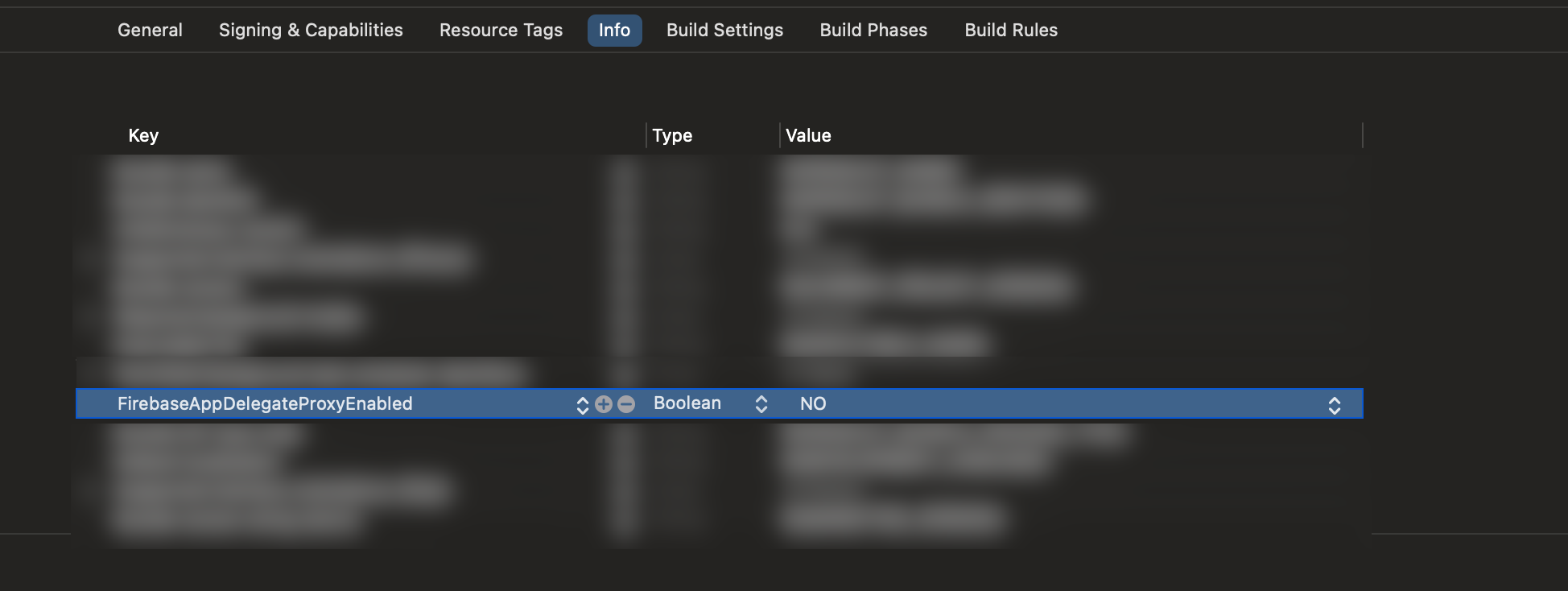
  1. In the app target settings:

    • Info:

      • Add the key FirebaseAppDelegateProxyEnabled (Boolean) with the value NO in the app’s Info.
  1. The MessagingDelegate protocol is not required in this case. When FirebaseAppDelegateProxyEnabled is disabled, Firebase does not automatically swizzle AppDelegate, so the SDK handles APNs and FCM token setup and management manually. The MessagingDelegate is therefore not needed.

  2. Initialize Firebase in didFinishLaunchingWithOptions:

   func application(
_ application: UIApplication,
didFinishLaunchingWithOptions launchOptions: [UIApplication.LaunchOptionsKey: Any]?
) -> Bool {
FirebaseApp.configure()
return true
}
  1. Retrieve and save the APNs token in didRegisterForRemoteNotificationsWithDeviceToken:
class AppDelegate: UIResponder, UIApplicationDelegate, UNUserNotificationCenterDelegate {
func application(
_ application: UIApplication,
didFinishLaunchingWithOptions launchOptions: [UIApplication.LaunchOptionsKey: Any]?
) -> Bool {
FirebaseApp.configure()
return true
}

func application(
_ application: UIApplication,
didRegisterForRemoteNotificationsWithDeviceToken apnsToken: Data
) {
// Save the token for later use when requesting the FCM token
setAPNsTokenInUserDefault(apnsToken)
}
}

Step 4. Manually setting the APNs token in Firebase Messaging before requesting the FCM token​

Example inside SDK provider
import FirebaseMessaging
import Altcraft

class FCMProvider: FCMInterface {

/// Retrieves the current FCM token
func getToken(completion: @escaping (String?) -> Void) {

/// APNs token retrieved from UserDefaults
let apnsToken = getAPNsTokenDataFromUserDefaults()

/// Manually set the APNs token before requesting the FCM token
Messaging.messaging().apnsToken = apnsToken

/// Request FCM token
Messaging.messaging().token { token, error in
if error != nil {
completion(nil)
} else {
completion(token)
}
}
}

/// Deletes the current FCM token
func deleteToken(completion: @escaping (Bool) -> Void) {
Messaging.messaging().deleteToken { error in
if error != nil {
completion(false)
} else {
completion(true)
}
}
}
}
Last updated on Mar 10, 2026
Previous
Apple Push Notification Service
Next
Huawei Mobile Services
  • Step 1. Firebase Cloud Messaging project setup
  • Step 2. Altcraft resource configuration
  • Step 3. Integrating Firebase Cloud Messaging into the app project
    • Option 1: FirebaseAppDelegateProxyEnabled — YES (Default for Firebase Messaging)
    • Option 2: FirebaseAppDelegateProxyEnabled - NO
  • Step 4. Manually setting the APNs token in Firebase Messaging before requesting the FCM token
© 2015 - 2026 Altcraft, LLC. All rights reserved.