Altcraft Docs LogoAltcraft Docs Logo
User guide iconUser guide
Developer guide iconDeveloper guide
Admin guide iconAdmin guide
English
  • Русский
  • English
Login
    User API documentation
    API interaction
    Matching
      Profilesarrow
    • Import profile
      Update profile
      Import multiple profiles
      Update multiple profiles
      Add multiple profiles
      Add profile to database
      Quick profile import
      Import profile to RabbitMQ
      Get profile data
      Uploading profiles to a file
      Suspend all database profiles
      Unsuspend all profiles in a database
      Delete profile
      Subscription fields functional update
      Database fields functional update
      Merging multiple profiles
      Unsubscribe profile from resource
      Profile splitting
        Subscriptionsarrow
      • Add or edit subscription
        Get all profile subscriptions
        Get all subscriptions from multiple profiles
        Get profile subscription
        Delete profile subscription
        Restore deleted subscription
        Suspend all subscriptions
        Unsuspend all suspended subscriptions
        Action historyarrow
      • Get profile action history
        Get multiple profiles action history
        Profile relationsarrow
      • Attach relation
        Detach relation
        Modify relation properties
        Overwrite relation properties
        Get profile relations info
        Get profile relations info
      Get data for multiple profiles
      Databasesarrow
    • Get database statistics
      Update statistics on database
      Get database list
      Get database information
      Get database fields
      Database wipe
      Resourcesarrow
    • Get resource statistics
      Update statistics on resource
      Get resources list
      Get resource information
      Get resource subscription fields
      Segmentsarrow
    • Get statistics on resource
      Update statistics on segment
      Add or remove profile
      Get profile data in a static segment
      Create segment
      Update segment
      Get segment information
      Get segments list
      Delete segment
      Suppression listsarrow
    • Create suppression list
      Update suppression list
      Get suppression list info
      Get the list of suppression lists
      Delete suppression list
      Upload suppression list data to file
        Suppression list actionsarrow
      • Check if email is suppressed
        Add email to suppression list
        Add multiple emails to suppression list
        Remove email from suppression list
        Remove all emails from suppression list
        Check if domain is suppressed
        Add domain to suppression list
        Add multiple domains to suppression list
        Remove domain from suppression list
        Remove all domains from suppression list
        Check if phone number is suppressed
        Add phone number to suppression list
        Add multiple phones to suppression list
        Remove phone number from suppression list
        Remove all phone numbers from suppression list
      Templates and fragmentsarrow
    • Get templates list
      Get template info
      Delete template
      Add template
      Update template
      Channel object
      Campaignsarrow
    • Get campaign information
      Get campaign list
      Activate campaign
      Complete campaign
      Deactivate campaign
      Get campaign status
      Mailingsarrow
    • Activate mailing
      Deactivate mailing
      Get mailing list
      Get mailing information
      Get mailing log
      Clone mailing
      Delete mailing
      Get mailing status
        Broadcast mailingsarrow
      • Get broadcasts list
        Get broadcast information
        Create broadcast mailing
        Update broadcast mailing
        Launch a broadcast mailing
        Regular mailingsarrow
      • Get regular mailings list
        Get regular mailing information
        Create regular mailing
        Update regular mailing
        Launch a regular mailing
        Trigger mailingsarrow
      • Get trigger mailings list
        Get trigger mailing information
        Create trigger mailing
        Update trigger mailing
        Trigger launch (API call)
        Profile import + trigger mailing launch
        Task for bulk trigger launch
        Task for bulk profiles import + trigger launch
        Bulk trigger launch
        Bulk profiles import + trigger mailing launch
        Clone a trigger mailing
        Data array
      Automation scenariosarrow
    • Engage profile in scenario
      Import and engage profile in scenario
      Batch import and engage profiles in a scenario
      Task for batch import and engaging profiles in the scenario
      Get scenarios list
      Activate scenario
      Deactivate scenario
      Loyalty Programsarrow
    • Get profile tier in a loyalty program
      Export points transactions
      Expiring points for a period
      Get profile account transactions
      Get trigger promotions list
      Accrue points to a member
      Redeem member points
      Commit temporary transaction
      Preliminary Order Calculation
      Order Confirmation
      Roll back temporary transaction
      Cancel points transaction
      Get points account balance
      Register member in a loyalty program
      Remove member from loyalty program
      Promo codesarrow
    • Import promo codes
      Get promo code information
      Activate promo code
      Update promo code
      Attach promo code
      Detach promo code
      Get all promo codes
      Goalsarrow
    • Goals and goal values registration
      Application push notificationsarrow
    • Processing and adding a subscription
      Add app push events
      Marketarrow
      • Market objectsarrow
      • Order data object
        Product data object
        SKU data object
        Categories array
        Custom fields array
        Ordersarrow
      • Import order and item statuses
        Get orders list
        Delete order
        Get order status
        Update order line status
        Products and SKUarrow
      • Import products, SKUs and categories
        Import SKUs and categories
        Get products list
        Get SKUs list
        Delete products
        Delete SKU
      Analytic reportsarrow
    • Get summary report
      Get soft bounces report
      Get undeliveries report
      SendersDevarrow
    • Get senders list
        Virtual senders (Smart accounts only)arrow
      • Get virtual senders list
        Get virtual sender information
        Clone virtual sender
        Create virtual sender
        Update virtual sender
        Delete virtual sender
      External datatables queriesarrow
      • Segmentation queriesarrow
      • Add segmentation query
        Update segmentation query
        Get segmentation query information
        Get segmentation queries list
        Delete segmentation query
        Template queriesarrow
      • Add template query
        Update template query
        Get template query information
        Get template queries list
        Delete template query
      Objectsarrow
    • AKMTA object
      Content object
      Email rule object
      File object
      Profile data object
      SMS rule object
      Sender object
      Sender types
      Start schedule object
      Subscription object
      Trigger types
      Miscellaneousarrow
    • Upload file
      Get message web version
      Push providers
      Deduplication of requests
      How to send API request with RabbitMQ
      List of gender identifications
      Obtain valid values for fields: browsers, devices, tz, oses, languages
    Importing the API collection in Postman
    List of API endpoints
      SDKarrow
      • mSDKarrow
        • Androidarrow
        • Quick Start
          SDK Functionality
          SDK Configuration
          Public SDK API
            Provider configuration androidarrow
          • Firebase Cloud Messaging
            Huawei Mobile Services
            RuStore
          iOSarrow
        • Quick Start
          SDK Functionality
          SDK Configuration
          Public SDK API
            Provider configurationarrow
          • Apple Push Notification Service
            Firebase Cloud Messaging
            Huawei Mobile Services
          React Native (Android/iOS)arrow
        • Quick Start
          SDK Configuration
          SDK Functionality
          Public SDK API
          Provider setup
        Managing JWT and Role Token
  • API interaction

API interaction

tip

You can download the Altcraft API collection for Postman using this link.

Requests format​

Requests are sent by POST method using HTTP/1.1 protocol. The method is also mentioned on each request description page.

Request parameters are placed in the sent structure. Some parameters can be sent in URL (API key, format).

The input data format must be indicated in the Content-Type HTTP header.

Possible header values:

  • application/json — JSON format

Symbols must have UTF-8 coding.

POST https://example.com/api/v1.1/<method name>

If you use an Altcraft Platform Cloud account, send API requests to the URL ru.altkraft.com. In the case of deploying the platform on your hardware (On-Premises), use your own URL.

A description of the JSON format can be found in RFC 7159: http://tools.ietf.org/html/rfc7159.

Don't forget to encode characters that cannot be directly written in JSON.

Authorization​

For authorization when sending a request, you need to pass a token to the platform. There are several ways to do this, for example, by specifying it in the body of the request:

{
"token": "bfc505684d774e52b188fa1f003cd5ed",
"db_id": 1,
"resource_id": 1,
"matching": "email",
"email": "example@example.com",
"data": {
"_status": 0,
"_fname": "Jim",
"_lname": "Jones",
"email": "example@example.com",
"phones": ["+79000000000"]
}
}

You can also pass the token in one of the request headers. To do this, create a header with the Authorization key, and in its value specify Bearer <token>, where instead of <token> insert your token.

API token can be created in the user panel, in section "Settings" — "Tokens". Master user rights are necessary to create a token:
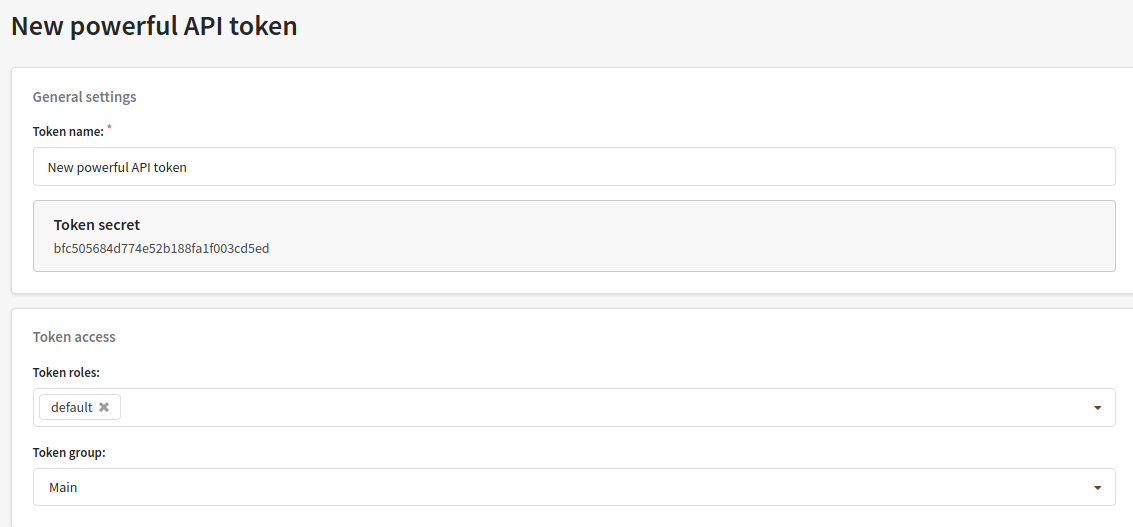
API token is automatically generated after saving. You can also select a token name and configure access rights (in roles) and groups of objects available for this token.

caution

We do not recommend passing a token in the URL of your request. This method is insecure and will not be supported by the platform in the future.

Response format​

The response format can be selected in the request header or parameters.

Response example (Successful operation):

{
"error": 0,
"error_text": "Successful operation",
"profile_id": "5f4fa1a5ce9448665fef548e"
}

The following parameters are given in responses:

  • error — error code;
  • error_text — error description;
  • profile_id — profile identifier (for successful operation).
info

Code 200 is the success status code in HTTP transport. However, if there is information about an error within the HTTP transport, additional details about the error are provided in a JSON object in the error field with explanations in error_text.

Response codes​

CodeDescription
0Operation is successful
400Incorrect request
401API token required
402Tariff limit reached
403No rights for this action
404The object is not found in the token vision zone
409Another record with the same unique attributes already exists
413The database is not available in the selected resource
415Requested Content-Type is not supported
429The number of requests set in the configuration file has been exceeded (API_MAX_REQUESTS_COUNT)
435Ambiguous search, there are several objects with given attributes
441The object belongs to another group
450Request validation error
500Internal service error
501The method does not exist

XML tags attributes​

XML queries are built on top of JSON queries, so in some situations it is necessary to write additional attributes inside tags:

  • array='true' - an attribute indicating that the tag is an array. Used when there is either 1 element inside the array or no elements at all.
  • string='true' - attribute is used to indicate that the value used has a string data type. Required when the string contains a number or the word "true"/"false".
  • json='true' - attribute needed when we need to pass json request inside xml request (for example, selection parameters when requesting data on several profiles).

Request deduplication​

If the connection fails at the moment of receiving the data, a second request may be sent. The platform will not accept a repeated request if it modifies the data in order to avoid duplicate events. Read more about repeated requests in this article.

Last updated on Mar 12, 2026
Previous
User API documentation
Next
Matching
  • Requests format
  • Authorization
  • Response format
  • Response codes
  • XML tags attributes
  • Request deduplication
© 2015 - 2026 Altcraft, LLC. All rights reserved.