SDK functionality
You must configure the SDK to work with your app beforehand. Detailed instructions are available here
The SDK is split into modules: core (authentication, events), push, target (goals), profile, and in-app. Each module is connected as a separate dependency and is accessed through its own property of the AltcraftSDK.shared object — AltcraftSDK.shared.push, AltcraftSDK.shared.target, AltcraftSDK.shared.profile, AltcraftSDK.shared.inApp.
Core: authentication
AltcraftSDK
└─ static let shared: AltcraftSDK
   // Access to user authentication
   └─ let authFunctions: AuthAPI
      // Authenticate the current SDK user
      ├─ func authenticate(): Void
      // Log out of the profile (return to the anonymous session)
      └─ func logOut(): Void
The authentication functions:
func authenticate()— authenticates the current user: sends a request with the current authentication data (JWT token or rToken) to the server and binds the device to the user's profile. After a successful authentication, the user gains access to personalized In-App notifications.func logOut()— ends the current authentication session and switches the device to anonymous mode. In anonymous mode, personalized In-App notifications and subscription management are not available.
Setting the JWT provider is done with the AltcraftSDK.shared.setJWTProvider(provider:) function (see SDK setup). To work without JWT, use the rToken from the configuration.
Call authenticate() only when the user is actually logging in to the app and is known to the client (for example, after a successful authorization via a login form, OAuth, or another authentication mechanism of your app). For logOut() — the same: only on an actual user logout.
Usage example:
AltcraftSDK.shared.authFunctions.authenticate()
Clearing SDK data
AltcraftSDK
// Full cleanup of SDK data (cache, DB, settings), then calls completion
└── func clear(
        completion: (() -> Void)? = nil
    ): Void
The function performs a full cleanup of SDK data: the cache, the database, and the local settings. The optional completion parameter is called after the cleanup is complete.
Core: SDK events
// SDK events API

AltcraftSDK
└── let eventSDKFunctions: SDKEvents
    // Subscribe to SDK events (replaces the existing subscriber)
    ├── func subscribe(
    │       callback: @escaping (Event) -> Void
    │   ): Void
    // Unsubscribe from events
    └── func unsubscribe(): Void
There can be only one active subscriber to SDK events in the app.
The types of SDK events:
- Event — a general event (information, successful requests);
- ErrorEvent — an error event;
- RetryEvent — an error event for a request for which automatic retry is provided on the SDK side.
Each event contains the following fields:
- function — the name of the function that triggered the event;
- event — the type of SDK event (
SDKEvent, the list is in the table below); - message — the event message;
- value — additional data (
[String: Any]?) added to some events; - date — the event time.
Subscribing to events
func subscribe(callback: @escaping (Event) -> Void): Void
The function subscribes the app to SDK events. When an SDK event occurs, it calls the passed callback and passes an instance of Event (or its subclass) to it. The callback is always called on the main thread.
Usage example:
AltcraftSDK.shared.eventSDKFunctions.subscribe { event in
    // Handle the event
}
SDK event classes
open class Event: NSObject {
    public let id = UUID()
    public let function: String
    public let event: SDKEvent?
    public let message: String?
    public let value: [String: Any]?
    public let date: Date
}

// Error without automatic retry
open class ErrorEvent: Event {}

// Error of a request for which automatic retry is provided
public final class RetryEvent: ErrorEvent {}
Unsubscribing from events
func unsubscribe(): Void
Cancels the delivery of SDK events. The subscriber remains assigned, but events are no longer passed.
Usage example:
AltcraftSDK.shared.eventSDKFunctions.unsubscribe()
List of all SDK events
List of events by module
SDK events are available through the module objects: CoreEvents (core), AltcraftSDK.shared.push.moduleEvents, AltcraftSDK.shared.target.moduleEvents, AltcraftSDK.shared.profile.moduleEvents, AltcraftSDK.shared.inApp.moduleEvents. Each element is an enum value with a string message (message).
Core:
| Value | Message |
|---|---|
configSet | SDK configuration is installed. |
sdkCleared | SDK data has been cleared |
userLogOut | User logged out. Anonymous session started |
backgroundTaskRegister | SDK background task is registered |
backgroundTaskCompleted | SDK background task completed |
authenticateSuccessful | successful request: profile/authenticate |
authenticateFailed | failed request: profile/authenticate |
Push:
| Value | Message |
|---|---|
pushProviderSet | push provider set: |
pushReceive | received Altcraft push notification. |
pushIsPosted | push is posted. |
pushSubscribeRequestSuccessful | successful request: push/subscribe |
pushSubscribeRequestFailed | failed request: push/subscribe |
pushSuspendRequestSuccessful | successful request: push/suspend |
pushSuspendRequestFailed | failed request: push/suspend |
pushUnsubscribeRequestSuccessful | successful request: push/unsubscribe |
pushUnsubscribeRequestFailed | failed request: push/unsubscribe |
tokenUpdateRequestSuccessful | successful request: push/update |
tokenUpdateRequestFailed | failed request: push/update |
pushStatusRequestSuccessful | successful request: push/status |
pushStatusRequestFailed | failed request: push/status |
unsuspendRequestSuccessful | successful request: push/unsuspend |
unsuspendRequestFailed | failed request: push/unsuspend |
pushEventRequestSuccessful | successful request: event/push |
pushEventRequestFailed | failed request: event/push |
invalidPushProviders | invalid provider. Available - ios-apns, ios-firebase, ios-huawei. |
apnsIsNotUpdated | forcing a push token update is not possible: the operation is not supported for APNs. |
Target:
| Value | Message |
|---|---|
mobileEventRequestSuccessful | successful request: event/post |
mobileEventRequestFailed | failed request: event/post |
Profile:
| Value | Message |
|---|---|
profileUpdateRequestSuccessful | successful request: profile/update |
profileUpdateRequestFailed | failed request: profile/update |
In-App:
| Value | Message |
|---|---|
inAppSubscribeRequestSuccessful | successful request: inapp/subscribe |
inAppSubscribeRequestFailed | failed request: inapp/subscribe |
inAppUnsubscribeRequestSuccessful | successful request: inapp/unsubscribe |
inAppUnsubscribeRequestFailed | failed request: inapp/unsubscribe |
inAppStatusRequestSuccessful | successful request: inapp/status |
inAppStatusRequestFailed | failed request: inapp/status |
inAppEventRequestSuccessful | successful request: inapp/event |
inAppEventRequestFailed | failed request: inapp/event |
inAppPlacementsRequestSuccessful | successful request: inapp/placements |
inAppPlacementsRequestFailed | failed request: inapp/placements |
Push: working with subscription statuses
Changing the subscription status
AltcraftSDK
└─ static let shared: AltcraftSDK
   └─ var push: Push
      └─ var subscription: SubscriptionAPI
         // Subscribe (status = SUBSCRIBED)
         ├─ func pushSubscribe(
         │     sync: Bool = true,
         │     profileFields: [String: Any?]? = nil,
         │     customFields: [String: Any?]? = nil,
         │     cats: [CategoryData]? = nil,
         │     replace: Bool? = nil,
         │     skipTriggers: Bool? = nil
         │   ): Void
         // Suspend (status = SUSPENDED)
         ├─ func pushSuspend(
         │     sync: Bool = true,
         │     profileFields: [String: Any?]? = nil,
         │     customFields: [String: Any?]? = nil,
         │     cats: [CategoryData]? = nil,
         │     replace: Bool? = nil,
         │     skipTriggers: Bool? = nil
         │   ): Void
         // Unsubscribe (status = UNSUBSCRIBED)
         ├─ func pushUnSubscribe(
         │     sync: Bool = true,
         │     profileFields: [String: Any?]? = nil,
         │     customFields: [String: Any?]? = nil,
         │     cats: [CategoryData]? = nil,
         │     replace: Bool? = nil,
         │     skipTriggers: Bool? = nil
         │   ): Void
         // Switching subscriptions between profiles (LogIn/LogOut)
         ├─ func unSuspendPushSubscription(
         │     completion: @escaping (ResponseModel.ResponseWithHttpCode<ResponseModel.ResponseWithProfile>?) -> Void
         │   ): Void
         // Building functional operations over profile fields
         └─ func actionField(key: String) -> ActionFieldBuilder
The functions for changing the subscription status:
func pushSubscribe()— performs a subscription to push notifications;func pushSuspend()— suspends the subscription to push notifications (notifications do not arrive, but no unsubscribe event is created in the user's profile);func pushUnSubscribe()— cancels the subscription to push notifications;func unSuspendPushSubscription()— used to createLogInandLogOuttransitions;func actionField()— creates anActionFieldBuilderto build functional operations (set,unset,incr,add,delete,upsert) over profile fields insideprofileFields.
The status-changing functions have the same signature, which contains the following parameters:
sync: Bool
Default: true
Required: No
Description: A flag that sets the synchrony of the request execution.
Successful request execution:
In case of successful execution of a function of this group, an event pushSubscribeRequestSuccessful, pushSuspendRequestSuccessful, or pushUnsubscribeRequestSuccessful is created, containing the response data in event.value:
If sync == true
event.value
  ├─ error: 0
  ├─ error_text: ""
  ├─ http_code: 200
  └─ profile
     ├─ id: "your id"
     ├─ status: "subscribed"
     ├─ isTest: false
     └─ subscription
        ├─ subscriptionId: "your subscriptionId"
        ├─ hashId: "c52b28d2"
        ├─ provider: "ios-apns"
        ├─ status: "subscribed"
        ├─ fields
        │  ├─ _os_ver: {"raw":"18.6.2","ver":"[\"18.0\", \"6.0\", \"2.0\"]"}
        │  ├─ _device_type: "mob"
        │  ├─ _ad_track: false
        │  ├─ _device_name: "iPhone"
        │  ├─ _os_language: "en"
        │  ├─ _os_tz: "+0300"
        │  ├─ _os: "IOS"
        │  └─ _device_model: "iPhone14,7"
        └─ cats
           └─ [ { name: "developer_news", title: "dev_news", steady: false, active: false } ]
In a synchronous request, the following are available in the event value event.value:
-
error — the internal server error code (0 if there are no errors);
-
error_text — the error text (an empty string if there are no errors);
-
http_code — the response transport code;
-
profile — the profile data, if the request is successful:
- information about the profile (ProfileData)
- the subscription (SubscriptionData)
- the subscription categories (CategoryData)
- if the request ends with an error, only
profile = nilis returned
Data structures
public struct ProfileData: Codable {
    public let id: String?
    public let status: String?
    public let acid: String?
    public let isTest: Bool?
    public let subscription: SubscriptionData?
}

public struct SubscriptionData: Codable {
    public let subscriptionId: String?
    public let hashId: String?
    public let provider: String?
    public let status: String?
    public let fields: [String: JSONValue]?
    public let cats: [CategoryData]?
}

public struct CategoryData: Codable {
    public var name: String?
    public var title: String?
    public var steady: Bool?
    public var active: Bool?
}
If sync == false
event.value
  ├─ error: Int?
  ├─ error_text: String?
  ├─ http_code: Int
  └─ profile: ProfileData? = nil
In an asynchronous request, profile in the event value event.value is always nil.
Request execution with an error:
If the execution of a function of this group ends with an error, an event with the error type is created:
pushSubscribeRequestFailed— the subscription to notifications;pushSuspendRequestFailed— suspending the subscription;pushUnsubscribeRequestFailed— the unsubscription.
Event contents:
- only
http_code, if the Altcraft server was unavailable; erroranderror_text, if the server returned an error.
Getting event values
AltcraftSDK.shared.eventSDKFunctions.subscribe { event in
    let sdkEvent = event.event

    if sdkEvent == AltcraftSDK.shared.push.moduleEvents.pushSubscribeRequestSuccessful ||
       sdkEvent == AltcraftSDK.shared.push.moduleEvents.pushSubscribeRequestFailed
    {
        let value = event.value
        let error = value?["error"] as? Int
        let errorText = value?["error_text"] as? String
        let httpCode = value?["http_code"] as? Int
        let profile = value?["profile"] as? ProfileData
        let subscription = profile?.subscription
    }
}
profileFields:[String: Any?]?
Default: nil
Required: No
Description: A dictionary containing the profile fields.
The parameter can accept both system fields (for example, _fname — first name or _lname — last name) and optional ones (created in advance manually in the platform interface). The acceptable structures (JSON-compatible):
- Scalar values:
- String
- Bool
- Int
- Int64 / UInt64 (or
NSNumberequivalents) - Float
- Double
nil
- Objects:
[String: Any?] - Lists:
[Any?] - Arrays of maps:
[[String: Any?]]
If an invalid optional field is passed, the request ends with an error:
http_code: 400
error: 400
error_text: Platform profile processing error: with field "field_name": Incorrect field
Use actionField() for functional operations over profile fields:
AltcraftSDK.shared.push.subscription.pushSubscribe(
    profileFields: AltcraftSDK.shared.push.subscription.actionField("orders_count").incr(1)
)
customFields:[String: Any?]?
Default: nil
Required: No
Description: A dictionary containing the subscription fields.
The parameter can accept both system fields (for example, _device_model — the device model or _os — the operating system) and optional ones (created in advance manually in the platform interface). The acceptable value types (JSON-compatible, scalars only):
- String
- Bool
- Int
- Float
- Double
nil
If an invalid optional field is passed, the request ends with an error:
http_code: 400
error: 400
error_text: Platform profile processing error: field "field_name" is not valid: failed convert custom field
Nested objects, arrays, and collections are not allowed.
Most of the subscription system fields are collected by the SDK automatically and added to push requests. These system fields include: "_os", "_os_tz", "_os_language", "_device_type", "_device_model", "_device_name", "_os_ver", "_ad_track", "_ad_id".
cats:[CategoryData]?
Default: nil
Required: No
Description: Subscription categories.
The category structure:
public struct CategoryData: Codable {
    public var name: String?
    public var title: String?
    public var steady: Bool?
    public var active: Bool?
}
When sending a push request with specified categories, use only the name (category name) and active (category activity status) fields; the other fields are not used in request processing. The title and steady fields are filled in when the subscription information is retrieved.
Request example:
let cats: [CategoryData] = [CategoryData(name: "football", active: true)]
The categories used in the request must be created in advance and added to the resource in the Altcraft Platform. If a category that is not added to the resource is used in the request, the request returns an error:
http_code: 400
error: 400
error_text: Platform profile processing error: field "subscriptions.cats" is not valid: category not found in resource
replace:Bool?
Default: nil
Required: No
Description: When the flag is enabled, all subscriptions of other profiles with the same push token in the current database are switched to the unsubscribed status after a successful request.
skipTriggers:Bool?
Default: nil
Required: No
Description: When the flag is enabled, the profile containing this subscription is ignored in the triggers of mailings and scenarios.
Request implementation examples
Example of a push notification subscription request
Minimal working configuration:
AltcraftSDK.shared.push.subscription.pushSubscribe()
Passing all available parameters:
AltcraftSDK.shared.push.subscription.pushSubscribe(
    sync: true,
    profileFields: ["_fname": "Andrey", "_lname": "Pogodin"],
    customFields:  ["developer": true],
    cats: [CategoryData(name: "developer_news", active: true)],
    replace: false,
    skipTriggers: false
)
For pushSubscribe, pushSuspend, and pushUnSubscribe, automatic retry of the request is provided on the SDK side if the response http code is in the 500..599 range. The request is not retried if the response code is not in this range.
The unSuspendPushSubscription() function
The unSuspendPushSubscription() function is designed to create LogIn and LogOut transitions. It works as follows:
- searches for subscriptions with the same push token as the current one that do not belong to the profile the current JWT token points to;
- changes the status of the found subscriptions from
subscribedtosuspended; - changes the status in the subscriptions of the profile the current JWT points to, from
suspendedtosubscribed(if the profile the JWT points to exists and contains subscriptions); - returns
ResponseModel.ResponseWithHttpCode<ResponseModel.ResponseWithProfile>?, in whichresponse.profileis the current profile the JWT points to (if the profile does not exist,nilis returned).
Usage example:
AltcraftSDK.shared.push.subscription.unSuspendPushSubscription { response in
    // handle the response
}
Recommended implementation of LogIn and LogOut transitions
LogIn transition:
- The anonymous user logs in to the app. This user is assigned
JWT_1, which points to the database #1Anonymous; - A subscription to push notifications is performed; the profile is created in the database #1Anonymous;
- The user registers; they are assigned
JWT_2, which points to the database #2Registered; - The
unSuspendPushSubscription()function is called — the anonymous user's subscription in the database #1Anonymous is suspended; - The profile is searched for in the database #2Registered to restore the subscription;
- Since no subscription with this push token exists in the database #2Registered, the
unSuspendPushSubscription()function returns the profile without a subscription; - After this, you can perform a
pushSubscribe()subscription request, which creates a new profile in the database #2Registered.
LogOut transition:
- The user logs out of the profile on the app side (
LogOut); - The user is assigned
JWT_1, which points to the database #1Anonymous; - The
unSuspendPushSubscription()function is called, which suspends the subscription in the database #2Registered and changes the subscription status in the database #1Anonymous tosubscribed; - The request returns a non-empty profile — the subscription already exists, a new one is not required.
Implementation example:
func logIn() {
    JWTManager.shared.setRegJWT()
    // JWT is set for an authorized user
    AltcraftSDK.shared.push.subscription.unSuspendPushSubscription { result in
        if result?.httpCode == 200, result?.response?.profile?.subscription == nil {
            AltcraftSDK.shared.push.subscription.pushSubscribe(
                // Specify the required parameters
            )
        }
    }
}

func logOut() {
    JWTManager.shared.setAnonJWT()
    // JWT is set for an anonymous user
    AltcraftSDK.shared.push.subscription.unSuspendPushSubscription { result in
        if result?.httpCode == 200, result?.response?.profile?.subscription == nil {
            AltcraftSDK.shared.push.subscription.pushSubscribe(
                // Specify the required parameters
            )
        }
    }
}
Requesting the subscription status
AltcraftSDK
└── static let shared: AltcraftSDK
    └── var push: Push
        └── var subscription: SubscriptionAPI
            // Status of the profile's latest subscription
            ├── func getStatusOfLatestSubscription(
            │       completion: @escaping (ResponseModel.ResponseWithHttpCode<ResponseModel.ResponseWithProfile>?) -> Void
            │   ): Void
            // Status of the subscription by the current push token/provider
            ├── func getStatusForCurrentSubscription(
            │       completion: @escaping (ResponseModel.ResponseWithHttpCode<ResponseModel.ResponseWithProfile>?) -> Void
            │   ): Void
            // Status of the latest subscription by the specified provider (if nil — the current one is used)
            └── func getStatusOfLatestSubscriptionForProvider(
                    provider: String? = nil,
                    completion: @escaping (ResponseModel.ResponseWithHttpCode<ResponseModel.ResponseWithProfile>?) -> Void
                ): Void
The functions for requesting the subscription status:
func getStatusOfLatestSubscription()— the status of the profile's latest subscription;func getStatusForCurrentSubscription()— the status of the subscription for the current push token and provider;func getStatusOfLatestSubscriptionForProvider()— the status of the latest subscription by the specified provider. If the provider is not specified (provider = nil), the provider of the current push token is used.
func getStatusOfLatestSubscription(completion: @escaping (ResponseModel.ResponseWithHttpCode<ResponseModel.ResponseWithProfile>?) -> Void): Void
The function for getting the status of the profile's latest subscription. In completion, the object ResponseModel.ResponseWithHttpCode<ResponseModel.ResponseWithProfile>? is passed, containing response?.profile?.subscription — the last created subscription in the profile. If such a subscription does not exist, nil is passed.
Usage example:
AltcraftSDK.shared.push.subscription.getStatusOfLatestSubscription { response in
    // handle the response
}
func getStatusForCurrentSubscription(completion: @escaping (ResponseModel.ResponseWithHttpCode<ResponseModel.ResponseWithProfile>?) -> Void): Void
The function for getting the status of the subscription for the current push token and provider. In completion, the object ResponseModel.ResponseWithHttpCode<ResponseModel.ResponseWithProfile>? is passed, containing response?.profile?.subscription — the subscription found by the current push token and provider. If such a subscription does not exist, nil is passed.
Usage example:
AltcraftSDK.shared.push.subscription.getStatusForCurrentSubscription { response in
    // handle the response
}
func getStatusOfLatestSubscriptionForProvider(provider: String? = nil, completion: @escaping (ResponseModel.ResponseWithHttpCode<ResponseModel.ResponseWithProfile>?) -> Void): Void
The function for getting the status of the latest subscription by provider. In completion, the object ResponseModel.ResponseWithHttpCode<ResponseModel.ResponseWithProfile>? is passed, containing response?.profile?.subscription — the last created subscription with the specified push notification provider. If the provider is not specified (provider = nil), the provider of the current push token is used. If such a subscription does not exist, nil is passed.
Usage example:
AltcraftSDK.shared.push.subscription.getStatusOfLatestSubscriptionForProvider(provider: nil) { response in
    // handle the response
}
Below is an example of extracting data about the profile, subscription, and categories from the responses of the status-getting functions. This approach applies to all status-getting functions:
Data from the status-getting functions
AltcraftSDK.shared.push.subscription.getStatusForCurrentSubscription { response in
    // HTTP code
    let httpCode = response?.httpCode

    // Response
    let resp = response?.response
    let error = resp?.error
    let errorText = resp?.errorText

    // Profile
    let profile = resp?.profile
    let profileId = profile?.id
    let profileStatus = profile?.status
    let profileIsTest = profile?.isTest

    // Subscription
    let subscription = profile?.subscription
    let subscriptionId = subscription?.subscriptionId
    let hashId = subscription?.hashId
    let provider = subscription?.provider
    let subscriptionStatus = subscription?.status

    // Fields (dictionary [String: JSONValue])
    let fields = subscription?.fields

    // Cats (array of CategoryData)
    let cats = subscription?.cats

    // CategoryData (every element of the cats array)
    let firstCat = cats?.first
    let catName = firstCat?.name
    let catTitle = firstCat?.title
    let catSteady = firstCat?.steady
    let catActive = firstCat?.active
}
In case of a successfully executed request, the event pushStatusRequestSuccessful is created. In case of an error — pushStatusRequestFailed.
Push: managing push tokens
AltcraftSDK
└── static let shared: AltcraftSDK
    └── var push: Push
        └── var token: TokenAPI
            // Save a token manually
            ├── func setPushToken(
            │       provider: String,
            │       pushToken: Any?
            │   ): Void
            // Get the current device token data
            ├── func getPushToken(
            │       completion: ((TokenData?) -> Void)? = nil
            │   ): Void
            // Set an Apple Push Notification service provider (nil — remove)
            ├── func setAPNSTokenProvider(
            │       _ provider: APNSInterface?
            │   ): Void
            // Set a Firebase Cloud Messaging provider (nil — remove)
            ├── func setFCMTokenProvider(
            │       _ provider: FCMInterface?
            │   ): Void
            // Set a Huawei Mobile Services provider (nil — remove)
            ├── func setHMSTokenProvider(
            │       _ provider: HMSInterface?
            │   ): Void
            // Delete the push token of the specified provider
            ├── func deleteDeviceToken(
            │       provider: String,
            │       completion: (() -> Void)? = nil
            │   ): Void
            // Forced token update (delete —> update)
            ├── func forcedTokenUpdate(
            │       completion: (() -> Void)? = nil
            │   ): Void
            // Change the provider priority list and initiate a token update
            └── func changePushPriorityList(
                    _ list: [String]
                ): Void
The functions for working with a provider token in the SDK:
func setPushToken()— manual setting of the device push token and provider in local storage;func getPushToken()— getting the current push token;func setAPNSTokenProvider()— setting and removing an Apple Push Notification service provider;func setFCMTokenProvider()— setting and removing a Firebase Cloud Messaging provider;func setHMSTokenProvider()— setting and removing a Huawei Mobile Services provider;func changePushPriorityList()— dynamic change of the provider order with an update of the subscription push token;func deleteDeviceToken()— deleting the push token of the specified provider;func forcedTokenUpdate()— deleting the current push token with a subsequent update.
func setPushToken(provider: String, pushToken: Any?): Void
The function is designed for manually setting the device push token and provider. It is used as a simplified way to pass a push token to the SDK without implementing the provider protocols.
It is not recommended to use this function to pass a token. The recommended approach to passing a push token to the SDK is implementing FCMInterface, HMSInterface, or APNSInterface.
Usage example:
AltcraftSDK.shared.push.token.setPushToken(provider: "ios-apns", pushToken: "your token")
func getPushToken(completion: ((TokenData?) -> Void)? = nil): Void
The function passes the object TokenData(provider: String, token: String) to completion, containing the current device push token and its provider. If the push token is unavailable, nil is passed to completion.
Usage example:
AltcraftSDK.shared.push.token.getPushToken { data in
    let provider = data?.provider
    let token = data?.token
}
func setFCMTokenProvider(_ provider: FCMInterface?): Void
The function sets or removes the Firebase Cloud Messaging token provider. To disable the provider, pass nil.
Usage example:
AltcraftSDK.shared.push.token.setFCMTokenProvider(FCMProvider())
Call setFCMTokenProvider() in AppDelegate.application(_:didFinishLaunchingWithOptions:) before calling AltcraftSDK.shared.initialization(). This guarantees provider registration at the start of the app process, regardless of the lifecycle state of other components and whether the app is launched in the foreground or background.
func setHMSTokenProvider(_ provider: HMSInterface?): Void
The function sets or removes the Huawei Mobile Services token provider. To disable the provider, pass nil.
AltcraftSDK.shared.push.token.setHMSTokenProvider(HMSProvider())
Call setHMSTokenProvider() in AppDelegate.application(_:didFinishLaunchingWithOptions:) before calling AltcraftSDK.shared.initialization(). This guarantees provider registration at the start of the app process, regardless of the lifecycle state of other components and whether the app is launched in the foreground or background.
func setAPNSTokenProvider(_ provider: APNSInterface?): Void
The function sets or removes the Apple Push Notification service token provider. To disable the provider, pass nil.
AltcraftSDK.shared.push.token.setAPNSTokenProvider(APNSProvider())
Call setAPNSTokenProvider() in AppDelegate.application(_:didFinishLaunchingWithOptions:) before calling AltcraftSDK.shared.initialization(). This guarantees provider registration at the start of the app process, regardless of the lifecycle state of other components and whether the app is launched in the foreground or background.
func changePushPriorityList(_ list: [String]): Void
The function that allows a dynamic change of the push provider with an update of the subscription token. To do this, you must pass a new array with a different provider order. For example: [PushConstants.ProviderName.firebase, PushConstants.ProviderName.apns, PushConstants.ProviderName.huawei].
Usage example:
AltcraftSDK.shared.push.token.changePushPriorityList([
    PushConstants.ProviderName.firebase,
    PushConstants.ProviderName.apns,
    PushConstants.ProviderName.huawei
])
func deleteDeviceToken(provider: String, completion: (() -> Void)? = nil): Void
The function for deleting the push token of the specified provider. The token is invalidated and deleted from the local cache on the device and from the push provider's server. After deletion, you can request a new token.
Usage example:
AltcraftSDK.shared.push.token.deleteDeviceToken(provider: "ios-apns") {
    // the token has been deleted
}
func forcedTokenUpdate(completion: (() -> Void)? = nil): Void
The function for deleting the current push token with its subsequent update.
Usage example:
AltcraftSDK.shared.push.token.forcedTokenUpdate {
    // the token has been updated
}
Example of registering providers
We do not recommend using the setPushToken function to set a push token. Instead, configure the token-retrieval functions for each provider in use. Below is an example of implementing this approach:
Recommended way of registering providers in AppDelegate
class AppDelegate: UIResponder, UIApplicationDelegate {
    func application(
        _ application: UIApplication,
        didFinishLaunchingWithOptions launchOptions: [UIApplication.LaunchOptionsKey: Any]?
    ) -> Bool {
        let appGroup = "your appGroup id"

        AltcraftSDK.shared.setAppGroup(groupName: appGroup)
        AltcraftSDK.shared.backgroundTasks.registerBackgroundTask()
        AltcraftSDK.shared.setJWTProvider(provider: JWTProvider())

        // APNs provider
        AltcraftSDK.shared.push.token.setAPNSTokenProvider(APNSProvider())

        // FCM provider
        AltcraftSDK.shared.push.token.setFCMTokenProvider(FCMProvider())

        // HMS provider
        AltcraftSDK.shared.push.token.setHMSTokenProvider(HMSProvider())

        AltcraftSDK.shared.push.notificationManager.registerForPushNotifications(for: application)

        let config = AltcraftConfiguration.Builder()
            .setApiUrl("your api url")
            .build()
        AltcraftSDK.shared.initialization(configuration: config)

        return true
    }
}
Push: passing push notifications to the SDK
// Used inside the Notification Service Extension (NSE) — a facade for handling
// Altcraft push notifications, identifying Altcraft notifications, and registering goals
// without a dependency on UIApplication
AltcraftNSE
// Shared (singleton) instance for centralized NSE logic
├─ static let shared: AltcraftNSE
// Access to the goal registration API
├─ let target: TargetAPI
// Access to the profile fields update API
├─ let profile: UpdateAPI
// Check whether a notification belongs to Altcraft
├─ func isAltcraftPush(
│       _ request: UNNotificationRequest
│   ) -> Bool
// Handle an incoming Altcraft notification: pass the modified content to contentHandler
├─ func handleNotificationRequest(
│       request: UNNotificationRequest,
│       contentHandler: @escaping (UNNotificationContent) -> Void
│   ): Void
// Called when the NSE lifetime is about to expire
├─ func serviceExtensionTimeWillExpire(): Void
// Set up App Group and initialize the shared data container
├─ func setAppGroup(groupName: String?): Void
// Register the JWT provider
└─ func setJWTProvider(provider: JWTInterface): Void
The functions of the AltcraftNSE class:
func isAltcraftPush()— a function to check the source of a notification;func handleNotificationRequest()— a function that accepts aUNNotificationRequestfrom the Notification Service Extension for further processing on the SDK side;func serviceExtensionTimeWillExpire()— a function called when the lifetime of the Notification Service Extension expires (~30 seconds).
func isAltcraftPush(_ request: UNNotificationRequest) -> Bool
The SDK function that checks whether the source of a notification is Altcraft by a marker in userInfo.
Usage example:
let isAltcraft = AltcraftNSE.shared.isAltcraftPush(request)
func handleNotificationRequest(request: UNNotificationRequest, contentHandler: @escaping (UNNotificationContent) -> Void): Void
The SDK function that accepts a UNNotificationRequest from the Notification Service Extension for its processing on the SDK side and further display of the notification.
Usage example:
if AltcraftNSE.shared.isAltcraftPush(request) {
    AltcraftNSE.shared.handleNotificationRequest(request: request) { content in
        contentHandler(content)
    }
}
func serviceExtensionTimeWillExpire()
The function that is called by the system when the lifetime of the Notification Service Extension expires (~30 seconds).
Usage example:
AltcraftNSE.shared.serviceExtensionTimeWillExpire()
func setAppGroup(groupName: String?): Void
The function for setting the AppGroup identifier (required). In the NSE, it is called before handling notifications.
Usage example:
AltcraftNSE.shared.setAppGroup(groupName: "group.your.app.id")
func setJWTProvider(provider: JWTInterface): Void
The function for setting the JWT provider:
AltcraftNSE.shared.setJWTProvider(provider: jwtProvider)
Receiving notifications in the app
By default, the SDK handles incoming push notifications: NotificationManager is set as the notification center delegate, displays notifications, and performs the standard click handling logic.
If the app needs access to the notification content in the foreground (for example, for analytics or custom UI) or to the notification data on a click, use NotificationManager.
The notification center events (the SDK publishes them in NotificationCenter):
.altcraftPushWillPresent— a notification is shown in the foreground,userInfo: ["notification": UNNotification];.altcraftPushDidReceive— the user tapped the notification or performed an action,userInfo: ["response": UNNotificationResponse].
The handling delegation modes to the app:
customPushProcessing—true— handling and the choice of the display method in the foreground are delegated to the app;false— the SDK uses the standard display logic;customClickProcessing—true— handling the click on the notification is fully delegated to the app;false— the SDK uses the standard click handling logic.
Receiving a foreground notification in the app (optional)
The configuration described below is required only if you need access to the notification content in the foreground or you want to manually control the display of the notification (show/hide, change presentation options).
// Access to the SDK push notification manager
let manager = AltcraftSDK.shared.push.notificationManager

// Control push notification handling in the foreground.
// true  — handling and the choice of display method are delegated to the app.
// false — the SDK uses the standard notification display logic.
manager.customPushProcessing = false

// Callback for handling push notifications in the foreground.
// Called when a notification is received while the app is active.
// complete(...) must be called only when customPushProcessing = true.
manager.onForegroundNotification = { notification, complete in
    // Custom notification handling logic

    // Important: call complete(...) only if manager.customPushProcessing = true
    if #available(iOS 14.0, *) {
        complete([.banner, .badge, .sound])
    } else {
        complete([.alert, .badge, .sound])
    }

    // or [] to not display
}
If customPushProcessing = false, the SDK applies the standard notification display parameters, and the callback (if set) is called only for additional app logic. If customPushProcessing = true, the app must call complete(...) itself, otherwise the notification in the foreground may not be displayed.
Receiving the click event on a notification in the app (optional)
The configuration described below is required only if the app needs to access the notification data on a click, needs its own transition or action handling logic, or needs to fully intercept the click handling on the app side.
let manager = AltcraftSDK.shared.push.notificationManager

// Control notification click handling.
// true  — click handling is fully delegated to the app.
// false — the SDK uses the standard click handling logic.
manager.customClickProcessing = true

// Callback for handling a click on a notification.
// Called when the notification is tapped or an action is performed.
// complete() must be called when customClickProcessing = true.
manager.onNotificationClick = { response, complete in
    // Notification data
    let userInfo = response.notification.request.content.userInfo

    // Custom click handling logic
    print("push click")

    // End of processing
    complete()
}
If customClickProcessing = false, the SDK handles the click on the notification itself, sends the corresponding events, and completes the processing. The onNotificationClick callback (if set) in this case is called only for additional app logic.
If customClickProcessing = true, the app must call complete(). Without calling complete(), the iOS system will consider the click handling incomplete, which may lead to incorrect app behavior.
Push events: delivery and open
AltcraftSDK
└── static let shared: AltcraftSDK
    └── var push: Push
        └── var event: EventAPI
            // Report the delivery of a push notification
            ├── func deliveryEvent(
            │       from request: UNNotificationRequest
            │   ): Void
            // Report the opening of a push notification
            └── func openEvent(
                    from request: UNNotificationRequest
                ): Void
The functions for registering push notification events:
func deliveryEvent()— notifies the platform about the delivery of a push notification to the device. With standard handling, the SDK registers it automatically;func openEvent()— notifies the platform that the user opened the push notification. If you handle the click yourself (customClickProcessing = true), the open event must be registered manually.
Usage example:
AltcraftSDK.shared.push.event.openEvent(from: request)
Goals (target)
The target module registers goals (mobile events) — events on the Altcraft Platform: installs, purchases, subscriptions, and others, to which pixels, segments, and scenarios are bound on the platform.
AltcraftSDK
└── static let shared: AltcraftSDK
    └── var target: Target
        // Send a goal (mobile event) to the server
        └── var event: TargetAPI
            └── func mobileEvent(
                    sid: String,
                    altcraftClientID: String = "",
                    eventName: String,
                    sendMessageId: String? = nil,
                    payload: [String: Any?]? = nil,
                    matching: [String: Any?]? = nil,
                    matchingType: String? = nil,
                    profileFields: [String: Any?]? = nil,
                    subscription: (any Subscription)? = nil,
                    utm: UTM? = nil
                ): Void
Case: Passing information about an advertising campaign
Information about an advertising campaign of the app that led to an install can be passed to the platform as a value of the profileFields/customFields parameters of the pushSubscribe function, as well as the utm or payload parameters of the mobileEvent() function. After receiving a UTM tag in the app as a string, you must call the mobileEvent() function:
Passing via payload
AltcraftSDK.shared.target.event.mobileEvent(
    sid: "your sid",
    eventName: "app_install",
    payload: ["utm": "your utm tag"]
)
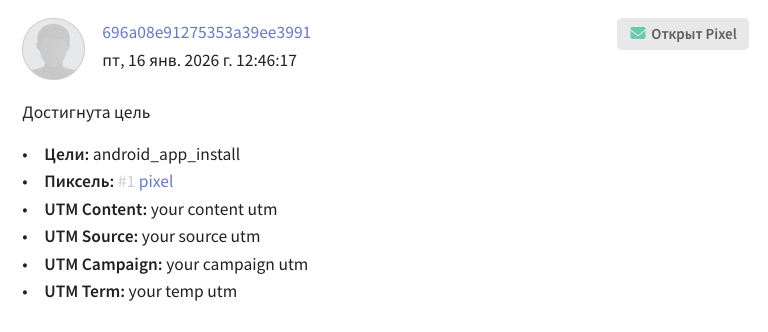
Passing to the UTM fields
AltcraftSDK.shared.target.event.mobileEvent(
    sid: "your sid",
    eventName: "app_install",
    utm: UTM(
        campaign: "your campaign utm",
        content:  "your content utm",
        keyword: "your keyword utm",
        medium: "your medium utm",
        source: "your source utm",
        temp: "your temp utm"
    )
)
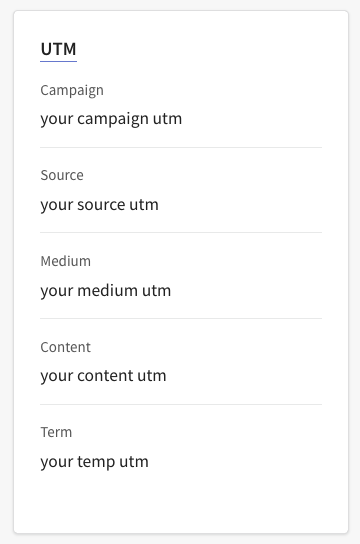
Passing to a custom profile field
// pass the utm tag to a profile field
// profile fields must be added in the platform in advance
AltcraftSDK.shared.push.subscription.pushSubscribe(
    profileFields: ["utm": "your utm tag"]
)
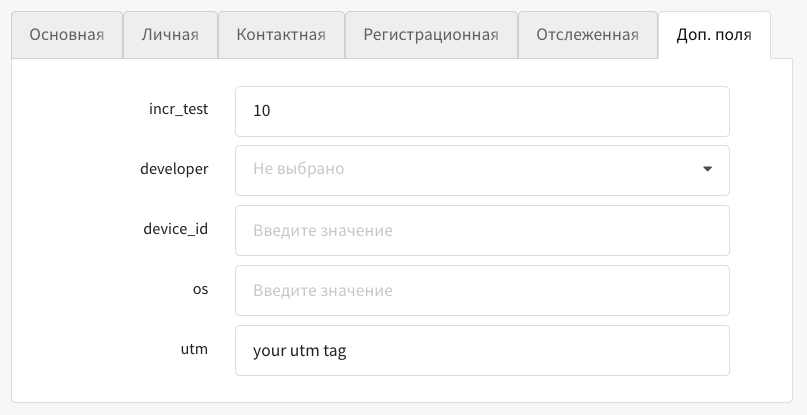
The data passed by any of these methods can be used to create a segment on the platform.
Note that when configuring on iOS, the app must use AppsFlyer, otherwise the UTM tag will not be passed to the app.
To register a goal, use the mobileEvent() function. It has the following parameters:
sid: String
Required: Yes
Description: The string identifier of the pixel to which goals are bound.
altcraftClientID: String
Default: ""
Required: No
Description: The Altcraft client identifier.
eventName: String
Required: Yes
Description: The name of the goal (mobile event).
sendMessageId: String?
Required: No
Description: The SMID identifier of the sent message (if the goal is associated with a specific mailing).
payload: [String: Any?]?
Required: No
Description: Goal data — a map with string keys for which only scalar data types are allowed:
- String
- Bool
- Int
- Int64 / UInt64 (or
NSNumberequivalents) - Float
- Double
nil
Non-serializable objects (for example, Date without conversion, custom classes) will lead to a coding error.
matching: [String: Any?]?
Required: No
Description: A map to which you can pass values with matching types and identifiers.
matchingType: String?
Required: No
Description: The matching type.
profileFields: [String: Any?]?
Required: No
Description: Profile fields — a map with string keys and values (JSON-compatible types):
- Scalar values:
- String
- Bool
- Int
- Int64 / UInt64 (or
NSNumberequivalents) - Float
- Double
nil
- Objects:
[String: Any?] - Lists:
[Any?] - Arrays of maps:
[[String: Any?]]
The parameter is used only when working with JWT authentication.
utm: UTM?
Required: No
Description: UTM tags. They are added with the UTM struct, where each UTM type is a separate property of the struct.
public struct UTM: Codable {
    public let campaign: String?
    public let content: String?
    public let keyword: String?
    public let medium: String?
    public let source: String?
    public let temp: String?
}
subscription: (any Subscription)?
Required: No
Description: The parameter for adding a subscription for the selected channel.
The parameter values are implementations of the Subscription protocol:
EmailSubscription— email subscriptionSmsSubscription— SMS subscriptionPushSubscription— push subscriptionCcDataSubscription— subscription in Telegram, Whatsapp, Viber, Notify.
Used only when working with JWT authentication.
Implementations of the Subscription protocol
General model: Subscription
Purpose — the base protocol for all subscription types.
Serialization is polymorphic; the discriminant field is channel.
Common fields (for all implementations):
| Field | Type | Required | Description |
|---|---|---|---|
resource_id | Int | Yes | Identifier of the resource/subscription source |
status | String? | No | Subscription status (for example, active/suspended) |
priority | Int? | No | Delivery priority for this subscription |
custom_fields | [String: JSONValue]? | No | Custom fields (key-value) for extended segmentation |
cats | [String]? | No | Subscription categories |
channel | String | Yes | Channel type; fixed by the implementation. |
Subscription variants:
EmailSubscription (channel = "email")
Main fields
| Field | Type | Required | Description |
|---|---|---|---|
resourceId | Int | Yes | ID of the Altcraft resource |
email | String | Yes | The recipient's email address |
Additional fields
| Field | Type | Required | Description |
|---|---|---|---|
status | String? | No | Subscription status |
priority | Int? | No | Subscription priority |
customFields | [String: JSONValue]? | No | Standard and custom subscription fields |
cats | [String]? | No | Subscription categories |
SmsSubscription (channel = "sms")
Main fields
| Field | Type | Required | Description |
|---|---|---|---|
resourceId | Int | Yes | ID of the Altcraft resource |
phone | String | Yes | Phone number in international format |
Additional fields
| Field | Type | Required | Description |
|---|---|---|---|
status | String? | No | Subscription status |
priority | Int? | No | Subscription priority |
customFields | [String: JSONValue]? | No | Standard and custom subscription fields |
cats | [String]? | No | Subscription categories |
PushSubscription (channel = "push")
Main fields
| Field | Type | Required | Description |
|---|---|---|---|
resourceId | Int | Yes | ID of the Altcraft resource |
provider | String | Yes | Provider (for example, "ios-apns") |
subscriptionId | String | Yes | Unique identifier of the subscription at the provider |
Additional fields
| Field | Type | Required | Description |
|---|---|---|---|
status | String? | No | Subscription status |
priority | Int? | No | Subscription priority |
customFields | [String: JSONValue]? | No | Standard and custom subscription fields |
cats | [String]? | No | Subscription categories |
CcDataSubscription (channel ∈ {"telegram_bot","whatsapp","viber","notify"})
Main fields
| Field | Type | Required | Description |
|---|---|---|---|
resourceId | Int | Yes | ID of the Altcraft resource |
channel | String | Yes | One of: "telegram_bot", "whatsapp", "viber", "notify" |
ccData | [String: JSONValue] | Yes | Channel-specific data (for example, chat ID, number, tokens) |
Additional fields
| Field | Type | Required | Description |
|---|---|---|---|
status | String? | No | Subscription status |
priority | Int? | No | Subscription priority |
customFields | [String: JSONValue]? | No | Standard and custom subscription fields |
cats | [String]? | No | Subscription categories |
Profile: updating profile fields
Updating profile fields with the updateProfileFields() function works only when JWT authentication of SDK API requests is used.
AltcraftSDK
└── static let shared: AltcraftSDK
    └── var profile: Profile
        // Updates the Altcraft profile fields
        └── var update: UpdateAPI
            └── func updateProfileFields(
                    profileFields: [String: Any?]? = nil,
                    skipTriggers: Bool? = nil
                ): Void
To update profile fields, use the updateProfileFields() function. It has the following parameters:
profileFields: [String: Any?]?
Required: No
Description: Profile fields — a map containing values for the fields to change (JSON-compatible types):
- Scalar values:
- String
- Bool
- Int
- Int64 / UInt64 (or
NSNumberequivalents) - Float
- Double
nil
- Objects:
[String: Any?] - Lists:
[Any?] - Arrays of maps:
[[String: Any?]]
For the update to be successful, the fields must be added to the subscriber's profile in advance.
skipTriggers:Bool?
Default: nil
Required: No
Description: When the flag is enabled, the profile containing this subscription is ignored in the triggers of mailings and scenarios.
Usage example:
AltcraftSDK.shared.profile.update.updateProfileFields(
    profileFields: ["_fname": "Andrey"]
)
In-App notifications
AltcraftSDK
└── static let shared: AltcraftSDK
    └── var inApp: InApp
        // Subscribe to the app lifecycle for automatic In-App display
        ├── func registerLifecycleTracking(): Void
        // Set the current screen marker (used when filtering In-App notifications)
        ├── func setScreen(screen: String): Void
        // Trigger an In-App notification by name
        ├── func trigger(name: String): Void
        // Request available In-App placements
        ├── func getPlacements(): Void
        // Configure the In-App notification animation
        ├── func setAnimation(_ block: @escaping @MainActor (InAppAnimator) -> Void): Void
        // Subscribe to In-App notifications (status = SUBSCRIBED)
        ├── var subscription: SubscribeAPI
        │   ├── func inAppSubscribe(
        │   │     sync: Bool = true,
        │   │     profileFields: [String: Any?]? = nil,
        │   │     customFields: [String: Any?]? = nil,
        │   │     cats: [CategoryData]? = nil,
        │   │     replace: Bool? = nil,
        │   │     skipTriggers: Bool? = nil
        │   │   ): Void
        │   // Unsubscribe from In-App notifications (status = UNSUBSCRIBED)
        │   ├── func inAppUnSubscribe(
        │   │     sync: Bool = true,
        │   │     profileFields: [String: Any?]? = nil,
        │   │     customFields: [String: Any?]? = nil,
        │   │     cats: [CategoryData]? = nil,
        │   │     replace: Bool? = nil,
        │   │     skipTriggers: Bool? = nil
        │   │   ): Void
        │   // In-App notification subscription status
        │   └── func getInAppSubscriptionStatus(
        │           completion: @escaping (ResponseModel.ResponseWithHttpCode<ResponseModel.ResponseWithProfile>?) -> Void
        │       ): Void
        // Output of In-App campaigns with "json" content type
        └── InAppEmitter.shared
            ├── func subscribe(callback: @escaping (String) -> Void): Void
            └── func unsubscribe(): Void
The functions for working with In-App notifications:
func registerLifecycleTracking()— registration of app lifecycle observers for automatic display of In-App notifications;func setScreen()— setting the current screen marker, used when filtering In-App notifications. On screen change, the SDK automatically generates theopenPagetrigger (typedefault);func trigger()— triggering an In-App notification by name (typecustom);func getPlacements()— requesting available In-App placements from the server;func setAnimation()— configuring the In-App notification display animation;InAppEmitter.shared— output of In-App campaigns withjsoncontent type to the app for custom rendering;func subscription.inAppSubscribe()— subscribing to In-App notifications;func subscription.inAppUnSubscribe()— unsubscribing from In-App notifications;func subscription.getInAppSubscriptionStatus()— getting the status of the In-App notification subscription.
func registerLifecycleTracking()
The function registers app lifecycle observers for automatic display of In-App notifications. After registration, the SDK tracks the UIApplication.didBecomeActiveNotification event and generates the openApp trigger (type default) once on the first transition of the app to the foreground.
Call registerLifecycleTracking() as early as possible at app startup — in AppDelegate.application(_:didFinishLaunchingWithOptions:). This is necessary so that the lifecycle observers have time to register before the first transition of the app to the foreground. If the call is made with a delay, In-App notifications that should have been displayed at app startup may be missed.
Usage example:
AltcraftSDK.shared.inApp.registerLifecycleTracking()
func setScreen(screen: String)
The function sets the current screen marker. The marker value is used by the Altcraft Platform when filtering In-App notifications — it allows displaying notifications only on certain app screens.
On screen change, the SDK automatically generates the openPage trigger (type default). Call this function when transitioning to a new screen, so that the SDK always knows which screen the user is on.
Usage example:
AltcraftSDK.shared.inApp.setScreen(screen: "home_screen")
func trigger(name: String)
The function allows manually triggering the display of an In-App notification by its name. It generates a trigger of type custom with the specified name. It is used when you need to display a notification in response to a user action or an event in the app.
Usage example:
AltcraftSDK.shared.inApp.trigger(name: "my_custom_trigger")
func getPlacements()
The function performs a request for available In-App placements from the Altcraft server. The result of the request can be obtained through SDK events.
If the inAppAutoRequest = true parameter is set in the SDK configuration, the placement request is performed automatically at initialization and then periodically. Without this parameter, requests are performed only on an explicit getPlacements() call or when triggers fire.
Usage example:
AltcraftSDK.shared.inApp.getPlacements()
func setAnimation(_ block: @escaping @MainActor (InAppAnimator) -> Void)
The function allows configuring a custom animation for the display of an In-App notification. It takes a closure with the InAppAnimator parameter, providing access to UIView and companyId after loading the static resources.
The InAppAnimator protocol:
public protocol InAppAnimator {
    // Identifier of the campaign associated with the animator
    var companyId: Int { get }

    // Applies changes to the view without animation
    @MainActor
    func prepare(_ block: (UIView) -> Void)

    // Performs a UIKit animation for the In-App view
    @MainActor
    func animate(
        duration: TimeInterval,
        delay: TimeInterval,
        options: UIView.AnimationOptions,
        animations: @escaping (UIView) -> Void,
        completion: ((Bool) -> Void)?
    )
}
Usage example:
AltcraftSDK.shared.inApp.setAnimation { animator in
    animator.animate(
        duration: 0.3,
        delay: 0,
        options: .curveEaseInOut,
        animations: { view in
            view.alpha = 1.0
        },
        completion: nil
    )
}
InAppEmitter.shared
Outputs In-App campaigns with json content type to the app for custom rendering. There can be only one active subscriber in the app — a new subscribe() call replaces the existing one. The callback is called on the main thread.
func subscribe(callback: @escaping (String) -> Void)— subscribing to In-App JSON output;func unsubscribe()— unsubscribing from In-App JSON output.
Usage example:
// Subscribe to In-App JSON output
InAppEmitter.shared.subscribe { json in
    // draw the In-App notification yourself
}

// Unsubscribe
InAppEmitter.shared.unsubscribe()
func subscription.inAppSubscribe(sync: Bool, ...)
The function performs a subscription to In-App notifications. After a successful call, the user's profile is subscribed to receiving In-App notifications from the Altcraft Platform.
The function parameters are the same as the pushSubscribe() parameters:
sync— the flag of the request execution synchrony;profileFields— profile fields;customFields— subscription fields;cats— subscription categories;replace— when enabled, replaces the existing subscription;skipTriggers— when enabled, the profile is ignored in the triggers of mailings and scenarios.
The parameters are configured exactly as in pushSubscribe().
Usage example:
AltcraftSDK.shared.inApp.subscription.inAppSubscribe()
func subscription.inAppUnSubscribe(sync: Bool, ...)
The function cancels the subscription to In-App notifications. After a successful call, the user's profile is unsubscribed from receiving In-App notifications.
The function parameters are the same as the pushUnSubscribe() parameters.
Usage example:
AltcraftSDK.shared.inApp.subscription.inAppUnSubscribe()
func subscription.getInAppSubscriptionStatus(completion: @escaping (ResponseModel.ResponseWithHttpCode<ResponseModel.ResponseWithProfile>?) -> Void)
The function for getting the current status of the In-App notification subscription. In completion, the object ResponseModel.ResponseWithHttpCode<ResponseModel.ResponseWithProfile>? is passed, containing response?.profile?.subscription — the profile's current subscription to In-App notifications. In case of a request execution error, nil is passed. The absence of a subscription is determined by the value response?.profile?.subscription == nil.
Usage example:
AltcraftSDK.shared.inApp.subscription.getInAppSubscriptionStatus { response in
    let httpCode = response?.httpCode
    let resp = response?.response
    let profile = resp?.profile
    let subscription = profile?.subscription
}
In-App notification display types
The SDK supports the following In-App notification display types:
| Type | Description |
|---|---|
fullscreen | Fullscreen In-App notification |
floating_bar | Floating bar (behavior is the same as fullscreen) |
slideup | A panel that slides in from the top or bottom of the screen. The SDK expects size and position data from JavaScript, then applies a native container. If JavaScript does not respond within 1 second, the notification is displayed as fullscreen |
custom | Custom display (behavior is the same as fullscreen) |
modal | Modal window (behavior is the same as fullscreen) |
In-App notification display limits
- In-App notifications are not displayed in landscape screen orientation;
- When the screen is rotated, an open In-App notification is closed;
- The display of In-App notifications is serialized — only one notification can be displayed at a time;
- Non-anonymous In-App campaigns require the
subscribedsubscription status for In-App notifications.