Merging multiple profiles
Description
Combining multiple profiles into a new profile or existing one.
caution
- The profiles generated by merging are not imports. Import trigger does not work on them.
- Email: localhost - as an absent field, it is created if necessary and is not copied to another profile.
- Not localhost email is copied like any other field, but in order to avoid any conflicts, it disappears from the source profile, changes to empty (that is, localhost).
Data field rules
The rules apply to the data objects inside each element of the source array and inside the destination object.
- The field value must be valid for the field type: numeric fields accept a number, "list" fields accept a variant name from the list or its ordinal number, etc. If the value does not match the field type (for example, a string that is not in the list of variants is passed to a list field), the request returns an error. Value formats for custom fields are listed in the Custom field value formats section.
- Only the fields explicitly passed in
dataare updated. If some profile fields should not change, do not pass them in the request. - For more flexible field value management, use database fields functional update.
URL
Method: POST
https://example.com/api/v1.1/profiles/merge
Request parameters
| Parameter | Type | Example | Required | Description |
|---|---|---|---|---|
| data | JSON object | "data":{ | No | Profile data that will change after merging. Set inside each element of the source array and inside destination |
| db_id | int | 1 | Yes | Database ID |
| skip_triggers | bool | true | No | Skip trigger events By default – false |
| source | array | "source": [ | Yes | Contains matching data about the profiles to be merged |
| destination | JSON object | "destination":{ | Yes | Contains the matching data of the profile resulting from the merge |
| matching | string | "email" "email_profile" "email_sub" "phone" "phone_sub" "profile_id" "push_sub" "custom" "custom_sub" "email_phone" "email_phone_sub" | No, if matched by email from the profile or subscriptions | Profile matching mode By default - email For each type of matching, certain fields must be passed in the request body. Learn more about these fields here. |
| field_name | string | custom_ID | Yes, if "matching": "custom" | Name of custom database field if matching : custom . In the data collection form, a field with the same name is required for search. |
| field_value | int/string | custom_string | Yes, if "matching": "custom" | Value of custom database field if matching : custom . |
| subscriptions | bool | true | No | Copy and merge subscriptions. Subscriptions to resource categories and data from subscription fields will also be copied. By default – true |
| history | bool | true | No | Copy history and activity flags By default – true |
| static_segments | bool | true | No | Whether to make changes to static segments or not (source-profiles will leave the segments, and destination-profile will enter) By default – true |
| overwrite | bool | true | No | Whether to copy the fields of source profiles or not. If the destination profile has empty fields, in any case, these fields will be filled with the profile fields the priority of which is the highest. |
| delete | bool | true | No | Whether to remove source profiles after merging or not |
Copying profile fields
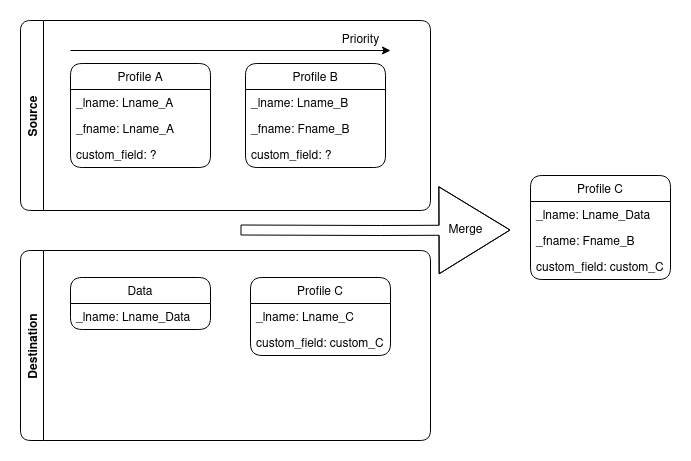
Request example
- JSON
- XML
{
    "matching": "custom",
    "field_name": "field_1",
    "source": [
        {
            "db_id": 1,
            "field_value": "1",
            "data": {
                "_fname": "Profile1",
                "_lname": "LnameProfile1"
            }
        },
        {
            "db_id": 1,
            "matching": "email",
            "email": "test2@mail.ru",
            "data": {
                "_fname": "Profile2",
                "_lname": "LnameProfile2"
            }
        }
    ],
    "destination": {
        "db_id": 2,
        "matching": "email",
        "email": "test3@mail.ru",
        "data": {
            "_fname": "Profile3",
            "_lname": "LnameProfile3"
        }
    },
    "subscriptions": true,
    "static_segments": true,
    "history": false
}
<xml>
    <matching>custom</matching>
    <field_name>field_1</field_name>
    <source>
        <db_id>1</db_id>
        <field_value>1</field_value>
        <data>
            <_fname>Profile1</_fname>
            <_lname>LnameProfile1</_lname>
        </data>
    </source>
    <source>
        <db_id>1</db_id>
        <matching>email</matching>
        <email>test2@mail.ru</email>
        <data>
            <_fname>Profile2</_fname>
            <_lname>LnameProfile2</_lname>
        </data>
    </source>
    <destination>
        <db_id>2</db_id>
        <matching>email</matching>
        <email>test3@mail.ru</email>
        <data>
            <_fname>Profile2</_fname>
            <_lname>LnameProfile2</_lname>
        </data>
    </destination>
    <subscriptions>true</subscriptions>
    <static_segments>true</static_segments>
    <history>false</history>
</xml>
Response example
- JSON
- XML
{
    "destination_id": {
        "db_id": 1,
        "profile_id": "6613cb65dc4594c2934db63b"
    },
    "error": 0,
    "error_text": "",
    "source_ids": [
        {
            "db_id": 1,
            "profile_id": "6613cb65dc4594c2934db63f"
        },
        {
            "db_id": 1,
            "profile_id": "6613cb65dc4594c2934db63b"
        }
    ]
}
<xml>
    <destination_id>
        <db_id>2</db_id>
        <profile_id>60a7855930b8bc8535b2acfb</profile_id>
    </destination_id>
    <error>0</error>
    <error_text></error_text>
    <source_ids>
        <db_id>1</db_id>
        <profile_id>60a7839330b8bc86a5bc5f62</profile_id>
    </source_ids>
    <source_ids>
        <db_id>1</db_id>
        <profile_id>60a7845230b8bc8535b2acf7</profile_id>
    </source_ids>
</xml>
Response parameters
| Parameter | Type | Description |
|---|---|---|
| destination_id | JSON object | Contains data about the profile resulting from the merge:db_id - database IDprofile_id - profile ID |
| source_ids | JSON object | Contains data about merged profiles as a list:db_id - database IDprofile_id - profile ID |
| error | int | Error code |
| error_text | string | Error text |