SDK functionality
You need to configure the SDK to work with your app beforehand. The detailed instructions are available here
The SDK is split into modules: core (authentication, events), push, target (goals), profile, and in-app. Each module is connected with a separate dependency and is accessed through its own object — AltcraftSDK.auth, AltcraftSDK.push, AltcraftSDK.target, AltcraftSDK.profile, AltcraftSDK.inApp.
Core: authentication
AltcraftSDK
└─ val auth: AuthAPI
   // Set the JWT token provider (null — unset)
   ├─ fun setJWTProvider(provider: JWTInterface?): Unit
   // Authenticate the current SDK user
   ├─ fun authenticate(context: Context): Unit
   // Log out of the profile (return to an anonymous session)
   ├─ fun logOut(context: Context): Unit
   // Check whether the current user is authenticated
   └─ suspend fun isAuthenticated(context: Context): Boolean
Authentication functions:
fun setJWTProvider()— sets theJWTInterfaceimplementation through which the SDK obtains JWT tokens. To remove the provider, passnull. To work without JWT, use the rToken from the configuration.fun authenticate()— authenticates the current user: sends a request with the current authentication data (JWT token or rToken) to the server and binds the device to the user profile. After successful authentication, the user gains access to personalized In-App notifications.fun logOut()— terminates the current authentication session and switches the device to anonymous mode. In anonymous mode, personalized In-App notifications and subscription management are unavailable.suspend fun isAuthenticated()— returnstrueif the current SDK user is authenticated, andfalseotherwise.
Call authenticate() only when the user actually logs in to the app and is known to the client (for example, after successful authentication through a login form, OAuth, or another authentication mechanism of your app). The same applies to logOut(): only on an actual user log out.
Example of setting the JWT provider:
class App : Application() {
    override fun onCreate() {
        super.onCreate()
        AltcraftSDK.auth.setJWTProvider(JWTProvider(applicationContext))
        // SDK initialization
    }
}
Example of checking the authentication status:
CoroutineScope(Dispatchers.IO).launch {
    val authenticated = AltcraftSDK.auth.isAuthenticated(context)
}
Clearing SDK data
AltcraftSDK
// Full cleanup of SDK data (database, SharedPreferences, background tasks)
└── fun clear(
        context: Context,
        onComplete: (() -> Unit)? = null
    ): Unit
The function performs a full cleanup of SDK data: it cancels pending WorkManager background tasks, deletes Room database records, and clears SharedPreferences. The optional onComplete parameter is called after the cleanup completes.
Resetting the restriction on retry operations at SDK initialization
At SDK initialization, background tasks that perform control and resending of requests related to push notifications and goals, as well as checking and executing the request to update the device push token, are started. Execution of this function is limited to one run within a single lifecycle of the app process. Sometimes it may be necessary to reset this restriction.
AltcraftSDK
// Allow reinitialization of background tasks in the current session
└── fun unlockInitialOperationsInThisSession(): Unit
The function resets the flag that prohibits restarting the background tasks for controlling and resending requests.
Core: SDK events
// SDK events API

AltcraftSDK
└── val SDKEvents: Events
    // Subscribe to SDK events (replaces the existing subscriber)
    ├── fun subscribe(
    │       newSubscriber: (Event) -> Unit
    │   ): Unit
    // Unsubscribe from events
    └── fun unsubscribe(): Unit
In the app, there can be only one active subscriber to SDK events.
SDK event types:
- Event — a general event (information, successful requests);
- Error — an error event;
- RetryError — an event about a request error for which an automatic retry is provided on the SDK side.
Each event contains the fields:
- function — the name of the function that caused the event;
- event — the SDK event type (
SDKEvent, the list is shown in the table below); - eventMessage — the event message;
- eventValue — additional data added to some events;
- date — the event time;
- internal — a flag indicating whether the event is internal.
Subscribing to events
fun subscribe(newSubscriber: (Event) -> Unit): Unit
The function subscribes the app to SDK events. When an SDK event occurs, it calls the passed newSubscriber and passes it an instance of Event (or its descendant).
Usage example:
AltcraftSDK.SDKEvents.subscribe { event ->
    // Handle the event
}
SDK event classes
open class Event(
    val function: String,
    val event: SDKEvent? = null,
    val eventMessage: String? = null,
    val eventValue: Map<String, Any?>? = null,
    val date: Date = Date(),
    val internal: Boolean = false
)

open class Error(
    function: String,
    event: SDKEvent? = null,
    eventMessage: String? = null,
    eventValue: Map<String, Any?>? = null,
    date: Date = Date(),
) : Event(function, event, eventMessage, eventValue, date)

class RetryError(
    function: String,
    event: SDKEvent? = null,
    eventMessage: String? = null,
    eventValue: Map<String, Any?>? = null,
    date: Date = Date(),
) : Error(function, event, eventMessage, eventValue, date)
Unsubscribing from events
fun unsubscribe(): Unit
Cancels the delivery of SDK events. The subscriber remains assigned, but events are no longer delivered.
Usage example:
AltcraftSDK.SDKEvents.unsubscribe()
List of all SDK events
List of events by module
SDK events are accessible through the module objects: AltcraftSDK.moduleEvents (core), AltcraftSDK.push.moduleEvents, AltcraftSDK.target.moduleEvents, AltcraftSDK.profile.moduleEvents, AltcraftSDK.inApp.moduleEvents. Each item is an SDKEvent object with a string message (message).
Core:
| Value | Message |
|---|---|
configIsSet | SDK configuration is installed |
sdkCleared | SDK data has been cleared |
notAuthenticatedError | User is not authenticated |
userLogOut | User logged out. Anonymous session started. |
roomMigrationError | Room database migration failed. The local SDK database will be recreated. |
authenticateSuccessful | successful request: profile/authenticate |
pushStatusRequestFailed | failed request: push/status |
Push:
| Value | Message |
|---|---|
invalidConfig | Invalid push configuration: unsupported push provider. Available providers: android-firebase, android-huawei, android-rustore. |
configIsNull | push configuration is null |
invalidCustomFields | invalid custom fields: not all values are primitives |
eventRetryLimit | push event retry limit |
eventRequestDataIsNull | push event request data is null |
eventRequestSuccessful | successful request: event/push |
eventRequestFailed | failed request: event/push |
pushUidIsNull | push uid is null |
subscribeRetryLimit | push subscribe retry limit |
subscribeRequestDataIsNull | push subscribe request data is null |
subscribeRequestSuccessful | successful request: push/subscribe |
subscribeRequestFailed | failed request: push/subscribe |
suspendRequestSuccessful | successful request: push/suspend |
suspendRequestFailed | failed request: push/suspend |
unsubscribeRequestSuccessful | successful request: push/unsubscribe |
unsubscribeRequestFailed | failed request: push/unsubscribe |
tokenUpdateRequestDataIsNull | token update request data is null |
tokenUpdateRequestSuccessful | successful request: push/update |
tokenUpdateRequestFailed | failed request: push/update |
pushTokenIsNull | push token is null |
notUpdated | push token not updated |
pushProviderSet | push provider set - |
invalidPushProvider | Invalid push provider. Available providers: android-firebase, android-huawei, android-rustore. |
statusRequestDataIsNull | subscription status request data is null |
statusRequestSuccess | successful request: push/status |
statusRequestFailed | failed request: push/status |
unSuspendRequestDataIsNull | unsuspend request data is null |
unSuspendRequestSuccessful | successful request: push/unsuspend |
unSuspendRequestFailed | failed request: push/unsuspend |
pushDataIsNull | push data is null |
notificationErr | notification error |
channelNotCreated | notification channel not created |
pushPermissionDenied | notification permission denied |
pushIsPosted | push notification is posted |
acPush | Altcraft push notification received |
notAcPush | received a notification unrelated to the Altcraft Platform |
receiverRedefined | push receiver redefined |
errorImgLoad | error loading push image |
successImgLoad | push image loaded successfully |
Target:
| Value | Message |
|---|---|
partsIsNull | target request parts is null |
retryLimit | target request retry limit |
invalidPayload | invalid target payload: not all values are primitives |
requestDataIsNull | target request data is null |
requestSuccessful | successful target request: event/post |
requestFailed | failed target request: event/post |
Profile:
| Value | Message |
|---|---|
requestDataIsNull | profile update request data is null |
retryLimit | profile update retry limit |
requestSuccessful | successful request: profile/update |
requestFailed | failed request: profile/update |
In-App:
| Value | Message |
|---|---|
subscribeRetryLimit | in-app subscribe retry limit |
subscribeRequestDataIsNull | in-app subscribe request data is null |
subscribeRequestSuccessful | successful request: inapp/subscribe |
subscribeRequestFailed | failed request: inapp/subscribe |
unsubscribeRequestSuccessful | successful request: inapp/unsubscribe |
unsubscribeRequestFailed | failed request: inapp/unsubscribe |
invalidCustomFields | invalid custom fields: not all values are primitives |
statusRequestDataIsNull | in-app status request data is null |
statusRequestSuccessful | successful request: inapp/status |
statusRequestFailed | failed request: inapp/status |
eventRetryLimit | in-app event retry limit |
eventRequestDataIsNull | in-app event request data is null |
smidIsNull | send message ID is null |
eventRequestSuccessful | successful request: inapp/event |
eventRequestFailed | failed request: inapp/event |
placementsRequestDataIsNull | in-app placements request data is null |
placementsRequestSuccessful | successful request: in_app/placements |
placementsRequestFailed | failed request: in_app/placements |
invalidStaticField | invalid in-app static field |
inAppStaticErrorLoad | error loading in-app notification static resources |
inAppContentErrorLoad | error loading in-app notification content |
Push: working with subscription statuses
Changing the subscription status
AltcraftSDK
└─ val push: Push
   └─ val subscription: SubscriptionAPI
      // Subscribe (status = SUBSCRIBED)
      ├─ fun subscribe(
      │     context: Context,
      │     sync: Boolean = true,
      │     profileFields: Map<String, Any?>? = null,
      │     customFields: Map<String, Any?>? = null,
      │     cats: List<CategoryData>? = null,
      │     replace: Boolean? = null,
      │     skipTriggers: Boolean? = null
      │   ): Unit
      // Suspend (status = SUSPENDED)
      ├─ fun suspend(
      │     context: Context,
      │     sync: Boolean = true,
      │     profileFields: Map<String, Any?>? = null,
      │     customFields: Map<String, Any?>? = null,
      │     cats: List<CategoryData>? = null,
      │     replace: Boolean? = null,
      │     skipTriggers: Boolean? = null
      │   ): Unit
      // Unsubscribe (status = UNSUBSCRIBED)
      ├─ fun unsubscribe(
      │     context: Context,
      │     sync: Boolean = true,
      │     profileFields: Map<String, Any?>? = null,
      │     customFields: Map<String, Any?>? = null,
      │     cats: List<CategoryData>? = null,
      │     replace: Boolean? = null,
      │     skipTriggers: Boolean? = null
      │   ): Unit
      // Switching subscriptions between profiles (LogIn/LogOut)
      ├─ suspend fun unSuspend(context: Context): ResponseWithHttpCode<ResponseWithProfile>?
      // Building functional operations on profile fields
      └─ fun actionField(key: String): ActionFieldBuilder
Functions for changing the subscription status:
fun subscribe()— subscribes to push notifications;fun unsubscribe()— cancels the push notification subscription;fun suspend()— suspends the push notification subscription (notifications do not arrive, but no unsubscription event is created in the user profile);suspend fun unSuspend()— used to createLogInandLogOuttransitions;fun actionField()— creates anActionFieldBuilderfor building functional operations (set,unset,incr,add,delete,upsert) on profile fields insideprofileFields.
The status-changing functions have the same signature, containing the following parameters:
context: Context
Mandatory: Yes
Description: Android Context.
sync: Boolean
Default: true
Mandatory: No
Description: A flag setting the synchronicity of request execution.
Successful request execution:
In case of successful execution of a request from this group of functions, an event is created that contains the response data in event.value:
If sync == true
ResponseWithProfile
  ├─ error: 0
  ├─ errorText: ""
  └─ profile
     ├─ id: "your id"
     ├─ status: "subscribed"
     ├─ isTest: false
     └─ subscription
        ├─ subscriptionId: "your subscriptionId"
        ├─ hashId: "7f31a9c4"
        ├─ provider: "android-firebase"
        ├─ status: "subscribed"
        ├─ fields
        │  ├─ _os_ver: {"raw":"14","ver":"[\"14.0\", \"0.0\", \"0.0\"]"}
        │  ├─ _device_type: "mob"
        │  ├─ _ad_track: true
        │  ├─ _device_name: "Pixel"
        │  ├─ _os_language: "en"
        │  ├─ _os_tz: "+0100"
        │  ├─ _os: "Android"
        │  ├─ _device_model: "Pixel 7"
        │  └─ _app_ver: "1.0.0"
        └─ cats
           └─ [ { name: "developer_news", title: "dev_news", steady: false, active: false } ]
For a synchronous request, the following are available in the event value event.value:
-
error – the server's internal error code (0 if there are no errors);
-
errorText – the error text (an empty string if there are no errors);
-
profile – the profile data, if the request is successful:
- profile information (ProfileData)
- subscription (SubscriptionData)
- subscription categories (CategoryData)
- if the request finished with an error, only
profile = nullis returned
Data structures
data class ResponseWithProfile(
    val error: Int?,
    val errorText: String?,
    val profile: ProfileData?
)

data class ProfileData(
    val id: String?,
    val status: String?,
    val acid: String? = null,
    val isTest: Boolean?,
    val subscription: SubscriptionData?
)

data class SubscriptionData(
    val subscriptionId: String?,
    val hashId: String?,
    val provider: String?,
    val status: String?,
    val fields: Map<String, JsonElement>?,
    val cats: List<CategoryData>?
)

data class CategoryData(
    val name: String?,
    val title: String?,
    val steady: Boolean?,
    val active: Boolean?
)
If sync == false
ResponseWithProfile
  ├─ error: Int?
  ├─ errorText: String?
  └─ profile: ProfileData? = null
For an asynchronous request, profile in the event value event.value is always null.
Request execution with an error:
If a request from this group of functions finished with an error, an event with the error code is created:
subscribeRequestFailed— subscribing to notifications;suspendRequestFailed— suspending the subscription;unsubscribeRequestFailed— unsubscribing.
Event contents:
- only
httpCode, if the Altcraft server was unavailable; erroranderrorText, if the server returned an error.
Getting event values
AltcraftSDK.SDKEvents.subscribe { event ->
    val sdkEvent = event.event ?: return@subscribe

    if (sdkEvent == AltcraftSDK.push.moduleEvents.subscribeRequestSuccessful ||
        sdkEvent == AltcraftSDK.push.moduleEvents.subscribeRequestFailed
    ) {
        val value = event.eventValue
        val error = value?.get("error")
        val errorText = value?.get("errorText")
        val profile = value?.get("profile") as? ProfileData
        val subscription = profile?.subscription
    }
}
profileFields:Map<String, Any?>?
Default: null
Mandatory: No
Description: A dictionary containing the profile fields.
The parameter can accept both system fields (for example, _fname — first name or _lname — last name) and optional ones (created manually in advance in the platform interface). Allowed structures (JSON-compatible):
- Scalar values:
- String
- Boolean
- Int
- Long
- Float
- Double
null
- Objects:
Map<String, *> - Lists:
List<*> - Arrays of maps:
Array<Map<String, *>>
If an invalid optional field is passed, the request finishes with an error:
http code: 400
error: 400
errorText: Platform profile processing error: with field "field_name": Incorrect field
Use actionField() for functional operations on profile fields:
AltcraftSDK.push.subscription.subscribe(
    context = context,
    profileFields = mapOf(
        AltcraftSDK.push.subscription.actionField("orders_count").incr(1)
    )
)
customFields:Map<String, Any?>?
Default: null
Mandatory: No
Description: A dictionary containing the subscription fields.
The parameter can accept both system fields (for example, _device_model — device model or _os — operating system) and optional ones (created manually in advance in the platform interface). Allowed value types (JSON-compatible, scalars only):
- String
- Boolean
- Int
- Long
- Float
- Double
null
If an invalid optional field is passed, the request finishes with an error:
http code: 400
error: 400
errorText: Platform profile processing error: field "field_name" is not valid: failed convert custom field
Most of the subscription system fields are collected automatically by the SDK and added to push requests. These system fields include: "_os", "_os_tz", "_os_language", "_device_type", "_device_model", "_device_name", "_os_ver", "_ad_track", "_ad_id".
cats:List<CategoryData>?
Default: null
Mandatory: No
Description: Subscription categories.
Category structure:
data class CategoryData(
    val name: String?,
    val title: String? = null,
    val steady: Boolean? = null,
    val active: Boolean?
)
When sending a push request with categories, use only the name (category name) and active (category activity status) fields; the other fields are not used in request processing. The title and steady fields are filled in when subscription information is retrieved.
Request example:
val cats = listOf(
    CategoryData(name = "football", active = true),
    CategoryData(name = "hockey",   active = true)
)
The categories used in the request must be created in advance and added to the resource in Altcraft Platform. If the request uses a category that has not been added to the resource — the request is returned with an error:
http code: 400
error: 400
errorText: Platform profile processing error: field "subscriptions.cats" is not valid: category not found in resource
replace:Boolean?
Default: null
Mandatory: No
Description: When the flag is activated, all subscriptions of other profiles with the same push token in the current database are set to the unsubscribed status after a successful request.
skipTriggers:Boolean?
Default: null
Mandatory: No
Description: When the flag is activated, the profile containing this subscription is ignored in the triggers of mailings and scenarios.
Request implementation examples
Example of performing a push notification subscription request
Minimal working configuration:
AltcraftSDK.push.subscription.subscribe(context)
Passing all available parameters:
AltcraftSDK.push.subscription.subscribe(
    context = this,
    sync = true,
    profileFields = mapOf("_fname" to "Andrey", "_lname" to "Pogodin"),
    customFields  = mapOf("developer" to true),
    cats = listOf(CategoryData(name = "developer_news", active = true)),
    replace = false,
    skipTriggers = false
)
An automatic request retry on the SDK side is provided for subscribe, suspend, and unsubscribe if the response http code is in the range 500..599. The request is not repeated if the response code is outside this range.
The unSuspend() function
The suspend fun unSuspend() function is designed to create LogIn and LogOut transitions. It works as follows:
- it searches for subscriptions with the same push token as the current one that do not belong to the profile the current JWT token points to;
- it changes the status of the found subscriptions from
subscribedtosuspended; - it changes the status in the subscriptions of the profile the current JWT points to from
suspendedtosubscribed(if the profile the JWT points to exists and contains subscriptions); - it returns
ResponseWithHttpCode<ResponseWithProfile>?, in whichresponse.profileis the current profile the JWT points to (if the profile does not exist,nullis returned).
Recommended implementation of LogIn and LogOut transitions
LogIn transition:
- An anonymous user logs in to the app. This user is assigned
JWT_1, which points to database #1Anonymous; - A push notification subscription has been performed; a profile is created in database #1Anonymous;
- The user registers and is assigned
JWT_2, which points to database #2Registered; - The
unSuspend()function is called — the anonymous user's subscription in database #1Anonymous is suspended; - A profile search is performed in database #2Registered to restore the subscription;
- Since no subscription with such a push token exists in database #2Registered, the
unSuspend()function returns the profile without a subscription; - After that, you can perform the subscription request
subscribe(), which creates a new profile in database #2Registered.
LogOut transition:
- The user logs out of the profile on the app side (
LogOut); - The user is assigned
JWT_1, which points to database #1Anonymous; - The
unSuspend()function is called, which suspends the subscription in database #2Registered and changes the subscription status in database #1Anonymous tosubscribed; - The request returns a non-empty profile — the subscription already exists, no new one is needed.
Implementation example:
private suspend fun unSuspend(context: Context) {
    AltcraftSDK.push.subscription
        .unSuspend(context)
        ?.let { result ->
            if (result.httpCode == 200 && result.response?.profile?.subscription == null) {
                AltcraftSDK.push.subscription.subscribe(
                    context = context
                    // Specify the required parameters
                )
            }
        }
}

fun logIn(context: Context)  = CoroutineScope(Dispatchers.IO).launch { unSuspend(context) }
fun logOut(context: Context) = CoroutineScope(Dispatchers.IO).launch { unSuspend(context) }
Requesting the subscription status
AltcraftSDK
└── val push: Push
    └── val subscription: SubscriptionAPI
        // Status of the profile's latest subscription
        ├── suspend fun status.latest(
        │       context: Context
        │   ): ResponseWithHttpCode<ResponseWithProfile>?
        // Status of the subscription by the current push token/provider
        ├── suspend fun status.current(
        │       context: Context
        │   ): ResponseWithHttpCode<ResponseWithProfile>?
        // Status of the latest subscription for the specified provider (if null — the current one is used)
        └── suspend fun status.latestForProvider(
                context: Context,
                provider: String? = null
            ): ResponseWithHttpCode<ResponseWithProfile>?
Functions for requesting the subscription status:
suspend fun status.latest()— the status of the profile's latest subscription;suspend fun status.current()— the subscription status for the current push token and provider;suspend fun status.latestForProvider()— the status of the latest subscription for the specified provider. If no provider is specified (provider = null), the provider of the current push token is used.
suspend fun status.latest(context: Context): ResponseWithHttpCode<ResponseWithProfile>?
The function that gets the status of the profile's latest subscription. Returns a ResponseWithHttpCode<ResponseWithProfile> object containing response?.profile?.subscription — the last created subscription in the profile. If no such subscription exists, null is passed.
Usage example:
CoroutineScope(Dispatchers.IO).launch {
    AltcraftSDK.push.subscription.status.latest(context)
}
suspend fun status.current(context: Context): ResponseWithHttpCode<ResponseWithProfile>?
The function that gets the subscription status for the current push token and provider. Returns a ResponseWithHttpCode<ResponseWithProfile> object containing response?.profile?.subscription — the subscription found by the current push token and provider. If no such subscription exists, null is passed.
Usage example:
CoroutineScope(Dispatchers.IO).launch {
    AltcraftSDK.push.subscription.status.current(context)
}
suspend fun status.latestForProvider(context: Context, provider: String? = null): ResponseWithHttpCode<ResponseWithProfile>?
The function that gets the status of the latest subscription by provider. Returns a ResponseWithHttpCode<ResponseWithProfile> object containing response?.profile?.subscription — the last created subscription with the specified push notification provider. If no provider is specified (provider = null), the provider of the current push token is used. If no such subscription exists, null is passed.
CoroutineScope(Dispatchers.IO).launch {
    AltcraftSDK.push.subscription.status.latestForProvider(context, provider = null)
}
Below is an example of extracting profile, subscription, and category data from the responses of the status-getting functions. This approach applies to all status-getting functions:
Data from the status-getting functions
CoroutineScope(Dispatchers.IO).launch {
    AltcraftSDK.push.subscription
        .status.current(context)
        ?.let { it ->
            val httpCode = it.httpCode
            val response = it.response
            val error = response?.error
            val errorText = response?.errorText
            val profile = response?.profile
            val subscription = profile?.subscription
            val cats = subscription?.cats
        }
}
Push: managing push tokens
AltcraftSDK
└── val push: Push
    │
    // Save the token manually (onNewToken)
    ├── suspend fun token.setToken(context: Context, provider: String?, token: String?): Unit
    │
    // Get the current device token data
    ├── suspend fun token.getToken(context: Context): TokenData?
    │
    // Set the Firebase Cloud Messaging provider (null — remove)
    ├── fun token.setFCMTokenProvider(provider: FCMInterface?): Unit
    │
    // Set the Huawei Mobile Services provider (null — remove)
    ├── fun token.setHMSTokenProvider(provider: HMSInterface?): Unit
    │
    // Set the RuStore provider (null — remove)
    ├── fun token.setRuStoreTokenProvider(provider: RustoreInterface?): Unit
    │
    // Delete the push token of the specified provider
    ├── suspend fun token.deleteToken(context: Context, provider: String): Unit
    │
    // Forced token update (delete —> update)
    ├── suspend fun token.forcedTokenUpdate(context: Context): Unit
    │
    // Change the provider priority list and initiate a token update
    ├── suspend fun token.changeProviderPriority(context: Context, priority: List<String>): Unit
    │
    // Request notification permission from the user
    └── fun requestNotificationPermission(context: Context, activity: ComponentActivity): Unit
Functions for working with the provider token in the SDK:
suspend fun token.setToken()— manual setting of the device push token and provider in the local storage;suspend fun token.getToken()— getting the current push token;fun token.setFCMTokenProvider()— setting and removing the Firebase Cloud Messaging provider;fun token.setHMSTokenProvider()— setting and removing the Huawei Mobile Services provider;fun token.setRuStoreTokenProvider()— setting and removing the RuStore provider;suspend fun token.changeProviderPriority()— dynamic reordering of providers with an update of the subscription push token;suspend fun token.deleteToken()— deleting the push token of the specified provider;suspend fun token.forcedTokenUpdate()— deleting the current push token with a subsequent update;fun requestNotificationPermission()— requesting permission to send notifications from the user (Android 13+).
suspend fun token.setToken(context: Context, provider: String?, token: String?): Unit
The function is designed for manually setting the device push token and provider. It should be called in the onNewToken() function of the push provider service. It is used as a simplified way of passing the token to the SDK without implementing the provider interfaces.
It is not recommended to use this function to pass the token. The recommended approach for passing the push token to the SDK is implementing FCMInterface, HMSInterface, or RustoreInterface.
Usage example:
CoroutineScope(Dispatchers.IO).launch {
    AltcraftSDK.push.token.setToken(context, provider, token)
}
Example of passing the token in FCMService.onNewToken():
class FCMService : FirebaseMessagingService() {
    override fun onNewToken(token: String) {
        super.onNewToken(token)

        // Pass the new token manually
        CoroutineScope(Dispatchers.IO).launch {
            AltcraftSDK.push.token.setToken(this@FCMService, FCM_PROVIDER, token)
        }
    }

    override fun onDeletedMessages() {}

    override fun onMessageReceived(message: RemoteMessage) {
        super.onMessageReceived(message)
        AltcraftSDK.push.receiver.takePush(this@FCMService, message.data)
    }
}
suspend fun token.getToken(context: Context): TokenData?
The function returns the current device push token and provider data as the data class TokenData(val provider: String, val token: String). If the token is unavailable — null is passed.
Usage example:
CoroutineScope(Dispatchers.IO).launch {
    AltcraftSDK.push.token.getToken(context).let {
        val provider = it?.provider
        val token = it?.token
    }
}
fun token.setFCMTokenProvider(provider: FCMInterface?): Unit
The function sets or removes the Firebase Cloud Messaging token provider. To disable the provider, pass null.
Usage example:
AltcraftSDK.push.token.setFCMTokenProvider(FCMProvider())
Call token.setFCMTokenProvider() in Application.onCreate() before calling AltcraftSDK.initialization(). This guarantees that the provider is registered at app process startup, regardless of the lifecycle state of other components and whether the app is launched in the foreground or background.
fun token.setHMSTokenProvider(provider: HMSInterface?): Unit
The function sets or removes the Huawei Mobile Services token provider. To disable the provider, pass null.
Usage example:
AltcraftSDK.push.token.setHMSTokenProvider(HMSProvider())
Call token.setHMSTokenProvider() in Application.onCreate() before calling AltcraftSDK.initialization(). This guarantees that the provider is registered at app process startup, regardless of the lifecycle state of other components and whether the app is launched in the foreground or background.
fun token.setRuStoreTokenProvider(provider: RustoreInterface?): Unit
The function sets or removes the RuStore token provider. To disable the provider, pass null.
Usage example:
AltcraftSDK.push.token.setRuStoreTokenProvider(RuStoreProvider())
Call token.setRuStoreTokenProvider() in Application.onCreate() before calling AltcraftSDK.initialization(). This guarantees that the provider is registered at app process startup, regardless of the lifecycle state of other components and whether the app is launched in the foreground or background.
suspend fun token.changeProviderPriority(context: Context, priority: List<String>): Unit
A function that allows a dynamic switch of the push provider with an update of the subscription token. To do this, you need to pass a new list with a different provider order. For example: listOf(HMS_PROVIDER, RUSTORE_PROVIDER, FCM_PROVIDER).
CoroutineScope(Dispatchers.IO).launch {
    AltcraftSDK.push.token.changeProviderPriority(
        context,
        listOf(HMS_PROVIDER, RUSTORE_PROVIDER, FCM_PROVIDER)
    )
}
suspend fun token.deleteToken(context: Context, provider: String): Unit
The function that deletes the push token of the specified provider. The token is invalidated and deleted from the local cache on the device and from the push provider server. After deletion, a new token can be requested.
CoroutineScope(Dispatchers.IO).launch {
    AltcraftSDK.push.token.deleteToken(context, provider)
}
suspend fun token.forcedTokenUpdate(context: Context): Unit
The function that deletes the current push token with a subsequent update of it.
Usage example:
CoroutineScope(Dispatchers.IO).launch {
    AltcraftSDK.push.token.forcedTokenUpdate(context)
}
fun requestNotificationPermission(context: Context, activity: ComponentActivity): Unit
The function requests permission to send notifications from the user. It requires a ComponentActivity through which the system permission dialog is displayed.
AltcraftSDK.push.requestNotificationPermission(this, activity)
Provider registration example
We do not recommend using the token.setToken function to set the push token. Instead, configure the token-getting functions for each provider in use. Below is an example of implementing this approach:
Recommended way of registering providers
class App : Application() {
    override fun onCreate() {
        super.onCreate()

        // set the JWT provider
        AltcraftSDK.auth.setJWTProvider(JWTProvider(applicationContext))

        // set the FCM provider
        AltcraftSDK.push.token.setFCMTokenProvider(FCMProvider())

        // set the HMS provider
        AltcraftSDK.push.token.setHMSTokenProvider(HMSProvider())

        // set the RuStore provider
        AltcraftSDK.push.token.setRuStoreTokenProvider(RuStoreProvider())

        // create the AltcraftConfiguration
        val config = AltcraftConfiguration.Builder(
            apiUrl = "your api url",
            rToken = "your r token",
            appInfo = AppInfo("app id", "app iid", "1.0.0"),
            enableLogging = false
        ).build()

        // SDK initialization
        AltcraftSDK.initialization(context = this@App, configuration = config)
    }
}
Push: passing push notifications to the SDK
AltcraftSDK
└── val push: Push
    └── val receiver: PushReceiverApi
        // Check whether the notification belongs to Altcraft
        ├── fun isAltcraftPush(
        │       message: Map<String, String>
        │   ): Boolean
        // Entry point into the SDK for delivering a push
        └── fun takePush(
                context: Context,
                message: Map<String, String>
            ): Unit
Functions for passing push notifications to the SDK:
fun isAltcraftPush()— checks whether the received notification belongs to Altcraft;fun takePush()— accepts notifications in the push provider service for their further processing on the SDK side.
Receiving a notification
fun takePush(context: Context, message: Map<String, String>): Unit
The function that accepts push notifications for their further processing on the SDK side.
Usage example:
override fun onMessageReceived(message: RemoteMessage) {
    super.onMessageReceived(message)

    AltcraftSDK.push.receiver.takePush(this@FCMService, message.data)
}
// message.data — the message payload
Handling a notification
For customizable handling of incoming push notifications, use the PushReceiver class — extend it and override the pushHandler() function:
open class PushReceiver {
    // Handling an incoming push
    open suspend fun pushHandler(
        context: Context,
        message: Map<String, String>
    ): Unit
}
By default, the SDK creates a standard PushReceiver implementation and calls pushHandler(), displaying the notification.
Passing arbitrary data to Intent extras when opening a push notification
The SDK supports passing arbitrary data from a push notification to the app through the special key "_extra". The value of _extra must be a string containing a JSON object.
When the notification is clicked, the SDK automatically:
- Extracts the
_extravalue from the push payload. - Adds it to the
Intent. - Passes it to the Activity that handles opening the notification or the deep link.
Thus, the contents of _extra become a regular Intent extra and are available in the app through:
val extraJson = intent?.getStringExtra("_extra")
The _extra field is designed to pass additional parameters that should not be part of the URL but are needed when handling the notification opening. The value of the _extra field can be added with Custom JSON in the push notification template.
Receiving notifications in any app package (optional)
To receive notifications in any app package, perform the following steps:
Step 1. Create a class AltcraftPushReceiver that extends PushReceiver. The pushHandler() function is overridden in this class:
import android.content.Context
import androidx.annotation.Keep
import com.altcraft.sdk.push.PushReceiver

@Keep
class AltcraftPushReceiver : PushReceiver() {
    override suspend fun pushHandler(context: Context, message: Map<String, String>) {
        // standard push message handling and notification display
        super.pushHandler(context, message)
    }
}
The class must be named AltcraftPushReceiver. If you name it differently, the SDK will not be able to find it to pass the notification.
Step 2. Depending on your business goals, configure the working logic of the AltcraftPushReceiver class:
-
If you want the SDK to perform the processing and display of notifications, then:
- use
super.pushHandler(context, message).
- use
-
If you want to handle notifications yourself, then:
- do not call the
super.pushHandler()function; - manually register the open events using the
AltcraftSDK.push.pushEvents.openEvent()function, otherwise the event will not be registered by Altcraft Platform.
- do not call the
The delivery events deliveryEvent are registered automatically. Creating AltcraftPushReceiver classes does not affect the registration of this event.
If you have created several AltcraftPushReceiver classes, the call to super.pushHandler() in each of these classes will display the message to the user. To avoid duplicating notifications, call super.pushHandler() in only one class.
Step 3. Add the names of the packages that contain the AltcraftPushReceiver classes to the pushReceiverModules configuration parameter. After that, the SDK automatically determines the presence of AltcraftPushReceiver classes in the specified packages using the reflection mechanism.
If the app code is to be obfuscated, the class must be marked with the @Keep annotation or added to the R8/ProGuard rules, otherwise the SDK will not be able to detect it.
Example of adding a package to the pushReceiverModules parameter:
pushReceiverModules = listOf(
   context.packageName, // the app package
   "com.altcraft.altcraftmobile.test"
)
Push events: delivery and open
AltcraftSDK
└── val push: Push
    └── val pushEvents: EventAPI
        // Report the delivery of a push notification
        ├── suspend fun deliveryEvent(
        │       context: Context,
        │       message: Map<String, String>? = null,
        │       messageUID: String? = null
        │   ): Unit
        // Report the opening of a push notification
        └── suspend fun openEvent(
                context: Context,
                message: Map<String, String>? = null,
                messageUID: String? = null
            ): Unit
Functions for registering push notification events:
suspend fun deliveryEvent()— reports to the platform that the push notification has been delivered to the device. With the standard SDK handling (super.pushHandler()), it is registered automatically;suspend fun openEvent()— reports to the platform that the user has opened the push notification. If you handle the notification yourself, the open event must be registered manually.
Parameters:
- context — Android Context;
- message — the push notification payload; the SDK extracts the message identifier from it;
- messageUID — the explicit message identifier. Takes precedence over the UID from
message.
Usage example:
CoroutineScope(Dispatchers.IO).launch {
    AltcraftSDK.push.pushEvents.openEvent(context, message)
}
Goals (target)
The target module registers goals (mobile events) — events with the Altcraft server: installs, purchases, subscriptions, and others to which pixels, segments, and scenarios are linked on the platform.
AltcraftSDK
└── val target: Target
    // Send a goal (mobile event) to the server
    └── fun sendTarget(
        context: Context,
        sid: String,
        eventName: String,
        sendMessageId: String? = null,
        payload: Map<String, Any?>? = null,
        matching: Map<String, Any?>? = null,
        matchingType: String? = null,
        profileFields: Map<String, Any?>? = null,
        subscription: Subscription? = null,
        utm: UTM? = null
    ): Unit
Case: Passing information about an advertising campaign
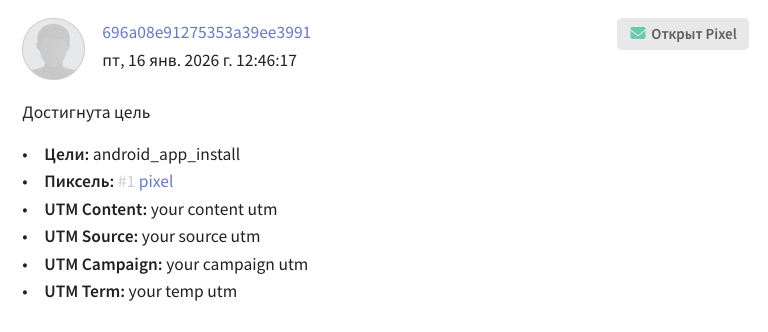
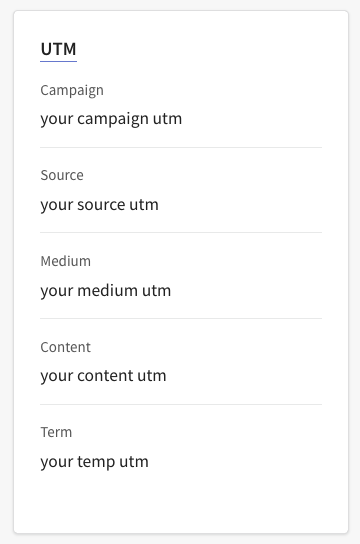
Information about an advertising campaign of the app that led to an install can be passed to the platform as the value of the profileFields/customFields parameters of the subscribe function, as well as of the utm or payload parameters of the sendTarget() function. After receiving the UTM tag in the app as a string, you need to call the sendTarget() function:
Passing via payload
AltcraftSDK.target.sendTarget(
    this,
    sid = "your sid",
    eventName = "app_install",
    payload = mapOf("utm" to "your utm tag")
)
Passing to UTM fields
AltcraftSDK.target.sendTarget(
    this,
    sid = "your sid",
    eventName = "app_install",
    utm = UTM(
        campaign = "your campaign utm",
        content =  "your content utm",
        keyword = "your keyword utm",
        medium = "your medium utm",
        source = "your source utm",
        temp = "your temp utm"
    )
)
Passing to a custom profile field
// pass the utm tag to a profile field
// the profile fields must be added in the platform beforehand
AltcraftSDK.push.subscription.subscribe(
    context = this,
    profileFields = mapOf("utm" to "your utm tag")
)
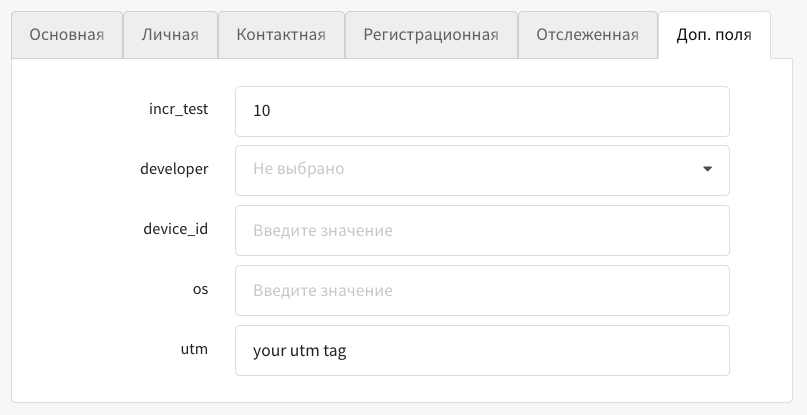
The data passed by any of these methods can be used to create a segment on the platform.
To register a goal, use the sendTarget() function. It has the following parameters:
context: Context
Mandatory: Yes
Description: Android Context.
sid: String
Mandatory: Yes
Description: String identifier of the pixel to which goals are linked.
eventName: String
Mandatory: Yes
Description: Name of the goal (mobile event).
sendMessageId: String?
Mandatory: No
Description: SMID identifier of the sent message (if the goal is related to a specific mailing).
payload: Map<String, Any?>?
Mandatory: No
Description: Goal data — a map with string keys, for which only scalar data types are allowed:
- String
- Boolean
- Int
- Long
- Float
- Double
null
matching: Map<String, Any?>?
Mandatory: No
Description: A map to which values with matching types and identifiers can be passed.
matchingType: String?
Mandatory: No
Description: Matching type.
profileFields: Map<String, Any?>?
Mandatory: No
Description: Profile fields — a map with string keys and values (JSON-compatible types):
- Scalar values:
- String
- Boolean
- Int
- Long
- Float
- Double
null
- Objects:
Map<String, *> - Lists:
List<*> - Arrays of maps:
Array<Map<String, *>>
The parameter is used only when working with JWT authentication.
utm: UTM?
Mandatory: No
Description: UTM tags. Added using the data class UTM, where each type of UTM is a separate parameter.
data class UTM (
    val campaign: String? = null,
    val content: String? = null,
    val keyword: String? = null,
    val medium: String? = null,
    val source: String? = null,
    val temp: String? = null
)
subscription: Subscription?
Mandatory: No
Description: Parameter for adding a subscription for the selected channel.
The values of the parameter are the implementations (subtypes) of the sealed interface Subscription:
EmailSubscription— email subscriptionSmsSubscription— SMS subscriptionPushSubscription— push subscriptionCcDataSubscription— subscription in Telegram, Whatsapp, Viber, Notify.
Used only when working with JWT authentication.
Implementations of the Subscription interface
General model: Subscription
Purpose — the base (sealed) interface for all types of subscriptions.
Serialization is polymorphic; the discriminator field is channel.
Common fields (for all implementations):
| Field | Type | Mandatory | Description |
|---|---|---|---|
resource_id | Int | Yes | Identifier of the resource/subscription source |
status | String? | No | Subscription status (for example, active/suspended) |
priority | Int? | No | Delivery priority for this subscription |
custom_fields | Map<String, Any?>?* | No | Custom fields (key-value) for extended segmentation |
cats | List<String>? | No | Subscription categories |
channel | String | Yes | Channel type; fixed by the implementation. |
Subscription variants:
EmailSubscription (channel = "email")
Main fields
| Field | Type | Mandatory | Description |
|---|---|---|---|
resourceId | Int | Yes | Altcraft resource ID |
email | String | Yes | Recipient's email address |
Additional fields
| Field | Type | Mandatory | Description |
|---|---|---|---|
status | String | No | Subscription status |
priority | Int | No | Subscription priority |
customFields | Map<String, Any?> | No | Standard and custom subscription fields |
cats | List<String> | No | Subscription categories |
SmsSubscription (channel = "sms")
Main fields
| Field | Type | Mandatory | Description |
|---|---|---|---|
resourceId | Int | Yes | Altcraft resource ID |
phone | String | Yes | Phone number in international format |
Additional fields
| Field | Type | Mandatory | Description |
|---|---|---|---|
status | String | No | Subscription status |
priority | Int | No | Subscription priority |
customFields | Map<String, Any?> | No | Standard and custom subscription fields |
cats | List<String> | No | Subscription categories |
PushSubscription (channel = "push")
Main fields
| Field | Type | Mandatory | Description |
|---|---|---|---|
resourceId | Int | Yes | Altcraft resource ID |
provider | String | Yes | Provider (for example, "android-firebase") |
subscriptionId | String | Yes | Unique identifier of the subscription at the provider |
Additional fields
| Field | Type | Mandatory | Description |
|---|---|---|---|
status | String | No | Subscription status |
priority | Int | No | Subscription priority |
customFields | Map<String, Any?> | No | Standard and custom subscription fields |
cats | List<String> | No | Subscription categories |
CcDataSubscription (channel ∈ {"telegram_bot","whatsapp","viber","notify"})
Main fields
| Field | Type | Mandatory | Description |
|---|---|---|---|
resourceId | Int | Yes | Altcraft resource ID |
channel | String | Yes | One of: "telegram_bot", "whatsapp", "viber", "notify" |
ccData | JsonObject | Yes | Channel-specific data (for example, chat ID, number, tokens) |
Additional fields
| Field | Type | Mandatory | Description |
|---|---|---|---|
status | String | No | Subscription status |
priority | Int | No | Subscription priority |
customFields | Map<String, Any?> | No | Standard and custom subscription fields |
cats | List<String> | No | Subscription categories |
Profile: updating profile fields
Updating profile fields with the updateProfileFields() function works only when JWT authentication of SDK API requests is used.
AltcraftSDK
└── val profile: Profile
    // Updates the Altcraft profile fields
    └── fun updateProfileFields(
        context: Context,
        profileFields: Map<String, Any?>? = null,
        skipTriggers: Boolean? = null
    ): Unit
To update profile fields, use the updateProfileFields() function. It has the following parameters:
context: Context
Mandatory: Yes
Description: Android Context.
profileFields: Map<String, Any?>?
Mandatory: No
Description: Profile fields — a map containing the values for the fields to be changed (JSON-compatible types):
- Scalar values:
- String
- Boolean
- Int
- Long
- Float
- Double
null
- Objects:
Map<String, *> - Lists:
List<*> - Arrays of maps:
Array<Map<String, *>>
For the update to succeed, the fields must be added to the subscriber profile in advance.
skipTriggers:Boolean?
Default: null
Mandatory: No
Description: When the flag is activated, the profile containing this subscription is ignored in the triggers of mailings and scenarios.
Usage example:
AltcraftSDK.profile.updateProfileFields(
    context = this,
    profileFields = mapOf("_fname" to "Andrey")
)
In-App notifications
AltcraftSDK
└── val inApp: InApp
    // Configure the animation of an In-App notification
    ├── fun animation(block: Animator.() -> Unit): Unit
    //
    // Set the current screen marker (used when filtering In-App notifications)
    ├── fun setScreen(context: Context, screen: String): Unit
    //
    // Trigger to show an In-App placement
    ├── fun trigger(context: Context, name: String): Unit
    //
    // Request available In-App placements
    ├── fun getPlacements(context: Context): Unit
    //
    // Emitting In-App campaigns with content type "json"
    ├── val emitter: EmitterAPI
    │   ├── fun subscribe(newSubscriber: (String) -> Unit): Unit
    │   └── fun unsubscribe(): Unit
    //
    // Subscribe to In-App notifications (status = SUBSCRIBED)
    ├── fun subscription.subscribe(
    │     context: Context,
    │     sync: Boolean = true,
    │     profileFields: Map<String, Any?>? = null,
    │     customFields: Map<String, Any?>? = null,
    │     cats: List<CategoryData>? = null,
    │     replace: Boolean? = null,
    │     skipTriggers: Boolean? = null
    │   ): Unit
    //
    // Unsubscribe from In-App notifications (status = UNSUBSCRIBED)
    ├── fun subscription.unSubscribe(
    │     context: Context,
    │     sync: Boolean = true,
    │     profileFields: Map<String, Any?>? = null,
    │     customFields: Map<String, Any?>? = null,
    │     cats: List<CategoryData>? = null,
    │     replace: Boolean? = null,
    │     skipTriggers: Boolean? = null
    │   ): Unit
    //
    // Status of the In-App notification subscription
    └─ suspend fun subscription.getSubscriptionStatus(context: Context): ResponseWithHttpCode<ResponseWithProfile>?
Functions for working with In-App notifications:
fun animation()— configuring the display animation of an In-App notification;fun setScreen()— setting the current screen marker, used when filtering In-App notifications. When the screen changes, the SDK automatically generates theopen_pagetrigger (typedefault);fun trigger()— triggering an In-App notification by name (typecustom);fun getPlacements()— requesting available In-App placements from the server;val emitter— emitting In-App campaigns with content typejsonto the app for custom rendering;fun subscription.subscribe()— subscribing to In-App notifications;fun subscription.unSubscribe()— unsubscribing from In-App notifications;suspend fun subscription.getSubscriptionStatus()— getting the status of the In-App notification subscription.
Activity lifecycle tracking is performed automatically by the SDK upon registration of the in-app module — there are no separate functions for this purpose in the new SDK. The SDK tracks Activity lifecycle events and automatically generates the open_app trigger (type default) when the Activity is launched for the first time.
fun animation(block: Animator.() -> Unit): Unit
The function allows you to configure a custom display animation of an In-App notification. It takes an extension function over Animator, in which you can set the animation parameters:
prepare(block: View.() -> Unit)— configures the In-App notification container;animate(block: ViewPropertyAnimator.() -> Unit)— sets the display animation.
Usage example:
AltcraftSDK.inApp.animation {
    // configure the animation
}
fun setScreen(context: Context, screen: String): Unit
The function sets the current screen marker. The marker value is used by Altcraft Platform when filtering In-App notifications — it allows displaying notifications only on certain screens of the app.
Call this function when transitioning to a new screen so that the SDK always knows which screen the user is on.
Usage example:
AltcraftSDK.inApp.setScreen(context, "home_screen")
fun trigger(context: Context, name: String): Unit
The function allows you to manually trigger the display of an In-App notification by its name. It is used for triggers by name, when a notification must be shown in response to a user action or an event in the app.
Usage example:
AltcraftSDK.inApp.trigger(context, "my_custom_trigger")
fun getPlacements(context: Context): Unit
The function requests the available In-App placements from the Altcraft server. The request result can be obtained through SDK events.
Usage example:
AltcraftSDK.inApp.getPlacements(context)
val emitter: EmitterAPI
Emits In-App campaigns with content type json to the app for custom rendering. In the app, there can be only one active subscriber — a new call to subscribe() replaces the existing one.
fun subscribe(newSubscriber: (String) -> Unit)— subscribing to the emission of In-App JSON;fun unsubscribe()— unsubscribing from the emission of In-App JSON.
Usage example:
// Subscribe to the emission of In-App JSON
AltcraftSDK.inApp.emitter.subscribe { json ->
    // render the In-App notification yourself
}

// Unsubscribe
AltcraftSDK.inApp.emitter.unsubscribe()
fun subscription.subscribe(context: Context, ...): Unit
The function performs a subscription to In-App notifications. After a successful call, the user profile is subscribed to receiving In-App notifications from Altcraft Platform.
The function parameters are similar to the parameters of push.subscription.subscribe():
context— Android Context;sync— the flag of request execution synchronicity;profileFields— profile fields;customFields— subscription fields;cats— subscription categories;replace— when activated, replaces the existing subscription;skipTriggers— when activated, the profile is ignored in the triggers of mailings and scenarios.
The parameters are configured exactly the same way as in push.subscription.subscribe().
Usage example:
AltcraftSDK.inApp.subscription.subscribe(context)
fun subscription.unSubscribe(context: Context, ...): Unit
The function cancels the subscription to In-App notifications. After a successful call, the user profile is unsubscribed from receiving In-App notifications.
The function parameters are similar to the parameters of push.subscription.unsubscribe().
Usage example:
AltcraftSDK.inApp.subscription.unSubscribe(context)
suspend fun subscription.getSubscriptionStatus(context: Context): ResponseWithHttpCode<ResponseWithProfile>?
The function that gets the current status of the In-App notification subscription. Returns a ResponseWithHttpCode object containing response?.profile?.subscription — the current profile subscription to In-App notifications. If the request fails, null is returned. The absence of a subscription is determined by the value response?.profile?.subscription == null.
Usage example:
CoroutineScope(Dispatchers.IO).launch {
    AltcraftSDK.inApp.subscription.getSubscriptionStatus(context)?.let { responseWithHttp ->
        val httpCode = responseWithHttp.httpCode
        val response = responseWithHttp.response
        val profile = response?.profile
        val subscription = profile?.subscription
    }
}
In-App notification display types
The SDK supports the following In-App notification display types:
| Type | Description |
|---|---|
fullscreen | Full-screen In-App notification |
floating_bar | Floating bar (behavior is similar to full screen) |
slideup | Panel sliding in from the top or bottom of the screen. The SDK waits for JavaScript data on the size and position, then applies the native container. If JavaScript does not respond within 1 second, the notification is displayed as full screen |
custom | Custom display (behavior is similar to full screen) |
modal | Modal window (behavior is similar to full screen) |
In-App notification display restrictions
- In-App notifications are not displayed in landscape screen orientation;
- When the screen is rotated, an open In-App notification is closed;
- When the Activity finishes, an open In-App notification is closed;
- The "Back" button closes the In-App notification;
- Non-anonymous In-App campaigns require the
subscribedsubscription status for In-App notifications.