Segmentation by external data
Description
Segmentation rules can appeal to external sources for profiles selection data. This information can be stored it:
- Web service API
- Uploaded file
- Data input form (in the rule)
This allows you to make automatic segmentation by mane fields, and reduce similar conditions in the segment.
HTTP queries to external service API
If you select Is (not) in a field of post url responce operator in the rule, you can perform selection depending on answer from the service. Platform can take data in JSON, XML, and PIPE formats.
JSON segmentation rule example
Let's take situation, when information is given in JSON format. MIME header will be given, like:
"Content-Type": "application/json"
and data in this format:
{
  "segment": {
    "emails": [
      "john@example.org",
      "suzy@example.com",
      "rick@example.net",
      "andy@example.edu"
    ]
  }
}
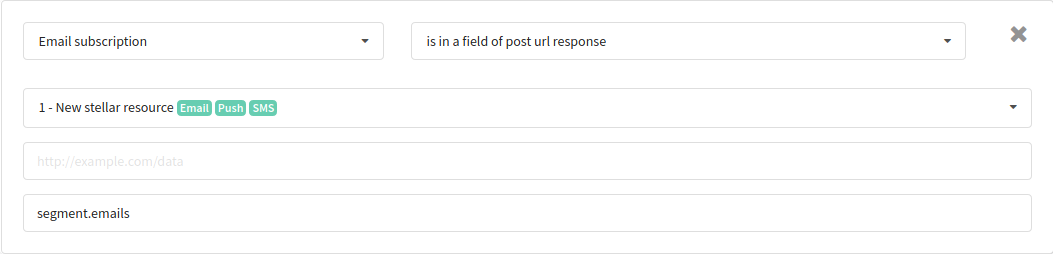
It is necessary to set API endpoint URL, and path to necessary field in JSON, in the segmentation rule:
Segmentation rule example for XML
Let's take situation, when information is given in XML format. MIME header will be given, like:
"Content-Type": "application/xml; charset=UTF-8"
and data in this format:
<names>
  <name>Andy</name>
  <name>Dave</name>
  <name>John</name>
  <name>Suzy</name>
</names>
It is necessary to set API endpoint URL, and path to necessary field in XML object, in the segmentation rule:

Segmentation rule example for PIPE
PIPE is the format of data, divided by line breaks (written in one column). Let's take situation, when information is given in PIPE format. MIME header will be given, like:
"Content-Type": "text/plain; charset=UTF-8"
and data in this format:
+78002000100
+78004000200
+78006000400
+78008000600
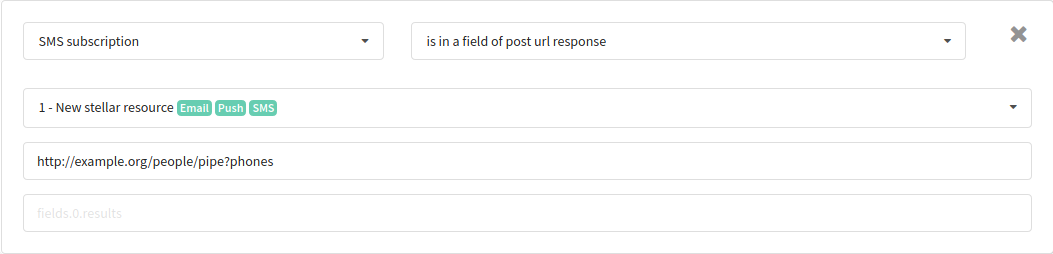
It is necessary to set API endpoint URL in the segmentation rule:
Uploaded file
If you select Is (Is not) is file in a column segmentation rule, form for uploading CSV (comma separated values) file will appear:
Email,Name
john@example.org,John
suzy@example.com,Suzy
dave@example.net,Dave
andy@example.edu,Andy
After uploading the file, you can select column in the drop-down menu:
Information from buffer
If you select Is (Is not) in list segmentation rule, data in PIPE format will be inserted manually into the special field.
PIPE is the format of data, divided by line breaks (written in one column).
