LDAP access configuration
Overview
You can configure LDAP access to your Altcraft MP account and Administrative panel. This allows your employees to use company's directory service like Active Directory to log into the platform with a predefined set of access groups and roles.
LDAP can be used for both Administrative panel and for account User interface.
A DistinguishedName for a group of users includes nested groups of directory service hierarchy.
LDAP access to Administrative panel
LDAP access to platform Administrative panel is configured in MarketingPlatform/config/main.json configuration file:
"LDAP": {
  "HOST": "<LDAP server host>",
  "PORT": <LDAPserverport>,
  "BINDLOGIN": "<LDAP user login>",
  "BINDPASS": "<LDAP user password>",
  "AUTH_GROUP": "<LDAP group distinguishedName>",
  "LDAP_ONLY": true/false,
  "IS_SSL": false/true,

},
"LDAP_CHECK_USER_TIME_PERIOD_SEC": 300
Specify your directory service net address and port as well as BINDLOGIN and BINDPASS — directory server login credentials.
Directory service connection account must have sufficient access rights to the groups that will be used for platform authorisation.
-
AUTH_GROUP— unique LDAP group DistinguishedName, that will give users access to Altcraft MP Administrative panel using a login and password pair. -
Configure SSL in your directory service and enable it in Altcraft by setting
"IS_SSL"parameter to"true"for a secure connection. -
LDAP_CHECK_USER_TIME_PERIOD_SEC— time interval between checking user DistinguishedName and access rights matching. It is configured outside "LDAP" object and affects bot Administrative panel and User interface. By default — 300 seconds.
LDAP_ONLY parameter restricts Altcraft login and password authorisations. All requests will be processed via LDAP to directory service.
After modifying main.json file restart Altcraft MP (./akd restart).
LDAP User interface access
LDAP access to account User interface is set up for every account separately in Altcraft Administrative panel.
LDAP binding creation
Enter Altcraft MP Administrative panel and open Create → LDAP binding or Setup → LDAP binding and press Create.
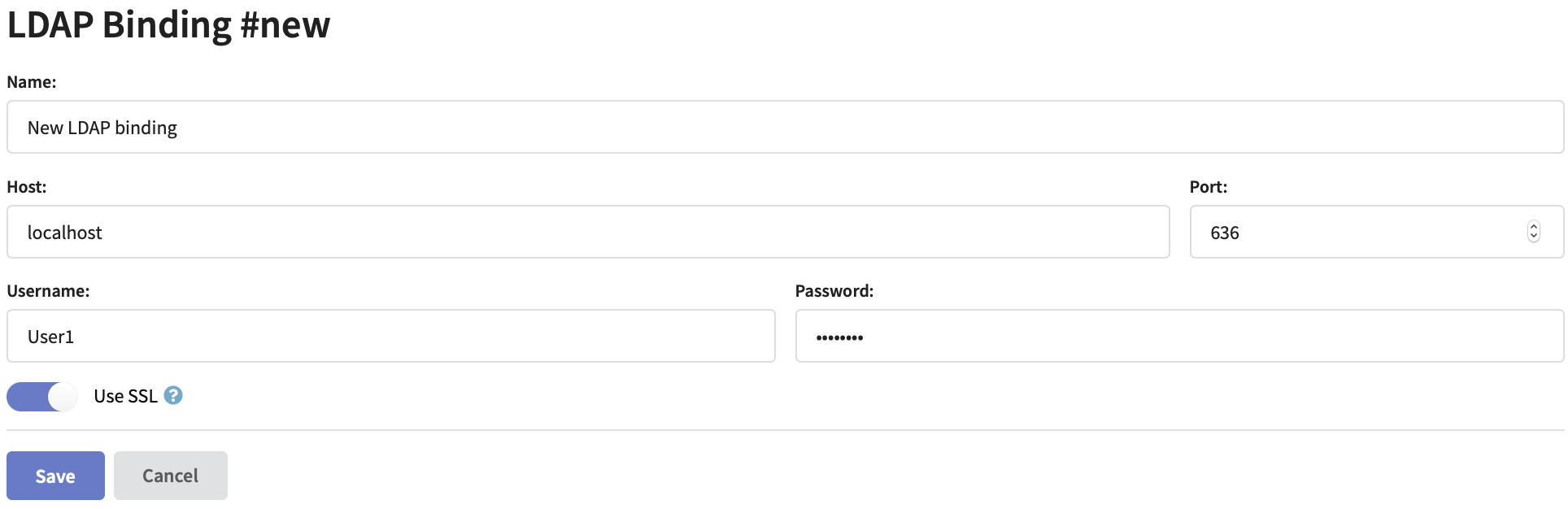
Specify LDAP connector name, directory server network address and port. Enter Username and Password for directory server database access. If you are planning to use a secure connection activate Use SSL option and set up directory service SSL certificates.
Directory service connection account must have sufficient access rights to the groups that will be used for platform authorisation.
Setting up account LDAP access
Open an existing account settings or create a new account. Activate Use LDAP option to get access to the settings:
LDAP only option restricts Altcraft login and password authorisations. All requests will be processed via LDAP to directory service.
Time interval between checking user DistinguishedName and access rights matching is configured in main.json configuration file in LDAP_CHECK_USER_TIME_PERIOD_SEC property with an integer value. By default — 300 seconds.
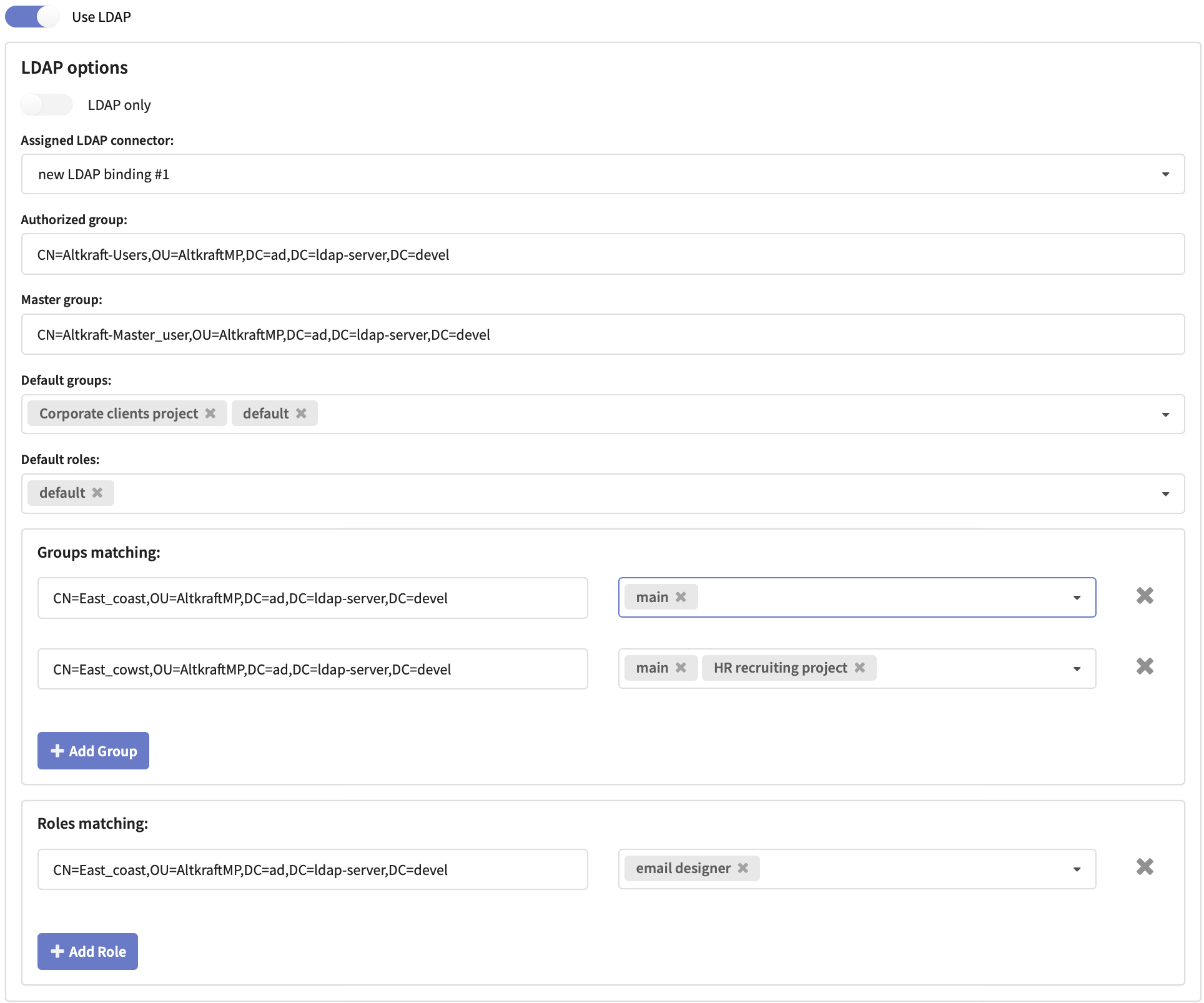
In a dropdown select an Assigned LDAP connector: LDAP binding, you are going to use for this account access.
Basic access settings
For configuring basic account access you will need directory service DistinguishedNames for the following groups:
- Auth Group — allows platform access with a default set of user groups and roles.
- Master Group — allows master access to account settings, main group containing all account objects and to objects outside groups.
Both LDAP groups are required for a user to have master access.
Specify these groups DistinguishedNames in the corresponding fields. As DN examples the following are used: CN — common name, OU — organisation unit and DC — domain component.
Select or create Default Groupsand Default Roles to be accessible by default for all users with Authorized group DistinguishedName.
WARNING! Users with no assigned groups or roles cannot log into account.
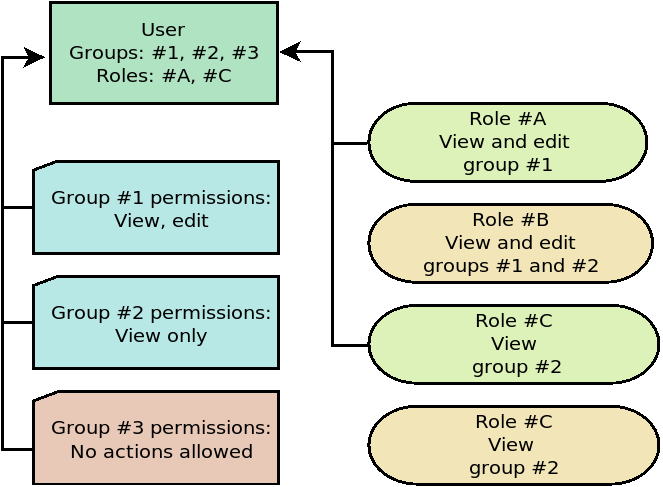
In case a user role allows to interact with a certain group make sure the corresponding group is assigned to the user as well. Otherwise no access to the group will be permitted.
Access differentiation
You can create directory service DistinguishedNames matching custom Altcraft MP groups and roles.
Enter the DistinguishedNames into these fields:
- Groups matching — to set access groups matching.
- Roles matching — to set access roles matching.
Authorizing with LDAP
To enter Administrative panel use LDAP username and password.
To enter account interface use LDAP username with account alias: ldapuser@domain.com@account1, and LDAP password.
If LDAP only option is disabled, both Altcraft MP and LDAP login credentials can be used.