Documentation for version v72
Message to RabbitMQ broker
Each single event will be sent immediately to the message broker queue. Both a local RMQ, which is part of the platform, and a broker located on an external host can be used.
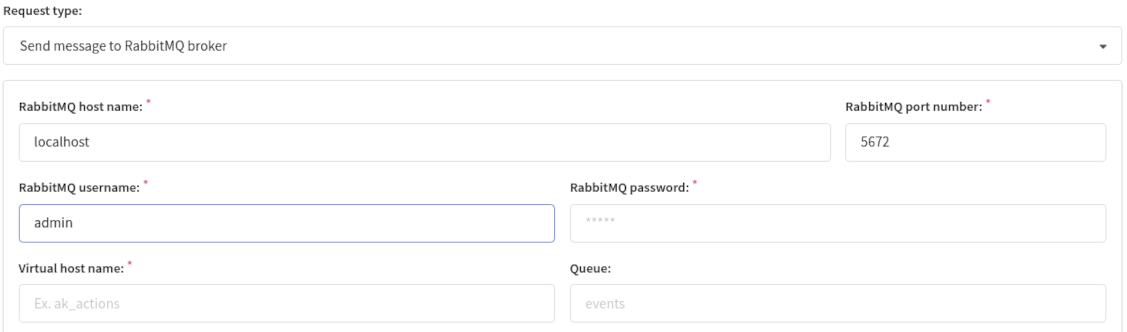
In the settings, specify the broker's parameters:
- host name
- port number
- username
- password for authorization
- virtual host name
- name of the queue into which event messages will be sent.
caution
RabbitMQ user must have access to the selected virtual host. Create a virtual host and give the RabbitMQ user the right to use it right in RabbitMQ.
You are free to choose whether to set up RabbitMQ queue name: if it is not set - a queue will be named after event type.
Email link click message example.
{
  "event_type": "click",
  "event_date": "2018-03-04T13:13:19.034315796Z",
  "list_id": 111,
  "_xxh": "ad1850e0d1d9481e",
  "_md5": "145bb30f7ddf1184cb560bc4b7705646",
  "is_test": false,
  "event_data": {
    "browser": "Firefox",
    "campaign_id": 973,
    "city": "",
    "country": "",
    "device": "web",
    "ip": "10.9.0.14",
    "lat": 0,
    "launch_id": "00000017000003cd5a9bf01a",
    "link_url": "http://www.ford.com",
    "lon": 0,
    "message_id": 17,
    "os": "Linux x86_64",
    "postal_code": "",
    "region": "",
    "segment_id": 0,
    "send_message_id": "5a9bf01a17_3cd_11_6f_0_2.5a8c045fc1dde44cbf718f78",
    "tz": "",
    "user_agent": "Mozilla/5.0 (X11; Linux x86_64; rv:59.0) Gecko/20100101 Firefox/59.0"
  },
  "custom_data": {
    "email": "alice@example.org"
  },
  "account_id": 23
}