Transferring Data to the Platform
When a user grants permission to receive notifications, the platform automatically creates a profile for them. In addition to profile creation, other additional data can also be transmitted. In this article, we will explain how to configure a script to collect information about the user and their actions.
Importing Client Profiles When Subscribing to Web Push Notifications
When a user subscribes to Web Push notifications, a new profile will be added to the Databases and the Resource where the Toolkit embedded on the site was generated.
If a database profile has previously opened your email newsletter from the same browser in which they are now subscribing to push, the subscription will be added to that profile. In this case, a new profile will not be created.
When a subscriber clicks on a push notification (following a link), the Altcraft platform collects profile data:
- Country, region, time zone, city, postal code, and IP address from which the push subscription occurred;
- Browser and operating system of the subscriber.
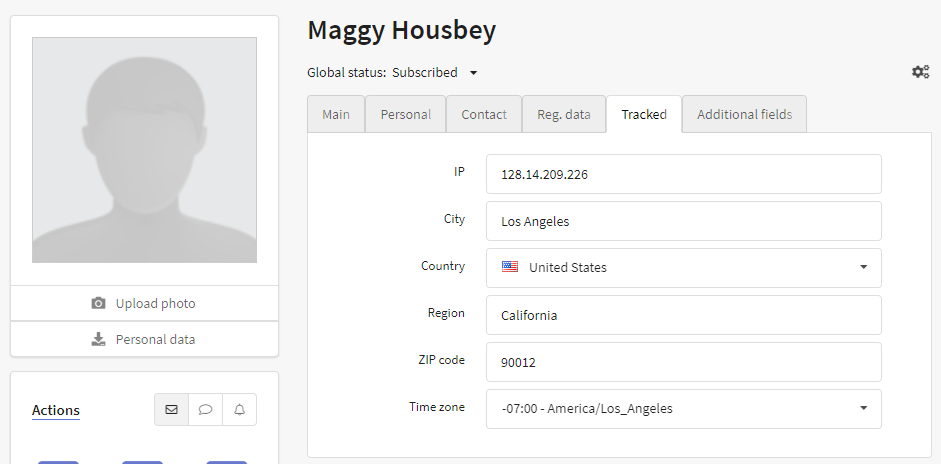
If the token becomes outdated or the user resubscribes to push, the platform will automatically update their subscription and issue a new token. This prevents duplicate profiles from being created in the database.
Mobile browsers also support Service Worker and Web Push notifications.
Transferring Client Data When Importing a Profile via Push Channel
At the time of push notification subscription registration, any known user data can be recorded into the new user's profile. For example, the client's first and last name, date of birth, pages viewed, and other business-related information. At the same time, you can check if an existing subscriber already has the same data.
Example with email matching in the resource and adding the user's first and last name:
const akPush = new AKPush();
akPush.initSubscription(
	{
		email: 'example@email.com'
	}, // Matching of profile by email. If no match is found, it will be recorded in the profile.

	{
		_fname: 'Anatoly',
		_lname: 'Wasserman'
	} // Record first and last name in the subscriber's profile
)
If multiple databases are linked to a resource, you can specify the ID of the database where the profile should be imported. Example with email matching in database id=1:
const akPush = new AKPush();
akPush.initSubscription(
	{
		db: 1
		email: 'example@email.com'
	}, // Matching of profile by email. If no match is found, it will be recorded in the profile.

	{
		_fname: 'Anatoly',
		_lname: 'Wasserman'
	} // Record first and last name in the subscriber's profile
)
Example with email matching in databases id=15 and id=20:
const akPush = new AKPush();
akPush.initSubscription(
	{
		db: [15,20]
		email: 'example@email.com'
	}, // Matching of profile by email. If no match is found, it will be recorded in the profile.

	{
		_fname: 'Anatoly',
		_lname: 'Wasserman'
	} // Record first and last name in the subscriber's profile
)
The list of profile fields is provided in this article.
Updating Profile Data and Suspending Subscriptions
akPush.updateSubscription will return an error if an up-to-date token has not been obtained via akPush.initSubscription, or if it has been removed from the cache using akPush.removeToken.
A user subscribed to push notifications in a browser can change their status. For example, they may log into their personal account and receive a different matching profile. In this case, the current push subscription must be disabled on the previous profile and enabled on the new one. To achieve this, use the akPush.updateSubscription method:
const akPush = new AKPush();
akPush.updateSubscription(
	{
		db: [15,20]
		email: 'example@email.com'
	},

	{
		_fname: 'Anatoly',
		_lname: 'Wasserman'
	}, // Record first and last name in the subscriber's profile
	false // Flag for inexclusive, determines whether to pause all subscriptions to the resource with the current browser token for other profiles (default)
)
Web Push Subscription Creation and Update Events
Platform users can subscribe to events for push subscription creation and updates (subscriber token changes). When such an event occurs, subscription data can be sent to an external server using additional code.
To subscribe to events, add the following code to your site's pages:
AKPush.events.on('subscribe', (data) => { // Subscribe to the 'subscribe' event
   console.log(data);
});
AKPush.events.on('update_subscription', (data) => { // Subscribe to the 'update_subscription' event
   console.log(data);
});
This code will log the subscriber's token, as well as browser and push provider information.