Documentation for version v72
Profile history export
Profile history export allows you to download data on profile activity from the platform. The data is usually in a specific database or a segment. The data will be exported to a CSV file.
- Open a list of databases or segments, find a necessary base and click the icon «Export profile history».

- Specify the period for which the data needs to be unloaded. You can also select campaigns if necessary:
-2bd58954c827d24d3f01ec66ecfc8c0a.png)
-
Select events to export:
- Basic (subscription confirmation, complaints, unsubscription, etc.)
- Activity in various communication channels (message delivery, openings, clicks, etc.)
- Pixel and goal registration
- Promo codes
- Connections

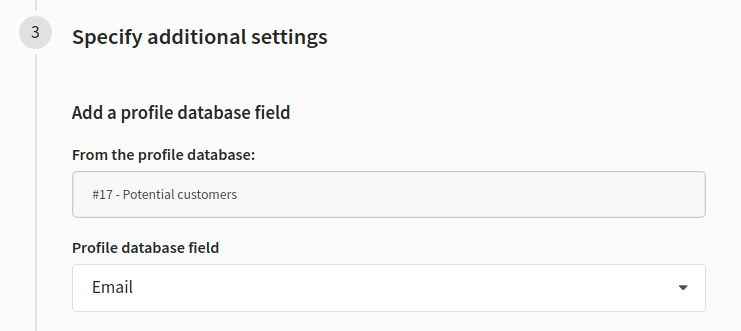
- Specify the profile database field by which you want to group the unloaded data:
-
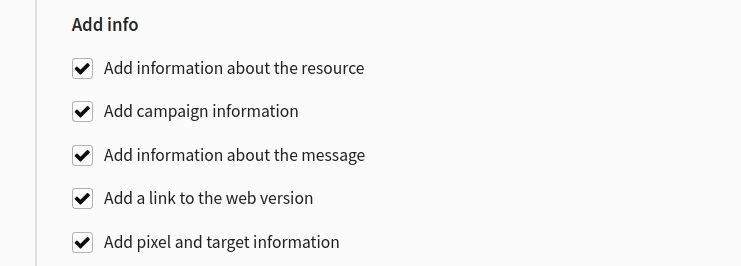
Add additional information for export:
- resource— add ID and the name of the resource to which the profile has subscribed to the target file
- campaign — add ID and the name of the campaign in which the event occurred;
- message— add ID and the name of the template used;
- add a link to the web version of an email;
- pixel and goal — add ID and the name of the pixel as well as the name and value of the goal registered by the pixel
- Enter an arbitrary name for the archive:

- Export the data by clicking «Export». An export task will be generated automatically. Its progress will be displayed immediately:

Once the task is complete, click «Download file». Archive in .zip format will be downloaded to your device:
-5d6f895745193444064f4948035e2cec.png)