Altcraft Docs LogoAltcraft Docs Logo
User guideDeveloper guideAdmin guide
Company siteHelp center
English
  • Русский
  • English
v72
  • v74
  • v73
  • v72
Login
  • User documentation
  • FAQ
  • Altcraft glossary
  • Profiles and databases
  • Communication channels
  • Segmentation
  • Message templates
    • Working with message templates
    • Visual editor for email-template
    • Template fragments
    • Image gallery
    • Content personalization
    • Creating tables based on array elements
    • Block editor for email template
    • Variables and Functions in Altcraft
    • Dynamic content in messages
      • Dynamic HTML content
      • Dynamic JSON content
      • Content from SQL database in templates
      • Dynamic API content
    • Importing and exporting a message template
    • Importing a template from a third-party service
    • Exporting a template from Pixcraft
  • Campaigns
  • Automation scenarios
  • Market
  • Loyalty programs
  • Reports and analytics
  • Integrations
  • Weblayers
  • Settings
  • API requests: where to start
  • Changelog
  • library
This is documentation for Altcraft Platform v72. This documentation is no longer maintained.
The information for up-to-date platform version at this page is available (v74).
  • Message templates
  • Dynamic content in messages
  • Dynamic JSON content
Documentation for version v72

Dynamic JSON content

Dynamic JSON content is good way to create dynamic messages and automate your work. It allows you to add information, generated exactly at the moment messages are sent.

You can include variables into JSON content queries, for example profile data fields like {lead._fname}.

Set the source of your external JSON content in message options tab.

JSON data looks like this:

{
"number": 10,
"text": "Hello!",
"list": ["One", "Two", "Three"],
"object": {"model": "x17", "price": "$99"},
"mixed": [
{"city": "Los Gamburger", "street": "Florence Avenue"},
{"city": "St. Potato", "street": "Glendale Boulevard"}
]
}

To add dynamic JSON content to your message template click the green </> variables button and select External JSON.

Thus JSON content is inserted into a message as a special variable type*{json.variable}:
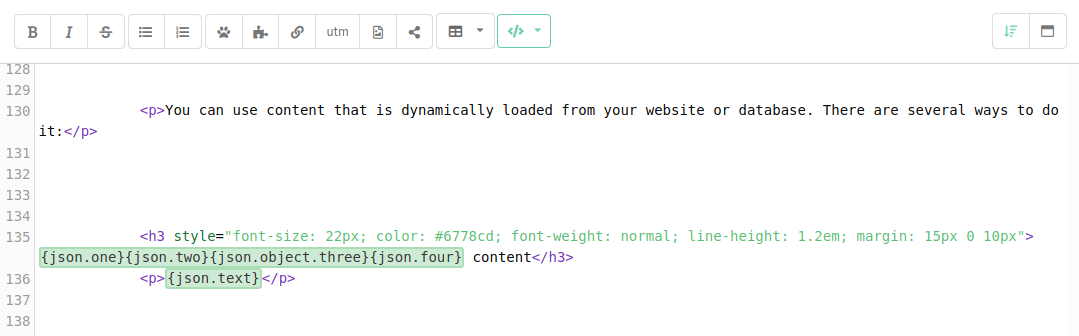
Two data types: "list" and "object" are available**.**

  • Objects are inserted as a one-value variable, like this: {json.object.key_name}

  • Lists are JSON arrays — they can be inserted with the help of loops, like this one:

{for $index $products= json.products} 
<li>{$products}</li>
{else}
<p>Check for new products next week!</p>
{end}
Last updated on Nov 20, 2024
Previous
Dynamic HTML content
Next
Content from SQL database in templates
© 2015 - 2025 Altcraft, LLC. All rights reserved.