Audit journal
Description
Audit journal is an important security and monitoring element that records user actions in the platform. Only users with master privileges have access to the audit. To go to the audit, open Settings → Audit journal.
The audit log is stored for 90 days. To change this value, you need to add the entry "AUDIT_LOG_TTL" : 90 to the main.json configuration file, changing the value as needed.
Audit journal settings
You can configure the audit query according to your current tasks:
- Period — time frame for displaying recorded actions.
- Action type — type of event recorded by the system. Actions are related to authorization in the platform, creation, editing and activation of objects in the account.
- Object type — allows you to view actions related to a specific type of entities in Altcraft. These can be users, groups and access roles, databases and segments, resources and mailings, campaigns, templates and their parts, as well as other objects.
- Object — you can select a specific account object and get information about actions with it.
To view the audit report, click Apply. To export the audit report to .XLS or .CSV, click Export report:
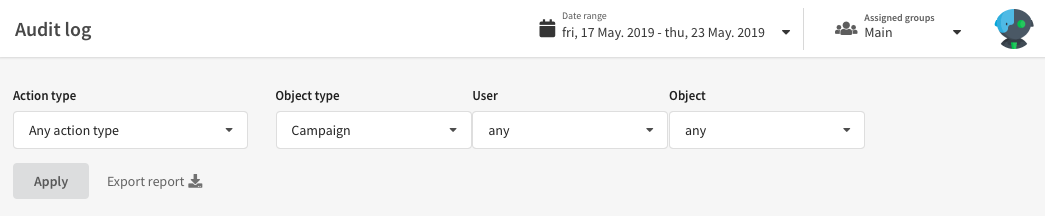
Viewing audit events
Actions that meet the query conditions are displayed as a list of tiles. The title of each tile indicates the type of recorded action. For each action, the date, the user who performed the action, their IP address and the object associated with the action are displayed.
Additional information contains a more detailed description of the event, for example, email addresses to which the test was sent.
Actions in the report can be sorted by date, user, IP address or object.
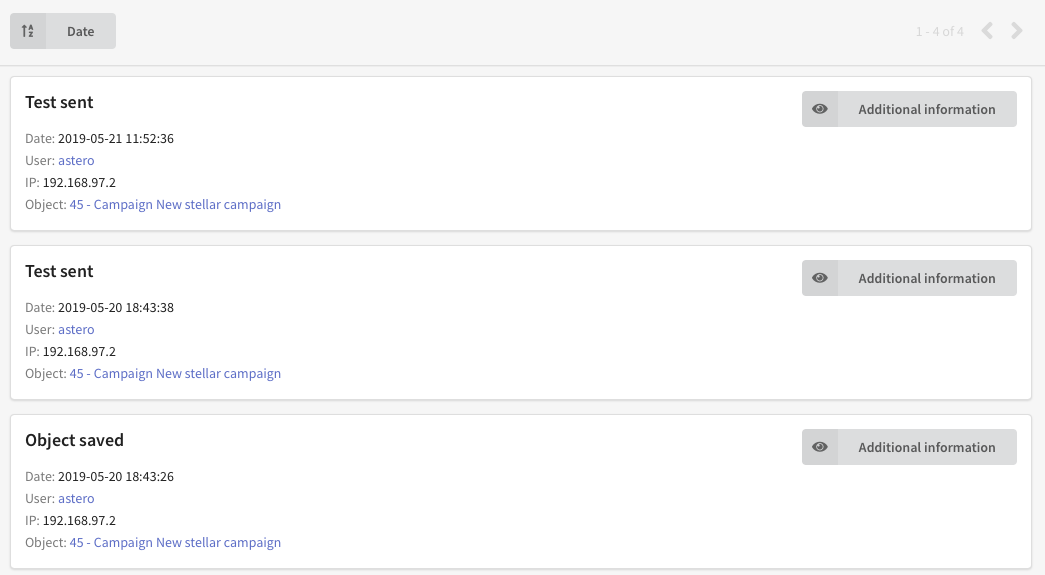
Campaigns audit actions
The system records the following actions with campaigns (combinations of mailings and scenarios):
Basic campaign operations
- Campaign creation — creating a new campaign
- Campaign update — changing campaign settings
- Campaign deletion — deleting a campaign
- Campaign activation — launching a campaign
- Campaign deactivation — stopping a campaign
- Campaign completion — final completion of campaign work
Local control groups (LCG) management
- LCG creation — setting up a local control group
- LCG update — changing LCG parameters
- LCG deletion — deleting a local control group
Marketing activities management
- Activity binding — adding a mailing or scenario to a campaign
- Activity unbinding — removing a mailing or scenario from a campaign
Segments management
- Segment binding — assigning a segment to a campaign
- Segment unbinding — removing a segment from a campaign
Loyalty programs operations
- Loyalty program creation — creating a new loyalty program
- Loyalty program update — changing loyalty program settings
- Loyalty program deletion — deleting a loyalty program
- Loyalty program activation — launching a loyalty program
- Loyalty program deactivation — stopping a loyalty program
All the above actions are also available for points types and loyalty levels.
Partner operations in loyalty programs:
- Loyalty program partner creation — creating a new loyalty program partner
- Loyalty program partner update — changing loyalty program partner
- Loyalty program partner deletion — deleting a loyalty program partner
Promotion operations:
- Promotion creation — creating a new promotion
- Promotion update — changing promotion settings
- Promotion deletion — deleting a promotion
- Promotion activation — launching a promotion
- Promotion deactivation — stopping a promotion
- Promotion completion — final completion of promotion work
The audit journal also stores information about attaching and detaching loyalty programs to subscriber profiles.
When working with mailings and scenarios within campaigns, the system also records standard actions (deletion, deactivation, completion) with the parent campaign ID specified.