Creating and configuring a channel
Channels are created in the system administration panel in the Custom channels section:

Before creating a channel, you will need the following information:
- Documentation of the channel API service and interactions with it. So request to send a message, requests to check delivery statuses, callbacks, etc;
- Fields which are used when sending a message;
- Fields which are used to identify the subscription;
- Fields that will be configured by the user and which by the administrator;
- What events will occur on the channel and what events in the platform they correspond to.
Basic settings
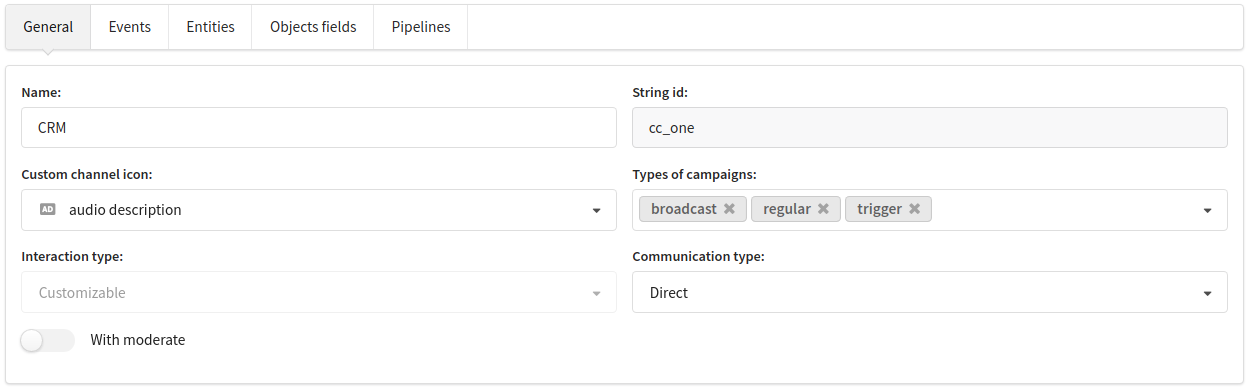
Name — channel's name.
String id - the string identifier is used in uploads, in the API and within the platform.
Custom channel's icon - channel's icon in the interface
Types of campaigns - types of campaigns where this channel will be available.
Communication type - direct or indirect.
- direct - sending content personally to each profile (example Email, SMS, Push, etc.). Requires setting up subscription fields (at least one field in subscriptions must be set up in the channel);
- indirect - sending content not to a specific profile, but to a group (example VKGroup, a banner on a website, etc.). Requires resource fields to be configured (at least one field in the resource must be configured in the channel).
With moderate is responsible for enabling mailing moderation for the indirect channel. Opens the Moderate pipeline for editing.
Fields
For each of the platform objects associated with channels, you can set the following fields:
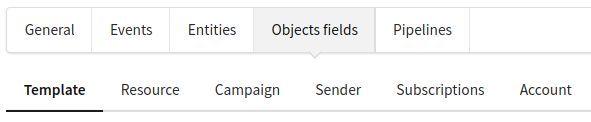
The minimum requirement is to set the Template fields and the fields of entities that depend on the Communication type.
For a direct channel, you need to set a field linking the profile to the resource - subscription:

Such a field, for example, will be available in the pipeline as $subscription.client_id.
Events
We create events in the channel, define a event name, string id (will be used in the API and uploads).
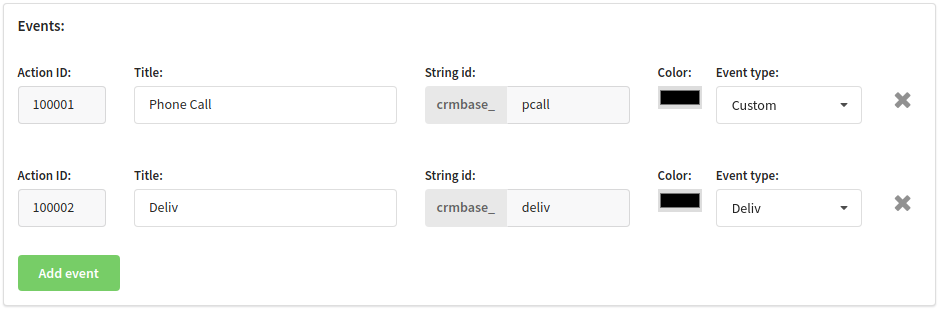
If the event is reflected in the platform (for example, a delivery event), then the correspondence must be indicated.
The color is set for presentation in reports and graphs.
External Entities
The Entities configuration is described in detail here.
Pipelines
The pipeline configuration that describes the interaction with external services is specified in the Pipelines section.
Types of pipelines:
The configuration is described in more detail in this article.
Technical limitations in custom user channels
1. No ability to further process arrays of objects in the pipeline. For example, if an external service sends statuses for multiple messages at once, it will not be possible to iterate through the array to register delivery or undelivery events. Additionally, if the channel configuration supports multiple attachments in the content field, the data for this field can only be sent to the external service in its unchanged form. It will not be possible to iterate through the attachments, send each one to the external service, retrieve a link, and use the array of received links in the message sending request.
2. The ability to send media attachments is limited. The channel is not intended for sending attachments larger than 1 MB per communication. It is recommended to keep attachments under 500 KB. This limitation does not apply to content fields with the image url type, where a link to the image will be sent instead of the image itself.