Documentation for version v72
Profile splitting
Description
Splitting a profile into multiple new or existing profiles.
caution
The profiles generated by splitting are not imports. Import trigger does not work on them.
URL
Method: POST
https://example.com/api/v1.1/profiles/split
Request parameters
| Parameter | Type | Example | Required | Description |
|---|---|---|---|---|
| token | string | "abcdefghijklmnqrstuvwxyz" | Yes | API token |
| data | JSON object | "data":{ | No | Profile data that will change after merging |
| skip_triggers | bool | true | No | Skip trigger events By default – false |
| source | JSON object | "source":{ | Yes | Contains matching data about the profiles to be split |
| destination | array | "destination": [ | Yes | Contains the matching data of the profile resulting from the splitting |
| matching | string | "email" "email_profile" "email_sub" "phone" "phone_sub" "profile_id" "push_sub" "custom" "custom_sub" "email_phone" "email_phone_sub" | No, if matched by email from the profile or subscriptions | Profile matching mode By default - email For each type of matching, certain fields must be passed in the request body. Learn more about these fields here. |
| field_name | string | custom_ID | Yes, if "matching": "custom" | Name of custom database field if matching : custom . In the data collection form, a field with the same name is required for search. |
| field_value | int/string | custom_string | Yes, if "matching": "custom" | Value of custom database field if matching : custom . |
| subscriptions | bool | true | No | Copy and split subscriptions. Subscriptions to resource categories and data from subscription fields will also be copied. By default – true |
| history | bool | true | No | Copy history and activity flags By default – true |
| static_segments | bool | true | No | Whether to make changes to static segments or not (source-profiles will leave the segments, and destination-profile will enter) By default – false |
| subscription_filters | JSON object | "subscription_filters": [ | No | Filter to copy specific subscriptions. If not specified, all subscriptions are copied. |
| overwrite | bool | true | No | Whether to copy the fields of source profiles or not. If the destination profiles have empty fields, these fields will be filled with the fields of the source profile in any case. |
| delete | bool | true | No | Whether to delete source profiles after splitting or not |
Request example
- JSON
- XML
{
    "token": "abcdefghijklmnqrstuvwxyz",
    "matching": "custom",
    "field_name": "field_1",
    "source": {
        "db_id": 1,
        "field_value": 1,
        "data": {
            "_fname": "Profile1",
            "_lname": "LnameProfile1"
        }
    },
    "destination": [
        {
            "db_id": 2,
            "matching": "email",
            "email": "test2@mail.ru",
            "data": {
                "_fname": "Profile2",
                "_lname": "LnameProfile2"
            }
        },
        {
            "db_id": 2,
            "field_value": 3,
            "data": {
                "_fname": "Profile3",
                "_lname": "Lname3"
            },
            "subscription_filters": [
                {
                    "resource_id": 1,
                    "channel": "push",
                    "provider": "Safari"
                },
                {
                    "resource_id": 2,
                    "channel": "email"
                }
            ]
        }
    ],
    "subscriptions": true,
    "static_segments": true,
    "history": false
}
<xml>
 <token>abcdefghijklmnqrstuvwxyz</token>
    <matching>custom</matching>
    <field_name>field_1</field_name>
    <delete>true</delete>
    <source>
        <db_id>1</db_id>
        <field_value>1</field_value>
        <data>
            <_fname>Profile1</_fname>
            <_lname>LnameProfile1</_lname>
        </data>
    </source>
    <destination>
        <db_id>2</db_id>
        <matching>email</matching>
        <email>test2@mail.ru</email>
        <data>
            <_fname>Profile2</_fname>
            <_lname>LnameProfile2</_lname>
        </data>
    </destination>
    <destination>
        <db_id>2</db_id>
        <field_value>3</field_value>
        <data>
            <_fname>Profile3</_fname>
            <_lname>LnameProfile3</_lname>
        </data>
        <subscription_filters>
            <resource_id>1</resource_id>
            <channel>push</channel>
            <provider>Safari</provider>
        </subscription_filters>
        <subscription_filters>
            <resource_id>2</resource_id>
            <channel>email</channel>
        </subscription_filters>
    </destination>
    <subscriptions>true</subscriptions>
    <static_segments>true</static_segments>
    <history>false</history>
</xml>
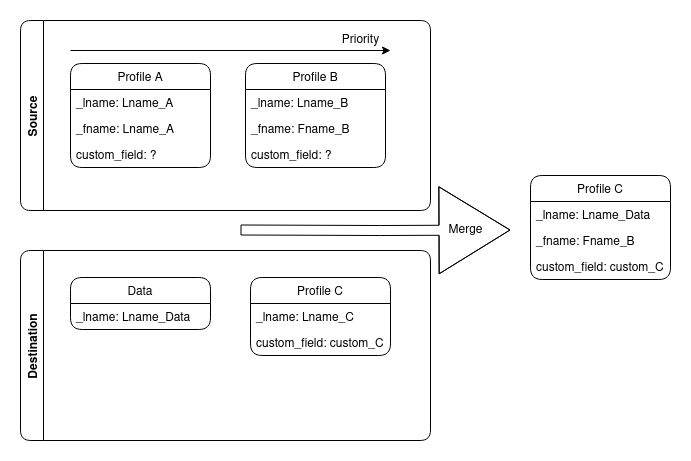
Copying profile fields
Response example
- JSON
- XML
{
    "destination_ids": [
        {
            "db_id": 2,
            "profile_id": "60a7b150fa3adb6f1179fe7f"
        },
        {
            "db_id": 2,
            "profile_id": "60a7b150fa3adb6f1179fe80"
        }
    ],
    "error": 0,
    "error_text": "",
    "source_id": {
        "db_id": 1,
        "profile_id": "60a7a45bfa3adb7132dcceaa"
    }
}
<xml>
    <destination_ids>
        <db_id>1</db_id>
        <profile_id>66432f6cee44bb50a6711634</profile_id>
    </destination_ids>
    <destination_ids>
        <db_id>1</db_id>
        <profile_id>6613cb65dc4594c2934db63f</profile_id>
    </destination_ids>
    <error>0</error>
    <error_text/>
    <source_id>
        <db_id>1</db_id>
        <profile_id>6643405b41c3a674897dd9cc</profile_id>
    </source_id>
</xml>
Response parameters
| Parameter | Type | Description |
|---|---|---|
| destination_ids | JSON object | Contains data about the profile resulting from the split: db_id - database ID profile_id - profile ID |
| source_id | JSON object | Contains data about split profiles as a list: db_id - database ID profile_id - profile ID |
| error | int | Error code |
| error_text | string | Error text |